iMenu for DSTwo

  • Thread starter Thread starter tempBOT
  • Start date Start date
  • Views Views 20,219
  • Replies Replies 45

tempBOT

The GBAtemp Robot
Editorial Team
Joined
Nov 21, 2007
Messages
35
Reaction score
597
Trophies
2
XP
5,202
iMenu for DSTwo
Unofficial plugin menu replacement.
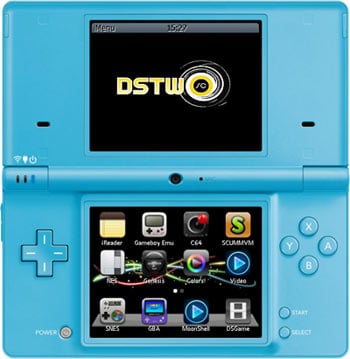
Some of you are aware that I have been (slowly) working on a replacement for the DSTwo plugin menu...

imenu.jpg

...Well I have finally added a download link for the first beta release on my website. Currently, I ask that people do not mirror this download, but by all means mirror this post.

icon11.gif
 Download

Contributed by spinal_cord

 
sure i will give this a try when its a little more developed thanks for the hard work
 
I guess mod can delete my topic,
no point in having two topic on the same subject
smile.gif


edit:
I decided not to use this imenu
it's a little slow, and not really worth it
the only reason to use this is, because it's prettier
not really worth the trouble..
 
What exact format do icons need to be in? I thought it was 16-bit BMP, but for some reason I have one icon I was making that just will NOT show up right. Oddly the other one I made does.
 
9th_Sage said:
What exact format do icons need to be in? I thought it was 16-bit BMP, but for some reason I have one icon I was making that just will NOT show up right. Oddly the other one I made does.

some people at the supercard forum was having similar issue, but spinal was complaining about people complaining, so they just stop asking questions
guess everyone has to trouble shoot it them self
 
RoMee said:
some people at the supercard forum was having similar issue, but spinal was complaining about people complaining, so they just stop asking questions
Er...ok then, but still, asking anyway. I'm not really complaining, I like the app. This is just really odd since it's in the same format as the other icon.
smile.gif


*edit*
Ah jeez, nevermind. I made a really foolish typo in the ini (accidentally put the mask as the same BMP as the icon itself).
 
RoMee said:
9th_Sage said:
What exact format do icons need to be in? I thought it was 16-bit BMP, but for some reason I have one icon I was making that just will NOT show up right. Oddly the other one I made does.

some people at the supercard forum was having similar issue, but spinal was complaining about people complaining, so they just stop asking questions
guess everyone has to trouble shoot it them self

Incorrect, people were complaining that the menu just didn't work, because they didn't read the readme included in the download. They were complaining about items not showing up when they hadn't created an ini file for them (!) or that the ones that did show wouldn't load when they didn't bother to set the path field or check that it was correct.

The icons are the same format as the ones original used by the official menu. Make sure the dimensions are correct also (40x42). The mask imagges are 8bit bmp. although currently they use the palette index rather than the shade of grey.
 
does it take longer then the original to load for anyone else ???
it looks nice but no controler selection is driving me nuts
i will most likely be upgrading back to the supercard original with the next upgrade of firmware.
 
spinal_cord said:
o_O Do people complain about iPod/iPhone not having d-pad controls in the menu?

That was my first complaint... then I got over it.

Looks like you've been hard at work. Keep it up, and in the meanwhile, I'll give this a whirl.
 
Gave this a (very) quick try - had a couple of problems

Would'nt start up - Got 'An error has occurred...' Message, so I reinstalled again & this time it did start up but when I tried scrolling - it crashed (Plain Black Screen).

I'm guessing this is because I didn't have all the nds files that matched all the ini files (all I had was the DSTwo files [Moonshell,GBA etc] & Colors, Lameboy)

Also - small suggestion, perhaps a PC program could be made to make the transistion a little easier ??

> One that 'looks' inside the '/_dstwoplug/' folder
> Sees what nds files are there
> Copy the nds files into the '_/plg/'
> Copy the bmp files into '/_images/' folder (& also create a *_mask.bmp' file as well)
> And make the necessary ini files as well, taking the 'name=' from the original '_ds2plugin/ folder & injecting it into a default '/_ini/' file
 

Site & Scene News

Popular threads in this forum