Tutorial
Updated
identification Problems with DSi and DSi XL
I Buy a DSi and they was broken. I cant find any information about Repair DSi and how to find a problem (console just won't start) . So i'm actually took the working console and caused errors on it to understand when they happens.I realise what that information would be a little bit outdates but its better late than never.
First Of all- DSi and DSi XL have the SAME pinouts for connectors. you can use Ribbon cable (8) from Moterboard to Powerboard, you even can run DSi power board on DSi Xl and vice versa. Camera, Top and botton screen also hardware compatible (only not physically fit)
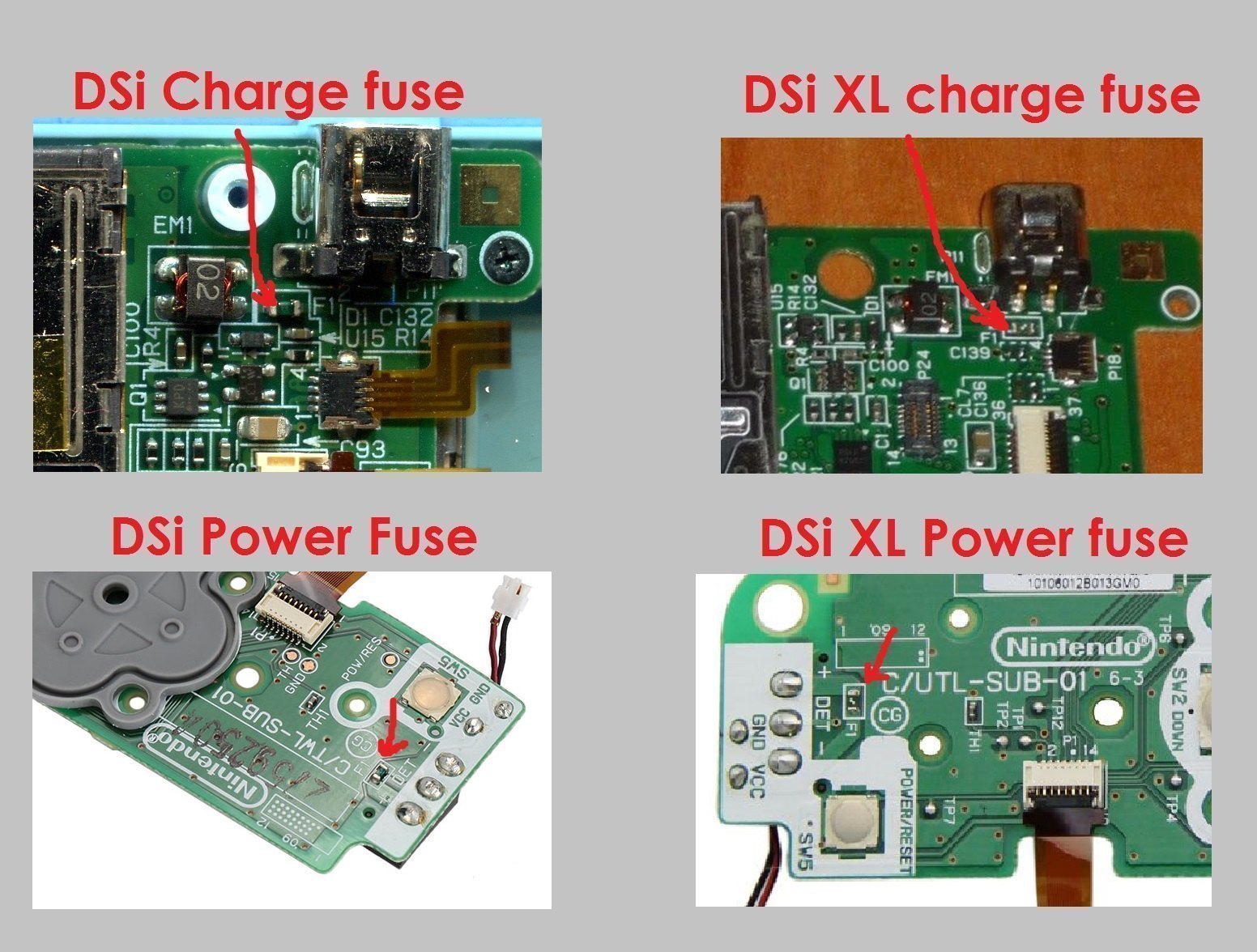
First of all, get a multimeter and check smd Fuse Components (If console not charge check Fuse 1 [F1] , if console charge but won't boot -- check Fuse [F1] on power board). if they not ringed -- replace or throw a jumper on your risk
 Then i describe the behavior and error of DSi or DSi XL with disconnected cables:
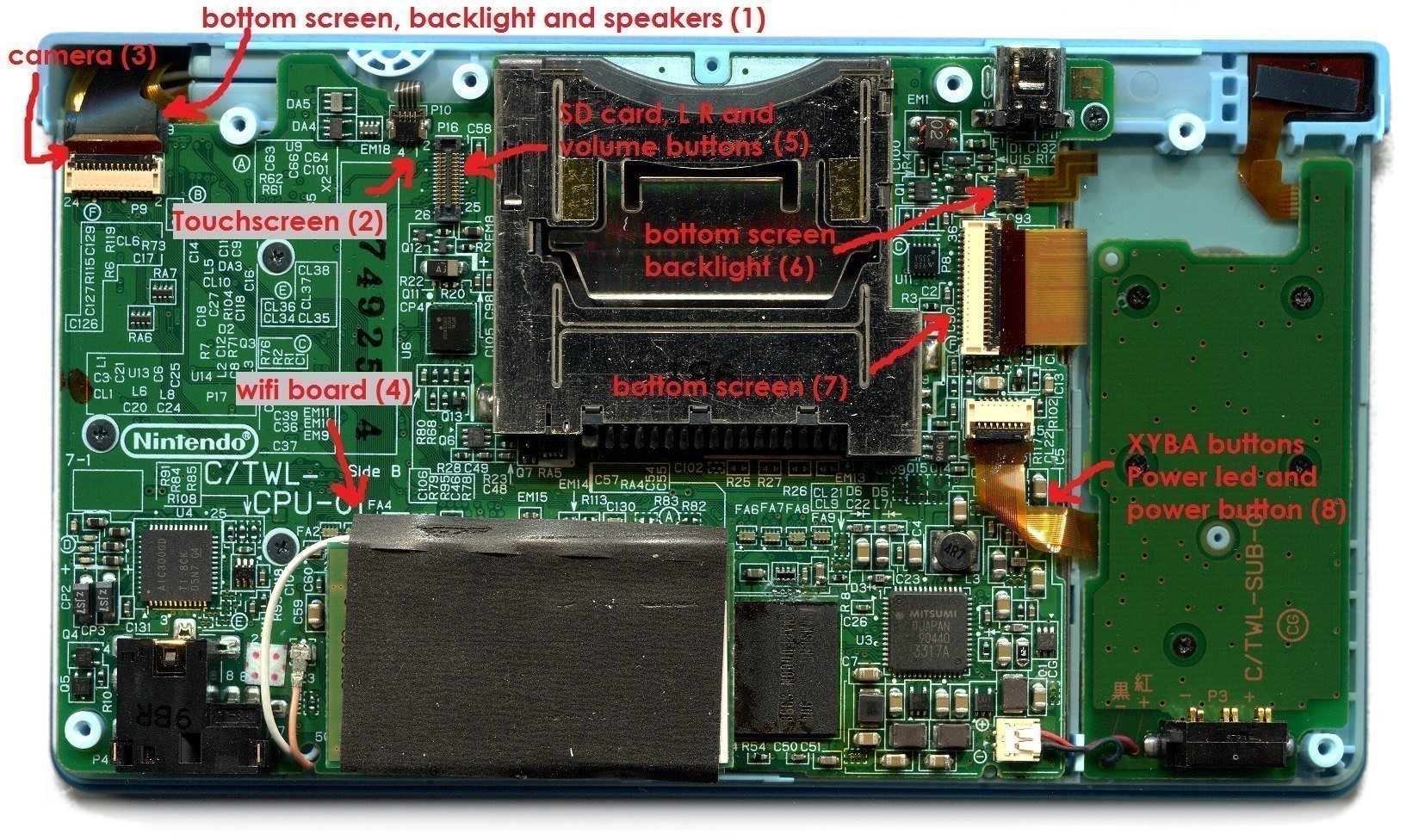
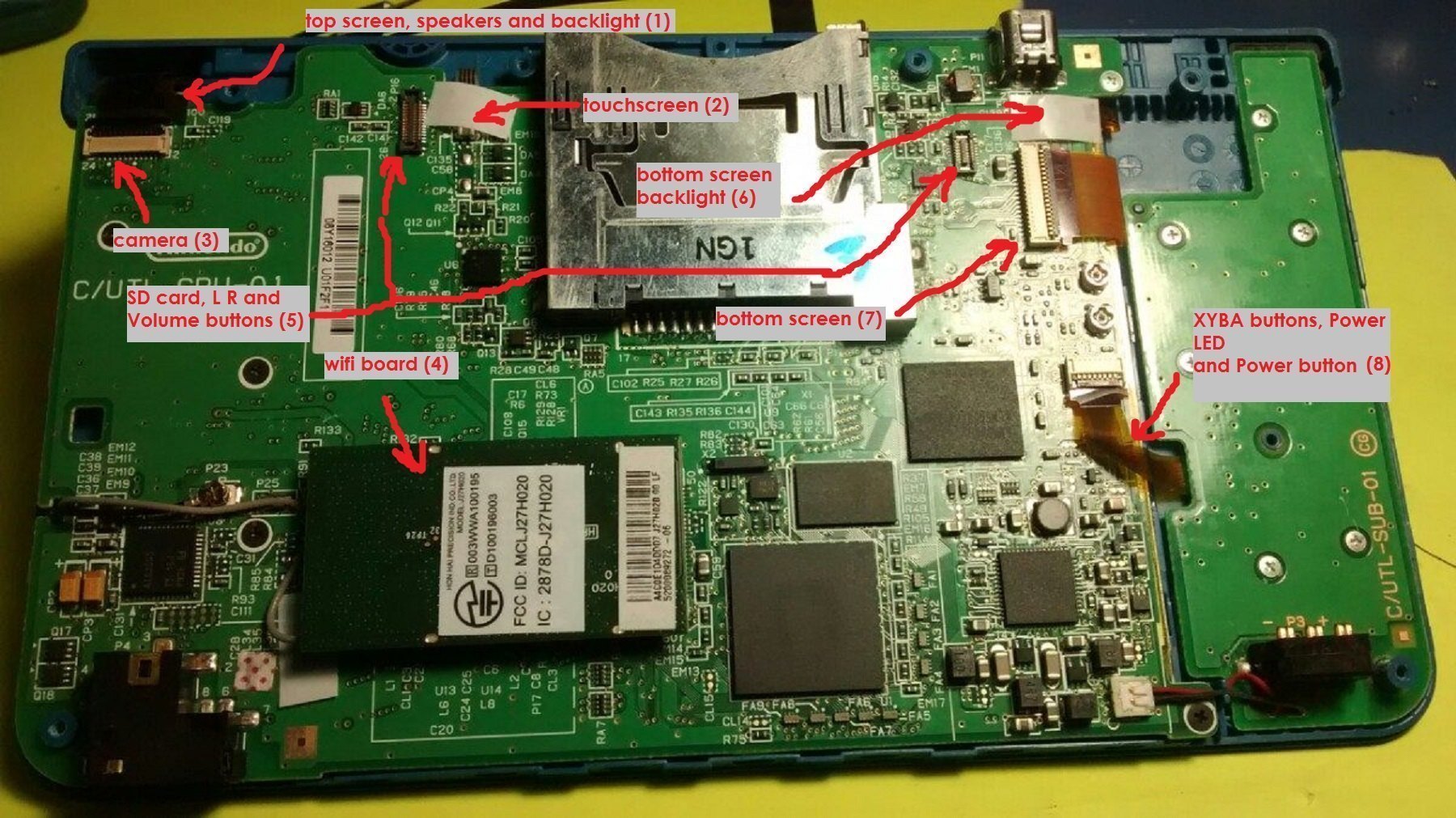 If Wifi board (4) not connected - blue LED lights up, Screen still black, the console does not turn off automaticly
If Top screen (1) not connected -blue LED Litghts up, Bottom screen Blink, console turn off after half second
If Camera (3) not Connected - blue LED Litghts up, You will see DSi Logo, Console Freezes at logo, console not turn off automaticly
If Touchscreen (2) not connected - blue LED Litghts up, You will see DSi Logo, you cant skip warning logo
If Botton screen backlight (6) not connected - blue LED Litghts up, Top screen Blink, console turn off after half second
If Botton screen (7) not connected - Console runs, you can open menu, but bottom screen stays white
if top and botton screen not connected - Blue LED not blink, Console runs, but turn off after half second (you can check start using laboratory power supply, they must waste from 0.05A to 0.20A 2 seconds)
If you not connect ribbon cable to powerboard (8) console wont start because it using for power button (you can check start using laboratory power supply , console not using power )
If you not connect cables for buttons/SD card/ microphone/wifi antenna/volume buttons (5) - console normally start
____________________
I wish you successful repairs, I hope this information could be useful to you
First Of all- DSi and DSi XL have the SAME pinouts for connectors. you can use Ribbon cable (8) from Moterboard to Powerboard, you even can run DSi power board on DSi Xl and vice versa. Camera, Top and botton screen also hardware compatible (only not physically fit)
First of all, get a multimeter and check smd Fuse Components (If console not charge check Fuse 1 [F1] , if console charge but won't boot -- check Fuse [F1] on power board). if they not ringed -- replace or throw a jumper on your risk
If Top screen (1) not connected -blue LED Litghts up, Bottom screen Blink, console turn off after half second
If Camera (3) not Connected - blue LED Litghts up, You will see DSi Logo, Console Freezes at logo, console not turn off automaticly
If Touchscreen (2) not connected - blue LED Litghts up, You will see DSi Logo, you cant skip warning logo
If Botton screen backlight (6) not connected - blue LED Litghts up, Top screen Blink, console turn off after half second
If Botton screen (7) not connected - Console runs, you can open menu, but bottom screen stays white
if top and botton screen not connected - Blue LED not blink, Console runs, but turn off after half second (you can check start using laboratory power supply, they must waste from 0.05A to 0.20A 2 seconds)
If you not connect ribbon cable to powerboard (8) console wont start because it using for power button (you can check start using laboratory power supply , console not using power )
If you not connect cables for buttons/SD card/ microphone/wifi antenna/volume buttons (5) - console normally start
____________________
I wish you successful repairs, I hope this information could be useful to you
Last edited by GorGylka,