
Hacking I need help with my sd card

  • Thread starter Thread starter jacob1223
  • Start date Start date
  • Views Views 1,061
  • Replies Replies 9

jacob1223

Well-Known Member
Member
Joined
Apr 3, 2016
Messages
244
Reaction score
5
Trophies
0
Age
35
XP
235
Country
Chad
I bought a new 64gb sd card and i was going to tranfer my emunand to it i followed this guide.
https://gbatemp.net/threads/how-to-transfer-emunand-to-another-sd-card-working-on-new3ds.383684/
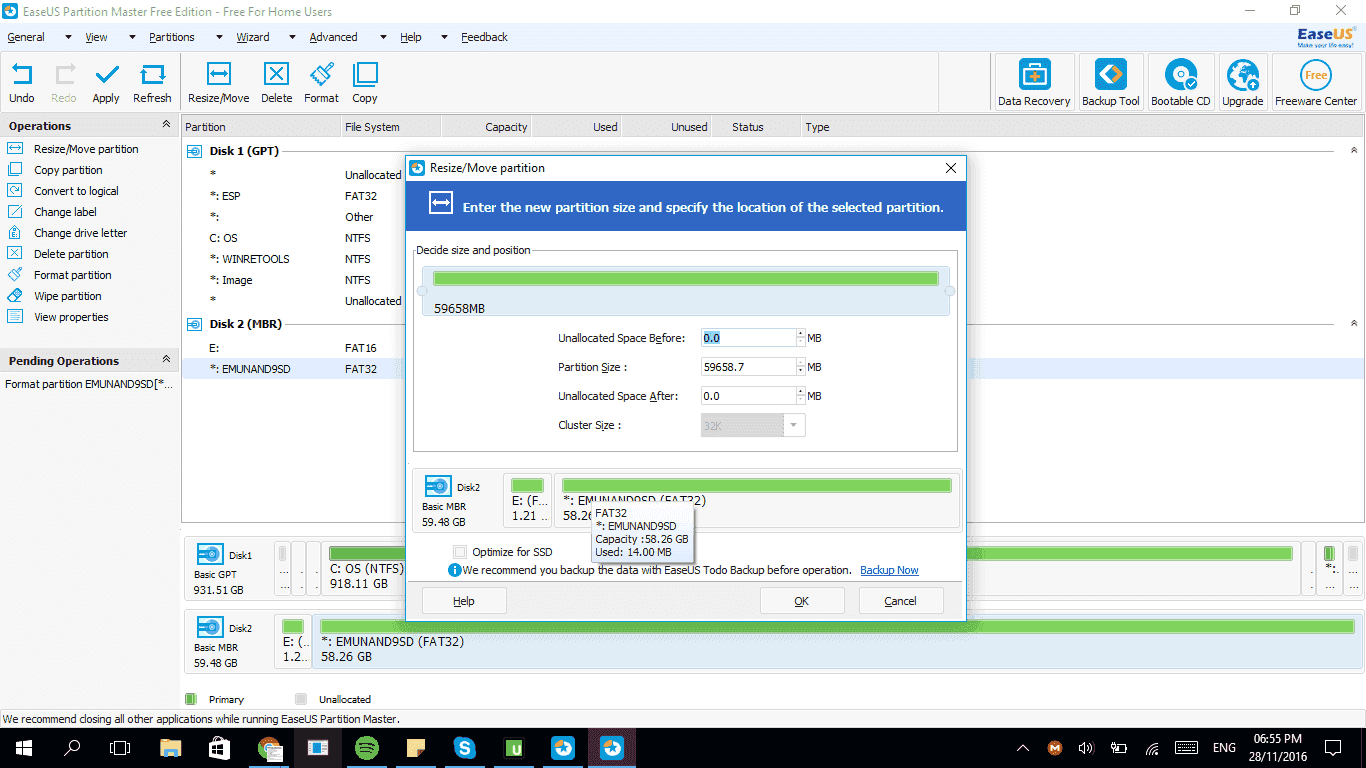
I tried opening the sd card and it said to format so i did and it says the capacity is 1.2gb.
When i launch EasePartionMaster is says it is 58gb
upload_2016-11-28_18-56-0-png.70629
 
upload_2016-11-28_19-36-49.png


--------------------- MERGED ---------------------------

how do i get rid of the 1.21 partition?
 
Backup data from your main SD card and the 64GB one.

Open emuNAND9 on your 3DS (through homebrew if you have a 9.2 sysNAND, through Luma payload if you have a9lh)

Find the option for formatting your SD card without emuNAND. When given the chance, swap SD cards to the 64GB one (or just use that one from the beginning). Let it format.

It should be good as new.
 
Open emuNAND9 on your 3DS (through homebrew if you have a 9.2 sysNAND, through Luma payload if you have a9lh)

Find the option for formatting your SD card without emuNAND. When given the chance, swap SD cards to the 64GB one. Let it format.

It should be good as new.
How to do it with arm9?
 
Backup data from your main SD card and the 64GB one.

Open emuNAND9 on your 3DS (through homebrew if you have a 9.2 sysNAND, through Luma payload if you have a9lh)

Find the option for formatting your SD card without emuNAND. When given the chance, swap SD cards to the 64GB one (or just use that one from the beginning). Let it format.

It should be good as new.
So I go to Sd Format Options, Format SD ( No emunand), Then swap sd cards?

--------------------- MERGED ---------------------------

Backup data from your main SD card and the 64GB one.

Open emuNAND9 on your 3DS (through homebrew if you have a 9.2 sysNAND, through Luma payload if you have a9lh)

Find the option for formatting your SD card without emuNAND. When given the chance, swap SD cards to the 64GB one (or just use that one from the beginning). Let it format.

It should be good as new.
Or do i swap sd card before?
 
So I go to Sd Format Options, Format SD ( No emunand), Then swap sd cards?
Yep. You might be able to swap SD cards before that - eg Select on main menu to unmount card. If you don't swap cards till after you go into format SD no emuNAND, make sure everything is backed up in case it doesn't give you the option to switch (it should make you have to input a key combination andgive you a warning before it happens though)
 
Yep. You might be able to swap SD cards before that - eg Select on main menu to unmount card. If you don't swap cards till after you go into format SD no emuNAND, make sure everything is backed up in case it doesn't give you the option to switch (it should make you have to input a key combination andgive you a warning before it happens though)
Thank you so much

--------------------- MERGED ---------------------------

Yep. You might be able to swap SD cards before that - eg Select on main menu to unmount card. If you don't swap cards till after you go into format SD no emuNAND, make sure everything is backed up in case it doesn't give you the option to switch (it should make you have to input a key combination andgive you a warning before it happens though)
By the way if i was to move emunand to sysnand on the old sd card could i just copy everything to the 64 gb sd card?
 
Thank you so much

--------------------- MERGED ---------------------------


By the way if i was to move emunand to sysnand on the old sd card could i just copy everything to the 64 gb sd card?
Yep you definitely could. That's one advantage of getting rid of emuNAND.
 
  • Like
Reactions: jacob1223

Site & Scene News

Popular threads in this forum
