Hacking I can't save using Patcher 2.57!

  • Thread starter Thread starter science
  • Start date Start date
  • Views Views 2,447
  • Replies Replies 18

science

science rules
Member
Joined
Jun 9, 2006
Messages
3,698
Reaction score
134
Trophies
3
Age
35
XP
1,383
Country
Canada
Whenever I go to patch a game, no matter what settings I use to patch, I always get this:

Compress: NO. Save: NO. Cheat: NO. Restart: YES. Patch: YES.

When I put the games on my SC, I can play them fine, but they don't save. I have made sure I have the latest software, not the first version that was buggy. Or at least I think I do. I've redownloaded and installed it multiple times from multiple sites (Official and scdev.org) and northing is working. What do I do???
 
There are various settings you need to change with the software before you export the game to create the DSQ and SAV files. Some games require certain settings, while others work with the default settings. Depends on the game though, I cant seem to get Final Fantasy 3, Children of Mana or Pokemon Ranger to save properly without getting either a Corrupt Data message (PR and CoM do that) or the game doesnt save properly with FF3.
 
The supercard team have really fucked up saving with the latest firmware/software update. I'd actually recommend a downgrade, until they sort it out.
 
Yeah, I think I'll be downgrading. I need to load up my SC before the 18th for some Wii wait line playing.
 
OMFG! I've downgraded about three times now, and every single one I've tried isn't working! WTF do I do?!?!?! This is starting to piss me off!!
 
No saving problems here..

make sure to re-upgrade you're firmware (put firmware file on mem card and run it on the supercard) the file comes with the latest package and is called upd170.bin or similar.

also the message about patch failing means nothing, it's for gba roms, and even if it says fail that just means the sram save routine of the gba rom didn't need patching.

The options tab in the client software is for gba only .. to get ds option double click the ds rom in the list or highlight/right click/properties.


Also with ds roms don't try to manually save or write to the save file or combo button save.. ds saving is invisible and acts exactly like a real ds cart... save in game, the game is saved, thats it.
 
Yeah, my firmware is updated already. What the problem is is my software client. When I upgraded to 2.57, every game I patched through it wouldn't save, and the problem is in the patcher because I can play all my old patched games fine. So I downgrade to patcher 2.542, 2.541, etc... and I still can't get my roms to patch with the saver function.
 
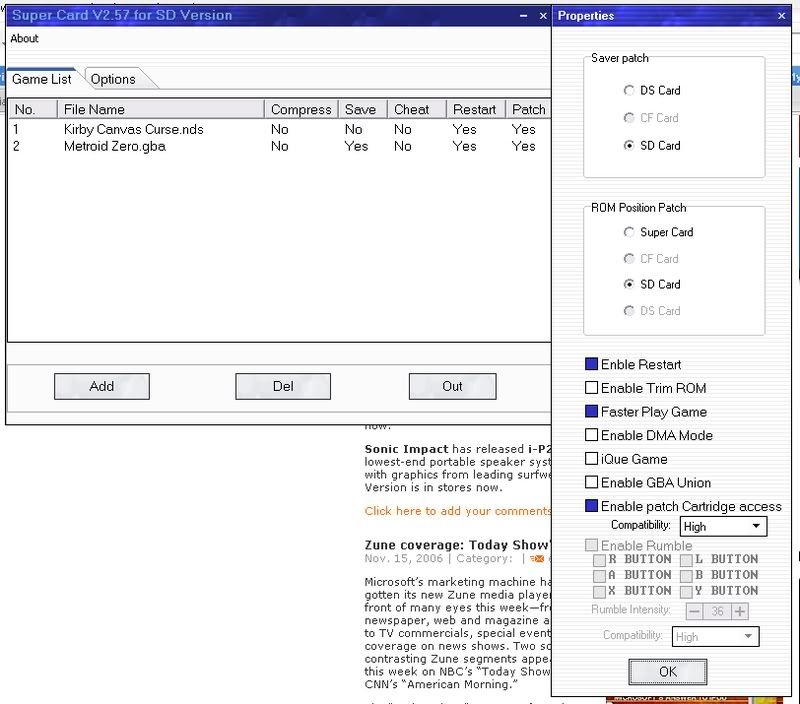
Heres whats happening in the client.

supercard.jpg


GBA games will patch fine and save fine, its DS games that won't let me save.
 
To play Final Fantasy 3 re-install the old Super card 2.56 software version for some reason the new SC 2.57 still have some bug...

and the setting for those game FF3, Children of Mana or Pokemon Ranger these must have "Enable Trim ROM" cilcked

Enble Restart - Yes
Enable Trim ROM - Yes
Faster Play Game - Yes
Enable patch Cartridge access compatbility: Hight
 
The SuperCard SD goes from 2.542 to 2.57 so I downgraded to 2.542, and I still can't save. The problem just isn't FF3, Children of Mana, etc. It's all the games. They won't patch correctly to let me save. I've tried every single setting possible and it isn't working.
 
It looks like a problem with the write access to the SD from the SC...

make a backup of the SD, then format it, wait in your chair, take a coffee...or a hot chocolate...
maybe it'll recover ^^;
 
I don't see how it could be a write problem from SC to SD. I'm playing and saving all my old patched games fine. It's just that the software isn't letting me select the save function for DS games. It patches GBA games fine.
 
Ahh, never mind. I reinstalled it into a new directory and it's working good now. Thanks for the help everyone
 
"Ahh, never mind. I reinstalled it into a new directory and it's working good now. Thanks for the help everyone"

AHH I've been following all your posts in this topic and now you suddenly found a solution. I have the same problem as you and I don't know what you did to fix it!!
 
Same thing happened to me. Almost every game. I downloaded the 1.7 firmware and updated my DS (even though it said I already had 1.7). Works fine now!
yaynds.gif
 

Site & Scene News

Popular threads in this forum