Hacking How to use controller with Luma's input redirection.

  • Thread starter Thread starter HeroMines
  • Start date Start date
  • Views Views 24,093
  • Replies Replies 36

HeroMines

Well-Known Member
Newcomer
Joined
May 12, 2017
Messages
64
Reaction score
31
Trophies
0
Age
26
XP
236
Country
United States
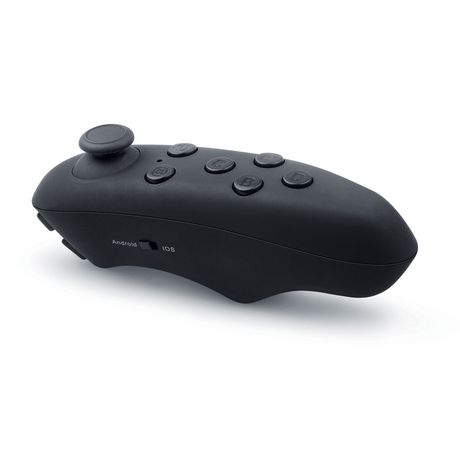
So a couple a days ago I bought this wireless Bluetooth controller,it has the ability to be used as an mouse,game controller,and can pause and play videos and music.After luma's 8.0 update I decided that I wanted to use my controller with Luma's input redirection,so I know how to use the touchscreen with the client but I still don't understand how to use my controller with input redirection.Can someone help me?

 
You need a software to emulate your controller as a xinput device,iirc something called xpadder can do that.
 
x360ce works too.
Okay so I got x360ce and I setup some of the controls,then I saved and exit and open up the input direction client and it still didn't work.


BTW this is the controller I'm trying to use.
999999-MIC-VRB03-101_D.jpg
 
Last edited by HeroMines,
X360ce isnt working with rosalina menu from what ive heard from someone testing it. What's the name of your controller and what kind of input does it communicate with? If its direct input i have a program that will work
 
Wait, did you copy x_input1_3.dll and x360ce.ini to the program's folder?
No.I'll try that soon.

--------------------- MERGED ---------------------------

X360se dosn`t work, I tested it few hours. You must use new kit-kat with joy2key. I use ps4 controler.
4742d7645be77.jpg
4742d7645be77.jpg.html
Hmm.I thought kit-kat-touch was n3ds only.

--------------------- MERGED ---------------------------

X360ce isnt working with rosalina menu from what ive heard from someone testing it. What's the name of your controller and what kind of input does it communicate with? If its direct input i have a program that will work
If i'm correct it's direct input.The box the controller came in said the name was "Evo VR Controller" try searching that.
 
Mmm... maybe you're right. If the OP says copying the x360ce files doesn't work, then he'd better try NDSLite_TAG's method.
I tried putting the xinput1_3.dll and x360ce.ini into the /Gamepads/ folder but that didn't work either.I then tried using NDSLite_TAG's method but that didn't work either so I assumed that it's controller dependent.:(
 
Last edited by HeroMines,

Site & Scene News

Popular threads in this forum