How to Edit the Versions.Bin (Tutorial)

  • Thread starter Thread starter godreborn
  • Start date Start date
  • Views Views 8,734
  • Replies Replies 12
  • Likes Likes 3

godreborn

Welcome to the Machine
Member
Joined
Oct 10, 2009
Messages
38,464
Solutions
14
Reaction score
24,175
Trophies
3
XP
29,465
Country
United States
I figured out how to do this manually. btw, the versions.bin is here:

Code:
storage_slc/security/versions.bin

it's not very hard really, but I don't know what happens if you mess up the file. it's the versions.bin. you have to know the title id of the game you want to downgrade. the easiest way I've found is the ticket (title.tik). this is the ticket that I learned how to do this for. it's from @Laf111 's ftp server app. this is where the title id is located (these 8 bytes):
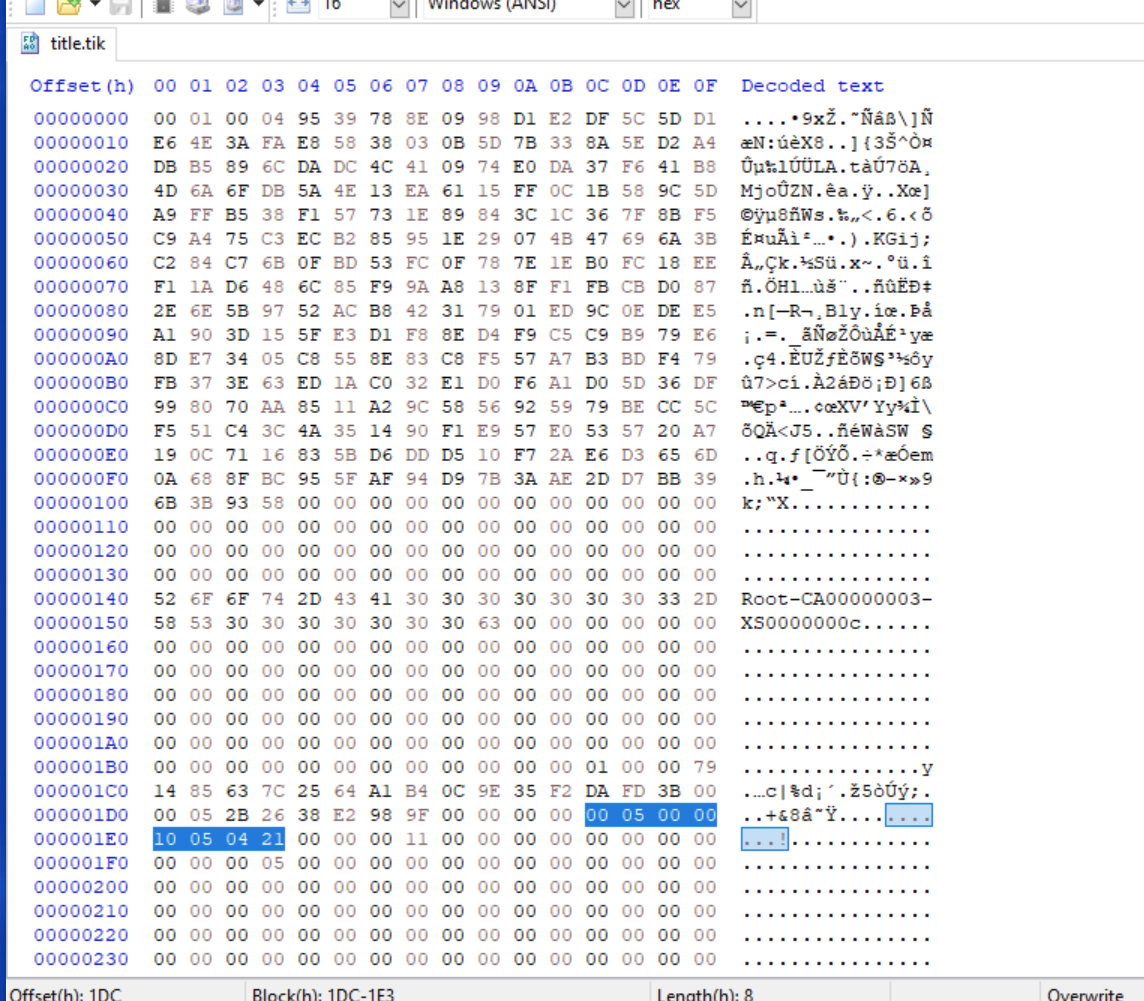

1633426049469.png


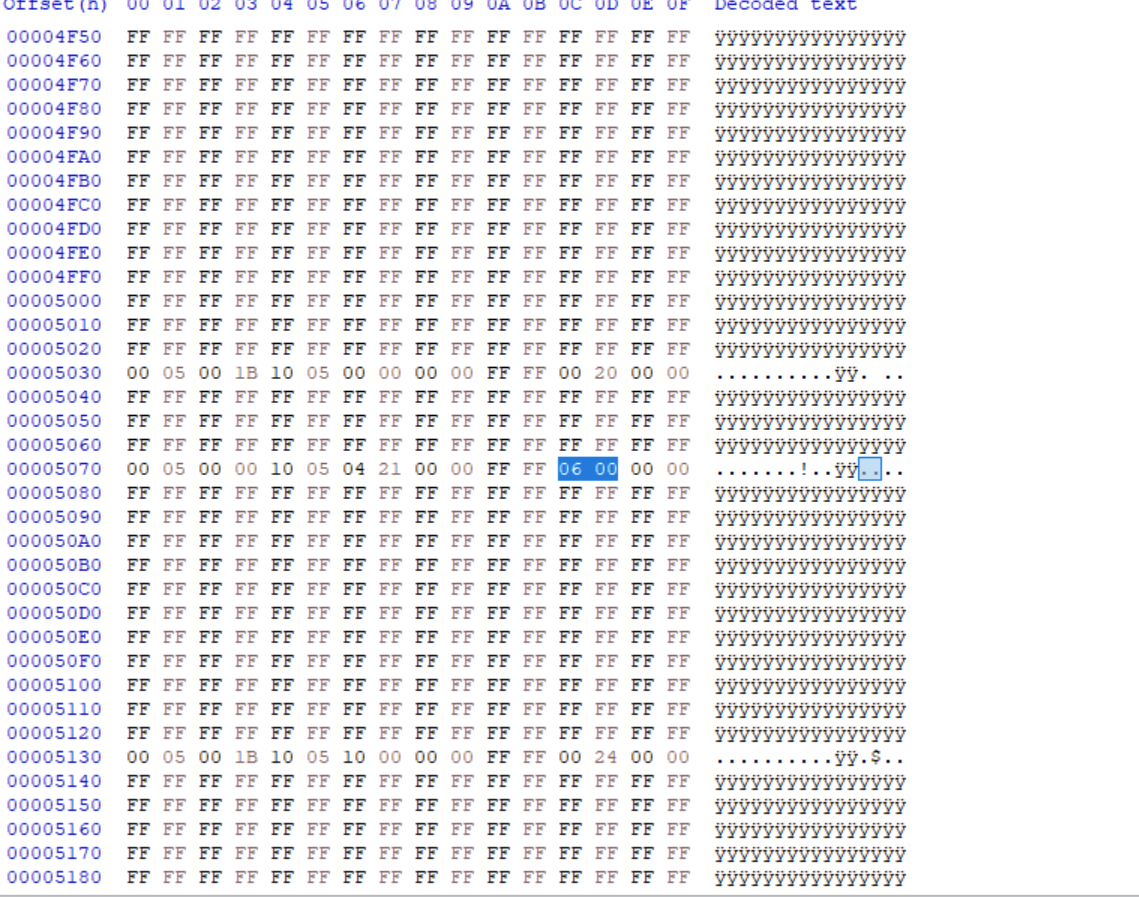
look up the title id via hex values in the versions.bin like this line:
1633426173879.png


those two bytes highlighted are the version for the game in the versions.bin. since this app relies on versions like 6.0 (06 00) and 6.1 (06 10), just change the byte to reflect that. this app contains updates as well. I've heard that if you put 00 00 in either the main game or the update (forgot which), it will negate the updates entirely. if you want to downgrade to a specific update, you have to turn the number of the version into a hex value (google it). I'm not entirely sure how to remove an update, if deleting it manually will corrupt something or not.

thanks to @ihaveahax for figuring this out. remember that tickets for eshop games and those of retail are likely to be different sizes, so the offset for the .tik's will be probably be different. it's not hard to find if you use the above as an example.
 

Attachments

  • 1633426049469.png
    1633426049469.png
    312.5 KB · Views: 221
Could I have assistance in downgrading Wii Sports Club? I can't get it to launch without trying to update :/
 
well, the version installed is going to be the decimal equivalent of those two hex bytes, so use a converter to change to another version or I think 00 00 is one without an update. as far as getting the system to negate an update, I don't know if that's possible if you're online. it won't update or it will error iirc if you have the dns to block updates, since it blocks the eshop, but it will still ask you to update if it detects one. you shouldn't have to update though. the nag itself -- I don't know if there's a way to prevent it other than being offline. though, the update from the versions.bin might play a role in this, whether the system knows to look for an update based on what's recorded or it could be automatic, I'm just not sure. you should try it and report back, unless you already have?
 
  • Like
Reactions: cubes
Yes 00 00 worked! It still asks for an update but I now have the option to start the game anyways! Awesome thanks!
 
  • Like
Reactions: godreborn
Is there a way to do it in Aroma CFW, ideally through an app or SDCaffine?
I really don't want to risk myself to brick my Wii U.
 
I figured out how to do this manually. btw, the versions.bin is here:

Code:
storage_slc/security/versions.bin

it's not very hard really, but I don't know what happens if you mess up the file. it's the versions.bin. you have to know the title id of the game you want to downgrade. the easiest way I've found is the ticket (title.tik). this is the ticket that I learned how to do this for. it's from @Laf111 's ftp server app. this is where the title id is located (these 8 bytes):


View attachment 279038

look up the title id via hex values in the versions.bin like this line:

View attachment 279039

those two bytes highlighted are the version for the game in the versions.bin. since this app relies on versions like 6.0 (06 00) and 6.1 (06 10), just change the byte to reflect that. this app contains updates as well. I've heard that if you put 00 00 in either the main game or the update (forgot which), it will negate the updates entirely. if you want to downgrade to a specific update, you have to turn the number of the version into a hex value (google it). I'm not entirely sure how to remove an update, if deleting it manually will corrupt something or not.

thanks to @ihaveahax for figuring this out. remember that tickets for eshop games and those of retail are likely to be different sizes, so the offset for the .tik's will be probably be different. it's not hard to find if you use the above as an example.

How do you even get to the bin files on pc
Post automatically merged:

I figured out how to do this manually. btw, the versions.bin is here:

Code:
storage_slc/security/versions.bin

it's not very hard really, but I don't know what happens if you mess up the file. it's the versions.bin. you have to know the title id of the game you want to downgrade. the easiest way I've found is the ticket (title.tik). this is the ticket that I learned how to do this for. it's from @Laf111 's ftp server app. this is where the title id is located (these 8 bytes):


View attachment 279038

look up the title id via hex values in the versions.bin like this line:

View attachment 279039

those two bytes highlighted are the version for the game in the versions.bin. since this app relies on versions like 6.0 (06 00) and 6.1 (06 10), just change the byte to reflect that. this app contains updates as well. I've heard that if you put 00 00 in either the main game or the update (forgot which), it will negate the updates entirely. if you want to downgrade to a specific update, you have to turn the number of the version into a hex value (google it). I'm not entirely sure how to remove an update, if deleting it manually will corrupt something or not.

thanks to @ihaveahax for figuring this out. remember that tickets for eshop games and those of retail are likely to be different sizes, so the offset for the .tik's will be probably be different. it's not hard to find if you use the above as an example.

How do you even access the versions.bin files anyway?? I don’t even know what to do. Could you do a step by step guide. ie: open file explorer and go…
 
Last edited by Floppynoob,
Is there a reason for going trough all the effort of editing it instead of just deleting it?
 
One question: How can I specifically get Mario Kart 8 in updates.bin? I'm dying to try a mod called CTGP-Café, but it requires update 4.1. If Mario Kart 8 is on update 4.2, the mod won't work because it gives me an error. I'm going to try a method I saw which involves putting files from update 4.2 into update 4.1 so the Wii U thinks Mario Kart 8 is updated when it actually isn't.

This time I didn't post in the wrong thread because I ended up writing this in a completely unrelated thread.
Post automatically merged:

I found something that will help you when you edit versions.bin: the version is stored in hexadecimal. So, for example, Mario Kart 8 version 4.1, also known as v64, will be displayed as "00 40 00". Image ( Follow the line of text marked in blue, that's the ID of Mario Kart 8 ):

8 ID.PNG


This is because 40 in hexadecimal is 64. Therefore, if your copy of Mario Kart 8 is version 4.2 ( also known as v81 ), you'll have to change "00 51 00" to "00 40 00" if you want to downgrade to version 4.1. I tested it and it worked for me ( and I even beat the Mushroom Cup in 200cc mode after doing that ) and I'm sure it will work for you too

Yes, I'll finally be able to try CTGP-Café
 
Last edited by WAME,
One question: How can I specifically get Mario Kart 8 in updates.bin? I'm dying to try a mod called CTGP-Café, but it requires update 4.1. If Mario Kart 8 is on update 4.2, the mod won't work because it gives me an error. I'm going to try a method I saw which involves putting files from update 4.2 into update 4.1 so the Wii U thinks Mario Kart 8 is updated when it actually isn't.

This time I didn't post in the wrong thread because I ended up writing this in a completely unrelated thread.
Post automatically merged:

I found something that will help you when you edit versions.bin: the version is stored in hexadecimal. So, for example, Mario Kart 8 version 4.1, also known as v64, will be displayed as "00 40 00". Image ( Follow the line of text marked in blue, that's the ID of Mario Kart 8 ):

View attachment 546014

This is because 40 in hexadecimal is 64. Therefore, if your copy of Mario Kart 8 is version 4.2 ( also known as v81 ), you'll have to change "00 51 00" to "00 40 00" if you want to downgrade to version 4.1. I tested it and it worked for me ( and I even beat the Mushroom Cup in 200cc mode after doing that ) and I'm sure it will work for you too

Yes, I'll finally be able to try CTGP-Café
hey man, im currently trying to get mario kart 8 ultimate to work on my wii u. this also requires having the game on ver 4.1. i cant seem to find the versions.bin foulder though.... could you maybe help me getting this mod to work?
thx in advance
 
hey man, im currently trying to get mario kart 8 ultimate to work on my wii u. this also requires having the game on ver 4.1. i cant seem to find the versions.bin foulder though.... could you maybe help me getting this mod to work?
thx in advance
I remember that it's located in a folder called "security" ( what a creative name! ) somewhere in Storage_SLC; it's been a long time since I modified versions.bin.
 

Site & Scene News

Popular threads in this forum