Tutorial
Updated
How to create Nintendo Switch games with Unity.
Note: NSPs build with a leaked SDK are not allowed to be shared on GBATemp (and most likely nowhere else too) because they were build with "stolen code". These NSPs can only be installed on hacked switches with sigpatches, so please only do projects for yourself instead of publishing them and making Nintendo mad & possibly even sue you.
Foreword:
If you are some random kid that wants to make a game for the switch without knowledge about Unity, Switch development and C/C++, stop right here. This is not meant for you and if you want to make a game that runs on the switch, use Godot. It is easy to make games with and they are legal to share. Dont expect any kind of help for making "illegal games", especially not if you cant read error messages to figure things out on your own.
Prerequisites
* I will not provide links to any SDK, nor will i tell you where to find it. Don't even ask.
** These links, while not publicly shared, are not protected in any way by unity. If you have the link from their website, you can download them without any restriction. However i still wont provide any URLs.
The leaked SDKs that you can find online usually do not have the same folder structure. They are often incomplete, scrambled or in other ways messed up which makes it hard to write a unified guide for them. I will therefore base this guide on a 15.3.0 SDK that recently leaked. Your experience might be different and its a lot of trial and error to get it working.
"Installing" the SDK
The complete SDK consists of many "addons" and most (if not all) of them are needed to make the build process work. You basically want to go through all folders and check if they have either a "NintendoSDK", "NintendoSDK-NEX", "NintendoSDK-NPLN" or "NintendoSDK-Pia6" subfolder and then merge them on your harddrive. Usually you will not overwrite any files except for maybe a license file. If you do this, you basically have a complete SDK with all addons installed to it. This is how it should look like on your harddrive once you are done (- the combined size is about 24GB.):
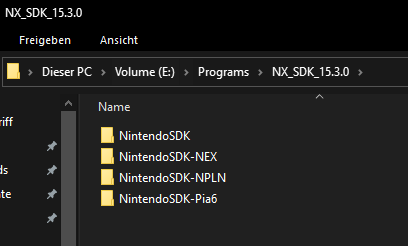
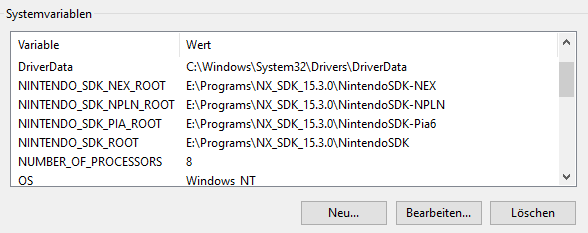
After you have extracted the necessary data, its time to add some environment variables. The folder path changes depending on where you put the SDK files obviously.
Restart your PC for them to take effect.
Installing Unity + Addon
Now you can install Unity and its "support for editor" addon. Make sure to install the correct version of both Unity and the addon, since the SDK is made for these specifically. You might get away with some versions lower and higher but there is absolutly no guarantee. Its best if you don't mix and match but choose the correct one. Usually the addon is delivered with the leaked SDK itself, which also tells you what Unity version to use.
Creating a game (or whatever)
It is highly advised that you read the documentation that comes with the SDK!
Stuff like character controller / HID and what not are all explained in the documentation. READ IT.
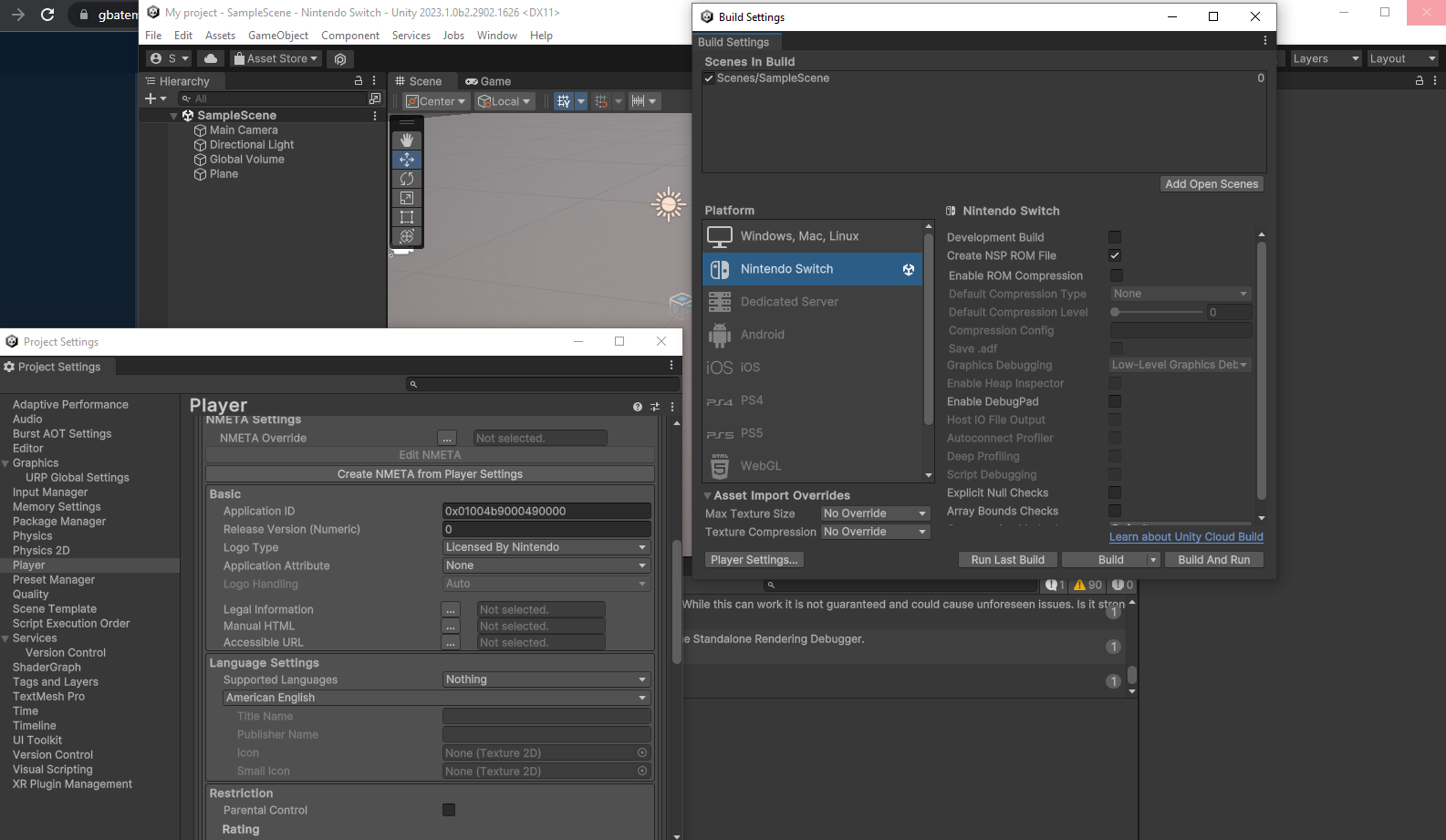
Once you are happy with your game (or whatever), click "File -> Build Settings" and change the Platform to Nintendo Switch. Let everything load, check the "Create NSP ROM File" checkbox and adjust all the NMETA settings in the "Player Settings" menu. I wont go over that stuff as its a lot and i am sure you can read and figure it out on your own. Click "Build" to create an NSP.
Making it installable
If you did everything correctly, you should now have an NSP file. But lets be honest, you do not own a dev unit to install the NSP on, do you?
Well, to be able to install and play your game on a retail switch, you need to repack it with your own retail unit keys. Use lockpick_rcm to get them and place them in (create if the folder does not exist):
You can then use hactool or any other method of your liking to repack the NSP. I created a simple repacker (check attachments) that does the job for me, however i wont guarantee that it works for you too. Either double-click the files or simply drag an NSP onto them. Its python code converted to an EXE so it might trigger your AV. You don't have to use it if you don't trust it but repacking research has to be done by you then.
Make sure that hacpack is on your harddrive and added to your PATH envoronment variable.
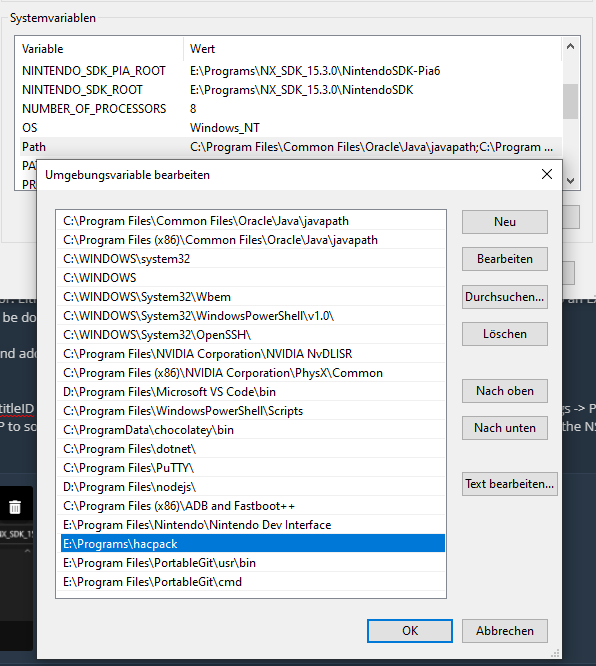
To use my repacker, the NSP needs to have its titleID somewhere inside the filename. You can check the titleID in Unity under "Player Settings -> Publishing Settings" as "Application ID" (the 0x is NOT part of the titleID). So you can rename your NSP to something like "mygame_01004b9000490000.nsp or whatever you like, then simply drag the NSP on repacker.exe.
Once you have a repacked NSP, you can install it to a retail unit running Atmosphere with sigpatches.
Have fun creating some games!
Result
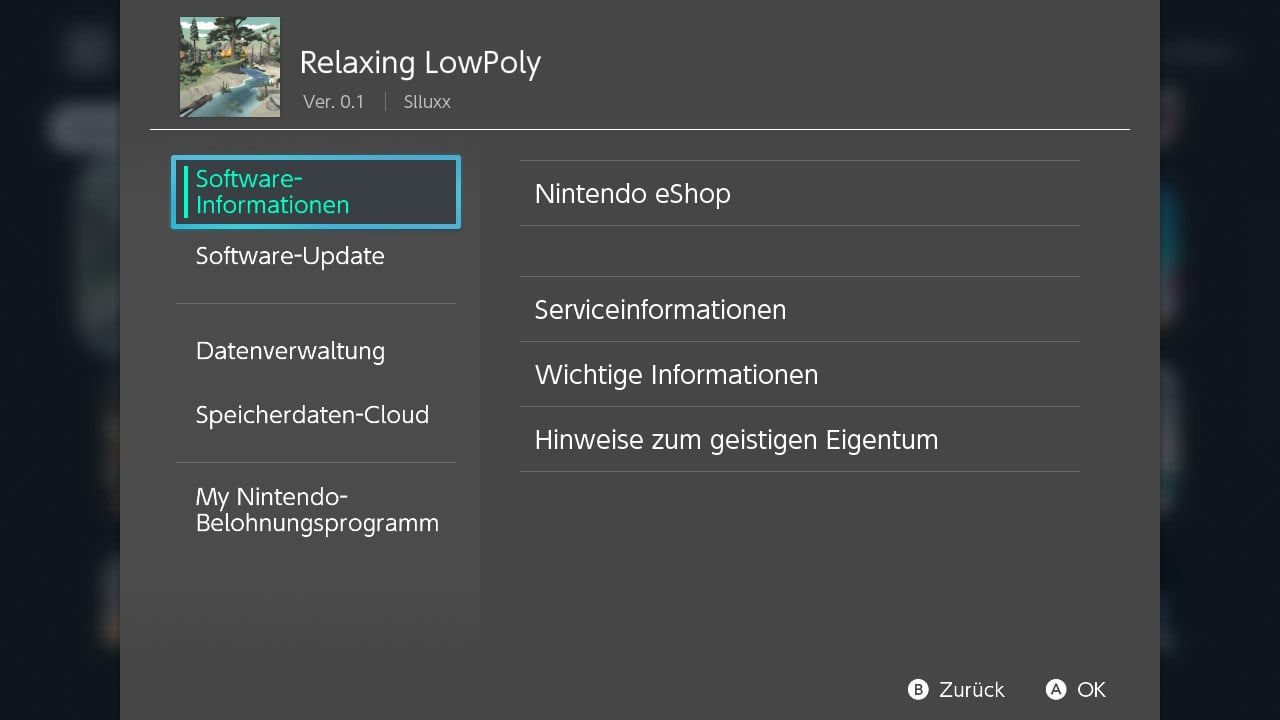
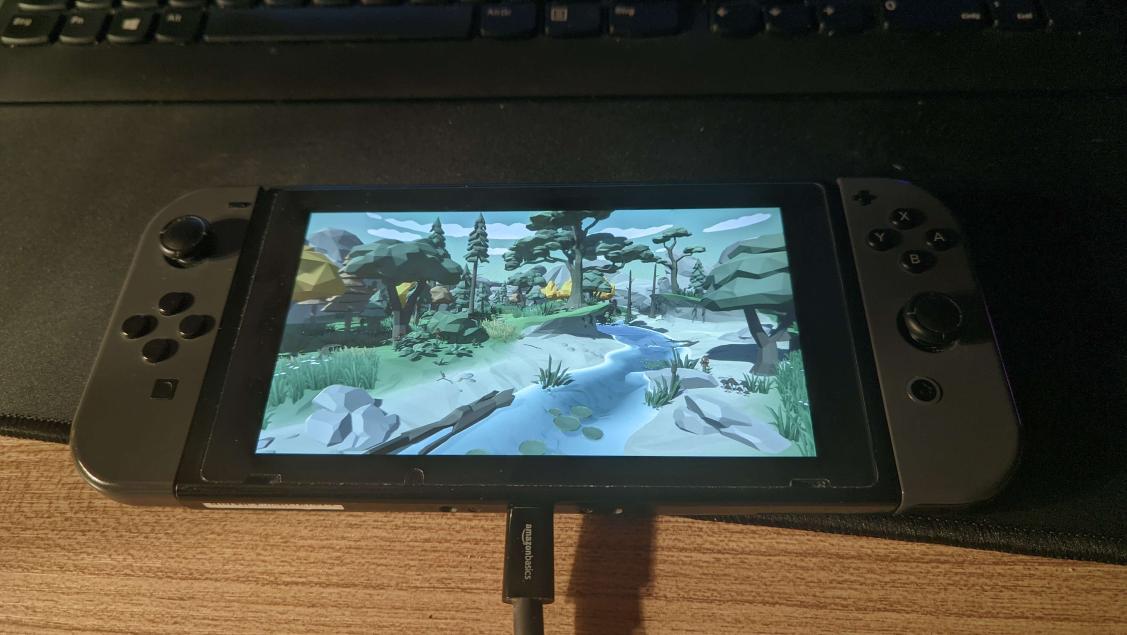
The result could look like this:
Foreword:
If you are some random kid that wants to make a game for the switch without knowledge about Unity, Switch development and C/C++, stop right here. This is not meant for you and if you want to make a game that runs on the switch, use Godot. It is easy to make games with and they are legal to share. Dont expect any kind of help for making "illegal games", especially not if you cant read error messages to figure things out on your own.
Prerequisites
- A leaked (or official) Nintendo Switch SDK from Nintendo (for example NX SDK 15.3.0) *
- The corresponding Unity version (for example 2023.1.0b2)
- The corresponding Unity "support for editor" addon. **
- https://github.com/The-4n/hacPack on your harddrive and added to your PATH environment variable
* I will not provide links to any SDK, nor will i tell you where to find it. Don't even ask.
** These links, while not publicly shared, are not protected in any way by unity. If you have the link from their website, you can download them without any restriction. However i still wont provide any URLs.
The leaked SDKs that you can find online usually do not have the same folder structure. They are often incomplete, scrambled or in other ways messed up which makes it hard to write a unified guide for them. I will therefore base this guide on a 15.3.0 SDK that recently leaked. Your experience might be different and its a lot of trial and error to get it working.
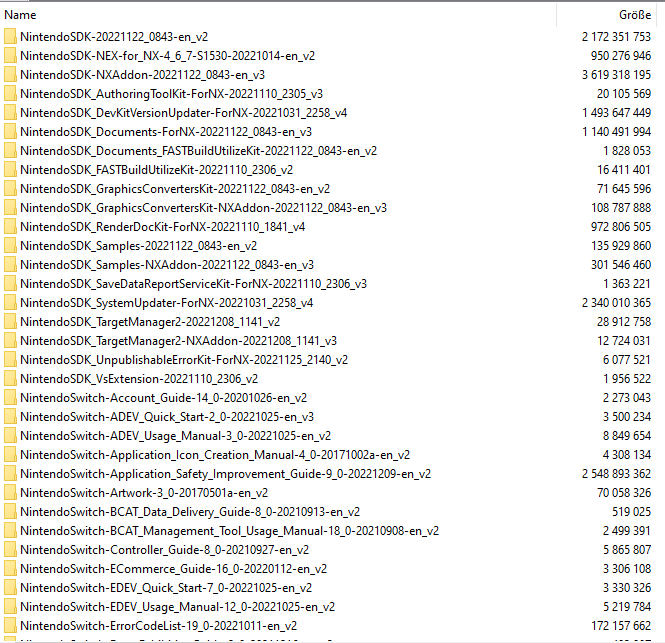
Folder structure of the recently leaked SDK:
"Installing" the SDK
The complete SDK consists of many "addons" and most (if not all) of them are needed to make the build process work. You basically want to go through all folders and check if they have either a "NintendoSDK", "NintendoSDK-NEX", "NintendoSDK-NPLN" or "NintendoSDK-Pia6" subfolder and then merge them on your harddrive. Usually you will not overwrite any files except for maybe a license file. If you do this, you basically have a complete SDK with all addons installed to it. This is how it should look like on your harddrive once you are done (- the combined size is about 24GB.):
After you have extracted the necessary data, its time to add some environment variables. The folder path changes depending on where you put the SDK files obviously.
Restart your PC for them to take effect.
Installing Unity + Addon
Now you can install Unity and its "support for editor" addon. Make sure to install the correct version of both Unity and the addon, since the SDK is made for these specifically. You might get away with some versions lower and higher but there is absolutly no guarantee. Its best if you don't mix and match but choose the correct one. Usually the addon is delivered with the leaked SDK itself, which also tells you what Unity version to use.
Creating a game (or whatever)
It is highly advised that you read the documentation that comes with the SDK!
Stuff like character controller / HID and what not are all explained in the documentation. READ IT.
Once you are happy with your game (or whatever), click "File -> Build Settings" and change the Platform to Nintendo Switch. Let everything load, check the "Create NSP ROM File" checkbox and adjust all the NMETA settings in the "Player Settings" menu. I wont go over that stuff as its a lot and i am sure you can read and figure it out on your own. Click "Build" to create an NSP.
Making it installable
If you did everything correctly, you should now have an NSP file. But lets be honest, you do not own a dev unit to install the NSP on, do you?
Well, to be able to install and play your game on a retail switch, you need to repack it with your own retail unit keys. Use lockpick_rcm to get them and place them in (create if the folder does not exist):
Code:
C:\Users\<YOUR USER NAME>\.switchYou can then use hactool or any other method of your liking to repack the NSP. I created a simple repacker (check attachments) that does the job for me, however i wont guarantee that it works for you too. Either double-click the files or simply drag an NSP onto them. Its python code converted to an EXE so it might trigger your AV. You don't have to use it if you don't trust it but repacking research has to be done by you then.
Make sure that hacpack is on your harddrive and added to your PATH envoronment variable.
To use my repacker, the NSP needs to have its titleID somewhere inside the filename. You can check the titleID in Unity under "Player Settings -> Publishing Settings" as "Application ID" (the 0x is NOT part of the titleID). So you can rename your NSP to something like "mygame_01004b9000490000.nsp or whatever you like, then simply drag the NSP on repacker.exe.
Once you have a repacked NSP, you can install it to a retail unit running Atmosphere with sigpatches.
Have fun creating some games!
Result
The result could look like this:
Attachments
Last edited by Slluxx,