This program (for Windows only) helps you to do shiny hunting on Ultra Sun/Ultra Moon. Thanks to zbash92 highly improved NTR streaming stability, making this AFK procedure even possible.
Source code: https://github.com/u93132/ShinyHunterUSUM.git

What you need:
1. A hacked latest version (11.17) New 3DS/ New 2DS with Luma3DS above v13.0.
2. Homebrew NTR-hr from this post: https://gbatemp.net/threads/rel-improved-hopefully-ntr-streamer-for-n3ds-xl-ll.644726/
2-1. You can use old versions NTR on 3DS, but multi-instance is not supported. Old versions NTR also frequently crashs the 3DS.
2-2. Static IP setting on 3DS is better, but this is optional
3. A WLAN card on you PC/laptop with hosted network feature to reduce latency significantly.
4. Pokemon Ultra Sun/Ultra Moon cartridge.
5. A quick review of how it works (a video shows an old version of Shiny Hunter USUM): https://gbatemp.net/threads/rel-improved-hopefully-ntr-streamer-for-n3ds-xl-ll.644726/post-10349120
Features:
Only the English version of USUM is supported now
1. Shiny hunting during battles
2. Shiny hunting when receiving Pokemons (Poipole, Type: Null)
3. Roto loto
4. The settings are auto-saved when the PC and 3DS are connected. You have 12 saving slots.
5. Auto screenshot when shiny Pokemons appear.
6. Real-time streaming.
Limitations:
1. Only English version gameplay is now supported.
2. Since this is a real-time streaming/programming procedure, the latency between PC and 3DS has to be small.
3. Still some stability issue on streaming and controlling, but I am not able to do much on this.
4. Only N3DS/N2DS are supported.
Setup up the environment on PC side:
1.Setup hosted network. Your PC and N3DS have to be on the same network.
2. Find your PC IP address.
Setup the environment on 3DS side:
1. Install the latest version of NTR-hr.
2. Press "L+Down+select" to enter Luma menu. Activate Input-redirection at Miscellaneous options... --> Start InputRedirection.
3. Write down your N3DS IP address.
3. Open the bootNTR application and load NTR 3.6-HR. If you uninstall a previous version and install the latest version, long press Select when open the application.
4. After loading, you will be back to the main menu.
5. Start the Ultra Sun/ Ultra Moon.
5-1. Set the USUM text speed to be fast.
Optional: Static IP setting on 3DS.
How to use:
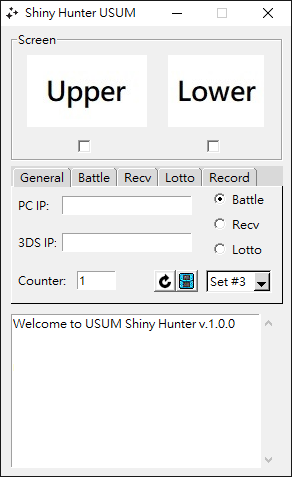
1. Enter your PC IP address with the port number (8001 is default by NTR).
2. Enter the 3DS IP.
3. Initialize the counter.
4. Click the 3DS icon.
5. Click the 3DS icon again to disconnect PC and 3DS if you want to pause.
Note 1: the physical buttons of 3DS are locked during shiny hunting.
Note 2: the 3DS icon button is locked for several seconds to finish its work whenever you click it. Please be patient.
Multi-instance:
If your PC IP is 192.168.xxx.ooo, the first hunter can have port 8001 and second one is 8002.
For example:
Hunter 1:
PC IP: 192.168.137.1:8001
3DS IP: 192.168.137.50
Hunter 2:
PC IP: 192.168.137.1:8002
3DS IP: 192.168.137.60
Then, you can have one PC connected to two 3DS.
Detail settings:
1. Battle: You can do shiny hunt during battle by setting up this page.
There are two types of encounter and two types of pokemon, so four kinds of Pokemon.
(1) Move-no aura: legendary Pokemons in the Ultra wormholes and normal grass encounter.
(2) Move-with aura: Stakataka and Blacephalon
(3) Talk-no aura: actually I think no Pokemons belong here.
(4) Talk-with aura: Ultra beasts in Ultra wormholes.
Save right beside (as close as possible) the event trigger point or in the middle of the grass.
2. Receiving Pokemons:
(1) Save in front of the NPC that gives you Poipole.
(2) Save on the left of the Type: Null event trigger point.
3. Roto-loto
(1) Save away from NPC to prevent A button pressing was overridden by conversations.
(2) Select which roto item you want. Multi-select is allowed.
4. Record (finally in the year of 2026)
(1) When the AFK procedure is fired up, then the stream is ready to be recorded.
(2) Or you can start the stream without starting AFK.
(3) You can do single shot or record continuously.
Update:
v0.3.4: Fixed the issue of receiving Type: Null.
v0.3.5: It is an old project. Now it supports full ip address.
v0.4.0: Startup pokemon is added. Please save in front of the grass where the event triggered.
v1.0.0: Recording functions, Pikachu in a hat, and S/M officially support.
v1.1.0: Record page capture modes (burst, 60 s video, one video per AFK round with Only shiny run), AVI / GIF / APNG output, red and blue console shot forms, per-Set Record settings, Set-numbered filenames for multi-instance, and the hunt lingers after a shiny so the video keeps the animation
v1.2.0: Floating Screen window for streaming & S/M starters
Edit in 2026:
I cleaned most of the potential bugs and improved the performance of identifying templates from figures. Meanwhile, thanks to the developer of Luma3DS (TuxSH) and NTR-HR (xzn), now the system and connection are more stable compared to in 2024. I also removed most of the features that are potentially latency dependent. If you wish to have a stable connection, you can do either:
(1) wire connecting your PC and the wifi router, and wifi connecting your 3DS and wifi router. (most stable)
(2) wireless connecting your PC, 3DS and the wifi router.
I also found the 3DS crash less often if you set the clock rate to 268 MHz.
Thanks to AI, now programming is much much faster..., though I dunno this is a good sign or rather.
Source code: https://github.com/u93132/ShinyHunterUSUM.git
What you need:
1. A hacked latest version (11.17) New 3DS/ New 2DS with Luma3DS above v13.0.
2. Homebrew NTR-hr from this post: https://gbatemp.net/threads/rel-improved-hopefully-ntr-streamer-for-n3ds-xl-ll.644726/
2-1. You can use old versions NTR on 3DS, but multi-instance is not supported. Old versions NTR also frequently crashs the 3DS.
2-2. Static IP setting on 3DS is better, but this is optional
3. A WLAN card on you PC/laptop with hosted network feature to reduce latency significantly.
4. Pokemon Ultra Sun/Ultra Moon cartridge.
5. A quick review of how it works (a video shows an old version of Shiny Hunter USUM): https://gbatemp.net/threads/rel-improved-hopefully-ntr-streamer-for-n3ds-xl-ll.644726/post-10349120
Features:
Only the English version of USUM is supported now
1. Shiny hunting during battles
2. Shiny hunting when receiving Pokemons (Poipole, Type: Null)
3. Roto loto
4. The settings are auto-saved when the PC and 3DS are connected. You have 12 saving slots.
5. Auto screenshot when shiny Pokemons appear.
6. Real-time streaming.
Limitations:
1. Only English version gameplay is now supported.
2. Since this is a real-time streaming/programming procedure, the latency between PC and 3DS has to be small.
3. Still some stability issue on streaming and controlling, but I am not able to do much on this.
4. Only N3DS/N2DS are supported.
Setup up the environment on PC side:
1.
2. Find your PC IP address.
Setup the environment on 3DS side:
1. Install the latest version of NTR-hr.
2. Press "L+Down+select" to enter Luma menu. Activate Input-redirection at Miscellaneous options... --> Start InputRedirection.
3. Write down your N3DS IP address.
3. Open the bootNTR application and load NTR 3.6-HR. If you uninstall a previous version and install the latest version, long press Select when open the application.
4. After loading, you will be back to the main menu.
5. Start the Ultra Sun/ Ultra Moon.
5-1. Set the USUM text speed to be fast.
Optional: Static IP setting on 3DS.
How to use:
1. Enter your PC IP address with the port number (8001 is default by NTR).
2. Enter the 3DS IP.
3. Initialize the counter.
4. Click the 3DS icon.
5. Click the 3DS icon again to disconnect PC and 3DS if you want to pause.
Note 1: the physical buttons of 3DS are locked during shiny hunting.
Multi-instance:
If your PC IP is 192.168.xxx.ooo, the first hunter can have port 8001 and second one is 8002.
For example:
Hunter 1:
PC IP: 192.168.137.1:8001
3DS IP: 192.168.137.50
Hunter 2:
PC IP: 192.168.137.1:8002
3DS IP: 192.168.137.60
Then, you can have one PC connected to two 3DS.
Detail settings:
1. Battle: You can do shiny hunt during battle by setting up this page.
There are two types of encounter and two types of pokemon, so four kinds of Pokemon.
(1) Move-no aura: legendary Pokemons in the Ultra wormholes and normal grass encounter.
(2) Move-with aura: Stakataka and Blacephalon
(3) Talk-no aura: actually I think no Pokemons belong here.
(4) Talk-with aura: Ultra beasts in Ultra wormholes.
Save right beside (as close as possible) the event trigger point or in the middle of the grass.
2. Receiving Pokemons:
(1) Save in front of the NPC that gives you Poipole.
(2) Save on the left of the Type: Null event trigger point.
3. Roto-loto
(1) Save away from NPC to prevent A button pressing was overridden by conversations.
(2) Select which roto item you want. Multi-select is allowed.
4. Record (finally in the year of 2026)
(1) When the AFK procedure is fired up, then the stream is ready to be recorded.
(2) Or you can start the stream without starting AFK.
(3) You can do single shot or record continuously.
Update:
v0.3.4: Fixed the issue of receiving Type: Null.
v0.3.5: It is an old project. Now it supports full ip address.
v0.4.0: Startup pokemon is added. Please save in front of the grass where the event triggered.
v1.0.0: Recording functions, Pikachu in a hat, and S/M officially support.
v1.1.0: Record page capture modes (burst, 60 s video, one video per AFK round with Only shiny run), AVI / GIF / APNG output, red and blue console shot forms, per-Set Record settings, Set-numbered filenames for multi-instance, and the hunt lingers after a shiny so the video keeps the animation
v1.2.0: Floating Screen window for streaming & S/M starters
Edit in 2026:
I cleaned most of the potential bugs and improved the performance of identifying templates from figures. Meanwhile, thanks to the developer of Luma3DS (TuxSH) and NTR-HR (xzn), now the system and connection are more stable compared to in 2024. I also removed most of the features that are potentially latency dependent. If you wish to have a stable connection, you can do either:
(1) wire connecting your PC and the wifi router, and wifi connecting your 3DS and wifi router. (most stable)
(2) wireless connecting your PC, 3DS and the wifi router.
I also found the 3DS crash less often if you set the clock rate to 268 MHz.
Thanks to AI, now programming is much much faster..., though I dunno this is a good sign or rather.
Attachments


Last edited by u93132,