hello there,
so i've been working on a sort of demake or recreation of the Scott Pilgrim beat 'em up game for the DS, since i wanted to try out DS programming, and eventually kept adding things, until i had one character in scene in the first map of the game, with background music and complete basic mechanics and all:

and with what i've been busy lately, is to get the background to scroll like the actual game, but stumbled upon a VRAM limitation with Nightfox's lib, which assigns just 8 banks (~128 KB) for backgrounds per screen for both tiles and maps, as seen on this define:
BUT for the scroll system that i want, i needed a little more than that, so i modified the lib to use more banks for tiles, and also set vram bank C to also upper screen main BG, which overall allowed me to have two 256 x 256 chunks loaded at the same time in screen.
the thing is, the first 2 chunks load just great (as seen on the previous screenshot, but when it scrolls and loads the next one, the graphics on that layer show glitchy:
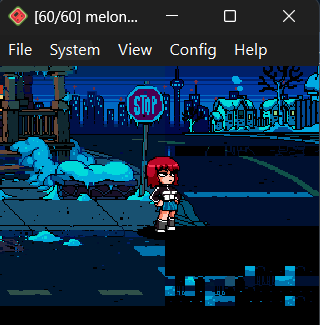
without getting into much detail of how this system works, it just unloads the left chunk that is not visible, and loads the upcoming next one to the right (the one which appears bugged).
basically, it should load these two chunks on screen as it loaded the ones in the first screenshot, but it doesn't.
i tried manually wiping the adresses of memory of vram bank C (where the buggy chunk is loaded) using memset() before loading the chunk, suspecting it may be caused because of overwritten memory in the vram bank, which led to corruption, but doesn't seem to be the case:
i'm really looking forward to continuing this for fun, so i'll be reading any advice or request that you give me, regarding this or any other thing. thanks c:
so i've been working on a sort of demake or recreation of the Scott Pilgrim beat 'em up game for the DS, since i wanted to try out DS programming, and eventually kept adding things, until i had one character in scene in the first map of the game, with background music and complete basic mechanics and all:
and with what i've been busy lately, is to get the background to scroll like the actual game, but stumbled upon a VRAM limitation with Nightfox's lib, which assigns just 8 banks (~128 KB) for backgrounds per screen for both tiles and maps, as seen on this define:
C:
/// Maxmimum number of VRAM blocks used for tilesets
#define NF_MAX_BANKS_TILES 8

/// Maxmimum number of VRAM blocks used for maps
#define NF_MAX_BANKS_MAPS 16
BUT for the scroll system that i want, i needed a little more than that, so i modified the lib to use more banks for tiles, and also set vram bank C to also upper screen main BG, which overall allowed me to have two 256 x 256 chunks loaded at the same time in screen.
the thing is, the first 2 chunks load just great (as seen on the previous screenshot, but when it scrolls and loads the next one, the graphics on that layer show glitchy:
without getting into much detail of how this system works, it just unloads the left chunk that is not visible, and loads the upcoming next one to the right (the one which appears bugged).
basically, it should load these two chunks on screen as it loaded the ones in the first screenshot, but it doesn't.
i tried manually wiping the adresses of memory of vram bank C (where the buggy chunk is loaded) using memset() before loading the chunk, suspecting it may be caused because of overwritten memory in the vram bank, which led to corruption, but doesn't seem to be the case:
C:
memset((void *)0x06200000 + (NF_TILEDBG_LAYERS[screen][layers[RIGHT]].tilebase << 14), 0, NF_TILEDBG_LAYERS[screen][layers[RIGHT]].tileblocks << 14);
memset((void *)0x06200000 + (NF_TILEDBG_LAYERS[screen][layers[RIGHT]].mapbase << 11), 0, NF_TILEDBG_LAYERS[screen][layers[RIGHT]].mapblocks << 11);
i'm really looking forward to continuing this for fun, so i'll be reading any advice or request that you give me, regarding this or any other thing. thanks c: