

Help diagnosing DELL Optiplex 745

  • Thread starter Thread starter JuanMena
  • Start date Start date
  • Views Views 2,439
  • Replies Replies 11

JuanMena

90s Kid, Old Skull Gamer & Artist.
Member
Joined
Dec 17, 2019
Messages
6,247
Solutions
5
Reaction score
26,241
Trophies
4
Age
32
Location
the 90s
XP
19,543
Country
Mexico
Man... I gotta stop buying stupid computers in flea market.
Anyway... guys, this DELL Optipled 745 is refusing to start.
Here's what's happening.

I tested it yesterday and it turned on but show no display. So I opened it and found it had no HDD. Today I went for a USB keyboard and plugged an old 500GB HDD to this, hoping to at least boot to BIOS... might be foreshadowing.

Anyway. I plugged in the HDD and the USB Keyboard. Connected the tower to the wall and it turned on by itself... I didn't even pressee the power button.

It has a solid green light, but beeps 6 times and it has one led that stays orange.
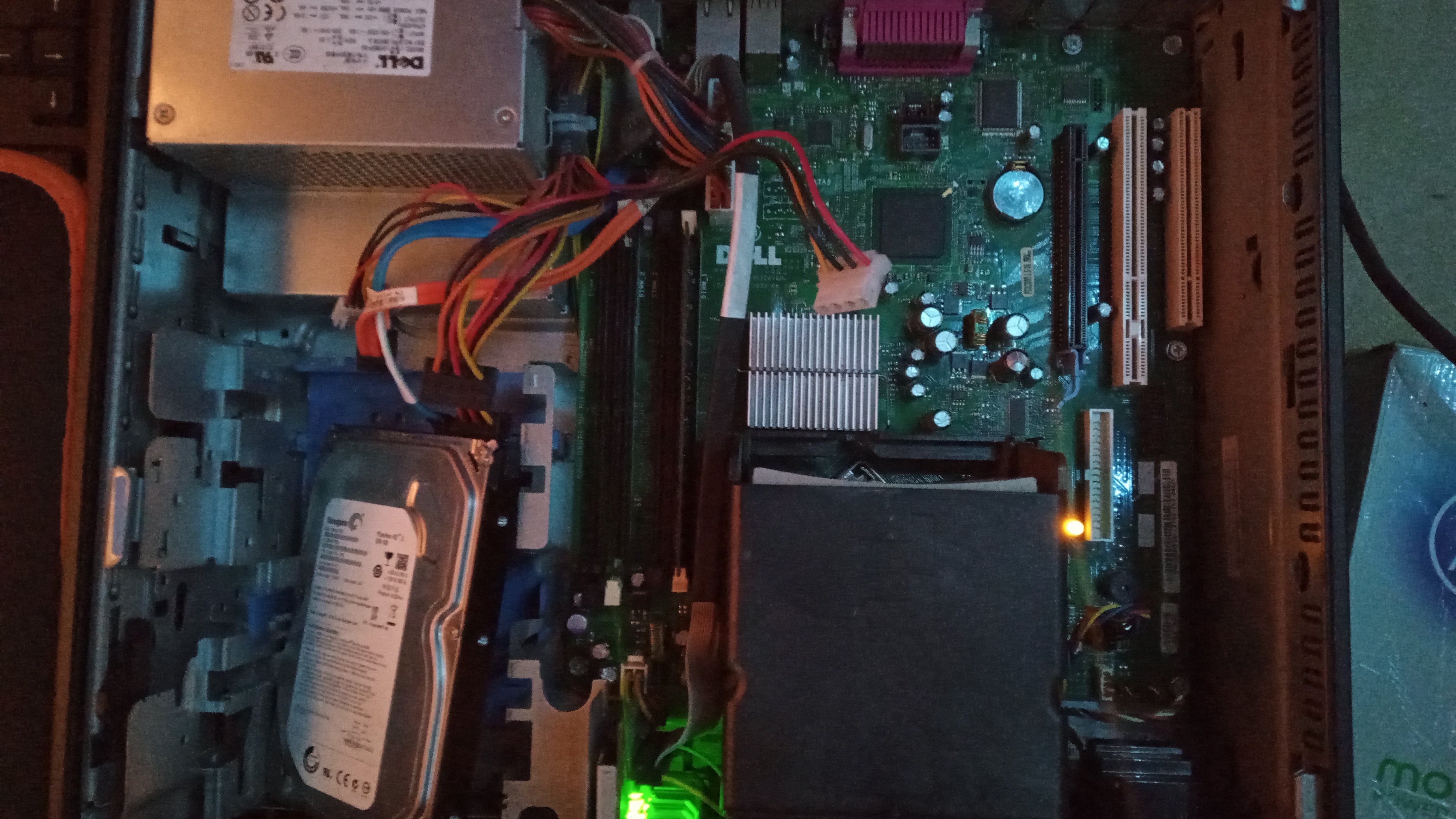
IMG_20240221_152147_018.jpg


Quick Google and turns out 6 beeps in Optiplex 745 means RAM failure. I've swapped RAM and tested it in all those 4 slots, still won't boot or show display.

The HDD is indeed spinning though.

Thing's I've tried is to turn it on without RAM and without HDD and without USB, same 6 beeps.
I've removed the CMOS battery and turned it on without it, same 6 beeps.
I've left it unplugged and then put the CMOS battery and turned it on, same 6 beeps.


I'm running out of ideas unless it's a BIOS corruption or something else I'm not understanding.
I've also noticed the keyboard is not even starting, so... I don't have high hopes with this.
Any ideas?

 
This machine is pretty much ancient. There's not much you can work with even if it did work. Also, 6 beeps typically means video card/chip failure
Yeah, I was hoping to use it as a Win7 machine. Also for learning purposes for my niece.

Should I get rid of this? Of should I keep it?
 
Yeah, I was hoping to use it as a Win7 machine. Also for learning purposes for my niece.

Should I get rid of this? Of should I keep it?
There are better alternatives out there when it comes to these dell workstations, so it doesn't matter much
 
  • Like
Reactions: JuanMena
Meh, guess it's expected since it was in the flea market. But was cheap and came with 120SSD, so basically the SSD was worth it.
 
  • Like
Reactions: Blythe93
Have you tried replacing the BIOS battery and resetting via the jumper? Some sources are saying Dell also used 6 beeps for GPU errors.

Yeah, I was hoping to use it as a Win7 machine. Also for learning purposes for my niece.

Should I get rid of this? Of should I keep it?

If it has Core 2, I'd only use it for something I really don't care about e.g. testing old PCI cards I think might break the motherboard, or maybe as a Windows XP machine or something.

Even as a Linux device, the things so old newer distros might struggle, let alone a HDD.
 
Have you tried replacing the BIOS battery and resetting via the jumper? Some sources are saying Dell also used 6 beeps for GPU errors.


If it has Core 2, I'd only use it for something I really don't care about e.g. testing old PCI cards I think might break the motherboard, or maybe as a Windows XP machine or something.

Even as a Linux device, the things so old newer distros might struggle, let alone a HDD.
I already have a Windows XP machine.

This Optiplex came with an SSD and 3GB of ram (x1 2GB and x2 512MB) and I'm assuming it is an x86 CPU, so even if it had Core 2 (which I haven't seen since it has a massive cooler) there's not much I could do with it.

Again, was planning to use it as a first computer for my niece, maybe Install RetroArch on it.

But actually your suggestion is good, I too read trying replacing the battery, but didn't read anything about a jumper. Will try later.
 
  • Like
Reactions: Blythe93
@JuanMena If you hammer f12 on startup, can you get into the diagnostics menu? I know you mentioned that you turned it off at some point but it started up by itself when you switched the plug back on for some reason, have you tried power cycling it by holding down the power button? It should do a full shut down if you hold it down long enough, then you can try turning it on with the power off and it should remove any residual power left. Then you can try turning it on again after and see if anything changes. If it's got 4 lights on the back, what colours are they when it tries to POST? You could also check the manual to see if it is using the right speed of ram and capacity.

https://downloads.dell.com/manuals/...x_desktop/optiplex-745_user's guide_en-us.pdf
 
Older Dells suffered from bad caps. You can see the swollen one as master801 pointed out. That cap is near the northbridge chip which handles the video so that may be causing the issue. As old as that pc is i would just harvest all the parts and find another junker to fix up with those parts. If you have a capacitor that's the same spec then it could be a fun fix to show your niece.
 
@JuanMena If you hammer f12 on startup, can you get into the diagnostics menu?
Nope.
Keyboard doesn't even start, so I'm guessing USB isn't available either.
There's no other leds other than the one in the power button and the orange one in the board.
Older Dells suffered from bad caps. You can see the swollen one as master801 pointed out. That cap is near the northbridge chip which handles the video so that may be causing the issue. As old as that pc is i would just harvest all the parts and find another junker to fix up with those parts. If you have a capacitor that's the same spec then it could be a fun fix to show your niece.
Yeah, it seems there's one blown
IMG_20240221_181207_078.jpg


I didn't saw it until you mentioned it.

Guess it'll have to be replaced, so this thread will be on hold until I do that, and see of that fixes the issue.
 
Last edited by JuanMena,
Nope.
Keyboard doesn't even start, so I'm guessing USB isn't available either.
There's no other leds other than the one in the power button and the orange one in the board.

Yeah, it seems there's one blown
View attachment 421519

I didn't saw it until you mentioned it.

Guess it'll have to be replaced, so this thread will be on hold until I do that, and see of that fixes the issue.
Check for bulging caps near the CPU socket underneath the CPU fan shroud, too.

Some of the time those can go bad.
 

Site & Scene News

Popular threads in this forum
