Hacking [Guide] Replace Zelda SS Textures and Models

  • Thread starter Thread starter fiveighteen
  • Start date Start date
  • Views Views 80,887
  • Replies Replies 225
  • Likes Likes 3
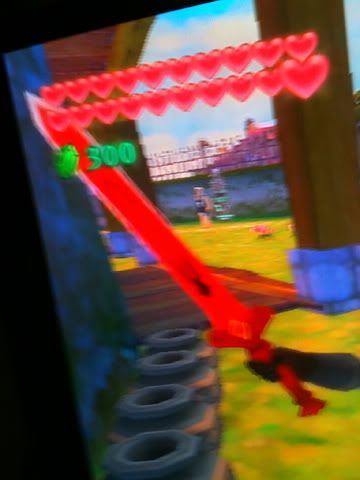
Hey, what do you guys think of this sword skin?

15hkah4.png


I would try to edit the shape of the sword but I don't know how to use 3D Studio MAX yet lol.
 
heya

im trying to make costume of link and zelda when there in there clothes at the start
dont suppose someone could post the images of them in ragdoll T out and all around pictures so make sure get every detail

thanks so much if someone can
 
heya

im trying to make costume of link and zelda when there in there clothes at the start
dont suppose someone could post the images of them in ragdoll T out and all around pictures so make sure get every detail

thanks so much if someone can

I don't know how to use 3D Studio Max so I can't help you with that. The model viewer in SZS Modifer just makes it looked retarded.
 
heya

im trying to make costume of link and zelda when there in there clothes at the start
dont suppose someone could post the images of them in ragdoll T out and all around pictures so make sure get every detail

thanks so much if someone can

I don't know how to use 3D Studio Max so I can't help you with that. The model viewer in SZS Modifer just makes it looked retarded.

well i have no clue
i just need pictures of around the models
:(
hopefully someone will know
 
heya

im trying to make costume of link and zelda when there in there clothes at the start
dont suppose someone could post the images of them in ragdoll T out and all around pictures so make sure get every detail

thanks so much if someone can

I don't know how to use 3D Studio Max so I can't help you with that. The model viewer in SZS Modifer just makes it looked retarded.

well i have no clue
i just need pictures of around the models
:(
hopefully someone will know

So do you only want the textures or the model itself standing in a T shape with textures? If it's only textures, I can help you out with that.

ALSO: Get ready for a big surprise (Arnold joke but seriously, wait till you see this.)
 
When it's in the distance, I agree it's an artistic choice and it's fine.
But it's sometime also applied on nearest objects.

That's why I think they are using this artistic renderer to mask the fact the textures are not very detailed.
Sometime the textures are even made of mosaics, like the grass.


Maybe the auto-downscale is used to create this mosaic effect.
Did you try replacing with an image size multiple of the current one?


To give you an idea how bad the textures are, heres a ground texture in its original size, directly ripped from the iso:


Thats one of the biggest resolution textures Ive found. Its 256x256.

The upperbody I edited a few pages back is 265x128.
I made a replacement in 1024x512, but ingame it gets downscaled back to 256x128.

What they have basicly done is they have added this mosaic effect on all textures, which looks ok from a bit of a distance. But up close they look really really bad.

 
When it's in the distance, I agree it's an artistic choice and it's fine.
But it's sometime also applied on nearest objects.

That's why I think they are using this artistic renderer to mask the fact the textures are not very detailed.
Sometime the textures are even made of mosaics, like the grass.


Maybe the auto-downscale is used to create this mosaic effect.
Did you try replacing with an image size multiple of the current one?


To give you an idea how bad the textures are, heres a ground texture in its original size, directly ripped from the iso:


Thats one of the biggest resolution textures Ive found. Its 256x256.

The upperbody I edited a few pages back is 265x128.
I made a replacement in 1024x512, but ingame it gets downscaled back to 256x128.

What they have basicly done is they have added this mosaic effect on all textures, which looks ok from a bit of a distance. But up close they look really really bad.

aww i am sad to hear this. i was hoping we could get a high res pack for the game :( oh well, maybe we can get some cool edits.
 
aww i am sad to hear this. i was hoping we could get a high res pack for the game :( oh well, maybe we can get some cool edits.

Well the Wii would never be able to handle a whole full high res pack, but It wouldve been fun to replace some textures with high res, such as the swords and other small, but yet important, things.


Edit: Im still unsuccessful with importing models :(
Ive started with the items (the brresC files) but there seems to be something wrong in the decoding/encoding. SZS Modifier wont open the decoded file, but BrawlBox opens it fine, and so do brresViewer.
Ive gotten as far as managing to replace a model and encode the file back to brresC, but Dolphin spits out errors right after the calibration screen... So somethings not working right :(
 
Ok now Im confused as hell... I replaced Links very first sword, yet in-game its still the old model.
At first I thought I was retarded and replaced the wrong file, so I did it again... and again... Then I extracted the file from the ISO again, and yup, the new model is in the file...

So, is there a second model for links sword hiding somewhere!? Im starting to get quite annoyed by this now.
 
If the Wii can't support High-res textures, maybe Dolphin could create a plugin like N64 which allow the emulator to redirect textures to an external folders with different files. Like Riivolution.
 
Ok now Im confused as hell... I replaced Links very first sword, yet in-game its still the old model.
At first I thought I was retarded and replaced the wrong file, so I did it again... and again... Then I extracted the file from the ISO again, and yup, the new model is in the file...

So, is there a second model for links sword hiding somewhere!? Im starting to get quite annoyed by this now.

You didn't tell us what you edited. No, the swords are all in one place with the rest of the swords which is ObjectPack>PLCompItem>EquipSword(A/B/C/etc depending on which sword).
 
You didn't tell us what you edited. No, the swords are all in one place with the rest of the swords which is ObjectPack>PLCompItem>EquipSword(A/B/C/etc depending on which sword).

ObjectPack>PLCompItem>EquipSwordA>3DModels>EquipSwordA is what I replaced.

Im back to square one now though, with the game crashing after the m+ calibration.
 
You didn't tell us what you edited. No, the swords are all in one place with the rest of the swords which is ObjectPack>PLCompItem>EquipSword(A/B/C/etc depending on which sword).

ObjectPack>PLCompItem>EquipSwordA>3DModels>EquipSwordA is what I replaced.

Im back to square one now though, with the game crashing after the m+ calibration.

You edited the Model then? Make sure it has the SAME polygon count or else it will crash.

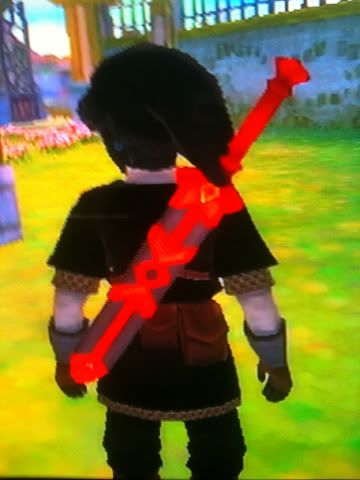
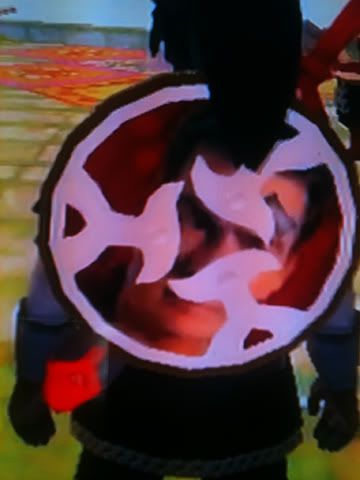
Here's what I did so far:
IMG_0087.jpg

IMG_0088.jpg


IMG_0089.jpg

Charlie Sheild

Still need to fix few things with him, the model is reading all three textures for some odd reason >:O.
 

Site & Scene News

Popular threads in this forum