EZ5i skinning competition

  • Thread starter Thread starter FAST6191
  • Start date Start date
  • Views Views 119,012
  • Replies Replies 757
Status
Not open for further replies.
Mbmax said:
joshbean39 said:
southpark skin
preview:
pic.png
download link:http://filetrip.net/f12333-southpark-skin-1-0.html
the preview is messed up a little
Hi and thanks for your entry.
BTW, this is an empty skin.
ohmy.gif


Please read my tutorial and compile it properly.
Also read rules in the first post so you can provide a full skin to this competition.
wink.gif
i fixed it
 
I have a couple of questions which I believe still have not been answered by the contest judges

1. are we allowed to use copyrighted artwork or not? I thought that the rules stated "no licensed artwork", and yet I'm seeing quite a few skins that were created which have obvious artwork elements which have been "lifted" and not created by the skin creaters themselves
(eg. entries by following users: pokeboy100, teh_PaRaDoX, ez-megaman, Lawlite, Paragonis, Jarn Sakarra, Lordpoketehpenquin, Joshbean39 to name a few)

what is the ruling on this?

if we can "steal" artwork to created licensed themes, I'm fine with that and will create a better entry than the one that I'm currently working on, otherwise I believe that all entries which break this rule should be disqualified and the entrants informed now to give them time to resubmit something that meets the criteria of the rules

2. which screen does the animation (.ani) file play out on when the cart is loading (top or bottom)?
 
bigel said:
OFFICIAL ENTRY!

I think i will join this too!

Here´s my entry!

I hope you like it
biggrin.gif


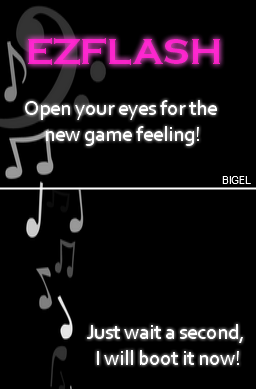
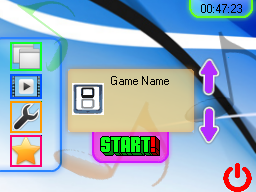
Title: MyMusic

Author: Bigel

Download: Here

So here are some screenshots of my work
biggrin.gif

TOTHETOP.png


fffffnonklicked.png


Klicked2.png


haha5.gif


haha1z.gif

EDIT: Version 1.2.1 is out now
Just tested this skin and it's completly broken. There is no template at all inside the .dat file.
Please use Ez Skin Forger RN90 to compile it again.

You also have the same bug than some of you guys encountered with the splash.ani.
BTW, now i have a fixed version of moonligh's tool, makesplash.exe.
i will upload it to filetrip soon.

I wish to thanks Xenon++ and Carpfish for this quick fix as i was not able to reach Moonlight any more.
So, thanks guys.
wink.gif


Edit : Ok. Here it is : MakeSplash 128 lines fix
bigel please use this version of makesplash to compile your splash animation.
wink.gif
 
As said in the rules from FAST6191's post :

FAST6191 said:
Competition Rules:
  • One Entry per person, GBAtemp forum account required, open to all member groups.
  • You must post your entry in this competition thread and clearly indicate that it is your entry.
  • Entry previews should be in standard web graphic form (JPG, GIF, PNG etc.). No Flash/Shockwave please.
  • Entries should not require the installation of additional software.
  • Entries must not include any illegal, pornographic or offensive material. Entries that are unsuitable will be removed.
  • A full skin is required[1]
  • It should go without saying but this should be your own work
  • The competition ends one month from start date at midnight(UK time).
[1] Skin making is covered in the tutorial but a full skin is a skin.dat, skin.ani, skin_bottom.bin and skin_up.bin
Omission of a skin.ani file will likely count against you (replace skin with your under chosen 8 letter name)
 
I made a box 45 pixels downward and 200 side to side probably needs to be a bit bigger though.To get a nice rounded box in photoshop use the rounded box tool below the path selection tool
 
is anyone else having any issues with the makesplash program? I've tried using every version that I can find (including the latest "makesplash fix version" here from this thread) but I receive a "stream error" when attempting to build the animation file. I have 50 .bmp files (all of them were exported at 24-bit bmp's from photoshop and every frame is the full 256x192 in size.
 
Here's my skin. First skin I ever made and I used my own doodles that I drew in school.

My Skin

ScreenShot.jpg


Hope ya like it.
cool.gif
 
thieves like us said:
is anyone else having any issues with the makesplash program? I've tried using every version that I can find (including the latest "makesplash fix version" here from this thread) but I receive a "stream error" when attempting to build the animation file. I have 50 .bmp files (all of them were exported at 24-bit bmp's from photoshop and every frame is the full 256x192 in size.
Edit the ini file so it suits your pictures if your pictures are named picture001.png make the ini say picture???.png
Also ^^ Holy crap nice skin change the icons and Ill love it.
 
ThatDudeWithTheFood said:
thieves like us said:
is anyone else having any issues with the makesplash program? I've tried using every version that I can find (including the latest "makesplash fix version" here from this thread) but I receive a "stream error" when attempting to build the animation file. I have 50 .bmp files (all of them were exported at 24-bit bmp's from photoshop and every frame is the full 256x192 in size.
Edit the ini file so it suits your pictures if your pictures are named picture001.png make the ini say picture???.png
Also ^^ Holy crap nice skin change the icons and Ill love it.
I also noticed that in the example the first image is splash000.bmp

I've tried changing the files to .png's (since that's what you specified but it appears that the program definately looking for bitmap images. I've added a splash000.bmp file and that still doesn't appear to correct the problem. I'm still receiving a "Stream read error." message after selecting my splash.ini file which consists of the following:

[ConvertSetting]
SourceFileMask=splash???.bmp
SourceFPS=20
WaitForTerminate=0
AlreadyAllDraw=1
UseDither24to15bit=1
 
^Sir, don't save bmps thru photoshop, try open it on MSpaint and save it there (.bmp format) 1 by 1 then recompile it
wink.gif
 
ops i said pngs the program only supports bmp ill pm you
EDIT:I sent you the splash.ani I can't test if it works but it seemed to compile fine.
EDIT2:300TH POST
 
ah, so photoshop is the culprit. that's good to know. thanks everyone for your help, especially ThatDudeWithTheFood
smile.gif


edit:
it still doesn't work, but the problem may be the size of the file. moonshell's default splash.ani is 350KB vs. my 2.5MB, so I'm guessing that there is a file size limitation as well. I guess I'll have to attempt something else for my animation file

also, given that there is a limitation, it's kind of a shame that the contest judges are requiring splash.ani to be present in your skin package in order to be counted as "complete" since you really don't have a lot of flexibility with such a small file size

 
thieves like us said:
ah, so photoshop is the culprit. that's good to know. thanks everyone for your help, especially ThatDudeWithTheFood
smile.gif


edit:
it still doesn't work, but the problem may be the size of the file. moonshell's default splash.ani is 350KB vs. my 2.5MB, so I'm guessing that there is a file size limitation as well. I guess I'll have to attempt something else for my animation file

also, given that there is a limitation, it's kind of a shame that the contest judges are requiring splash.ani to be present in your skin package in order to be counted as "complete" since you really don't have a lot of flexibility with such a small file size
I doubt there is any size limit for the splash animation. I made a 28MB one and it play without any problem under the EZ5 kernel or moonshell 2.10.
wink.gif


We have already talked about photoshop's BMP in this thread. It seems to create a weird BM8 header format instead of BM6.
I used irfanview in batch mode to fix a skinner animation in this thead.
Also be sure to not use indexed color BMP. Use RGB one.
 
Status
Not open for further replies.

Site & Scene News

Popular threads in this forum