Hacking DSTWO Skins

  • Thread starter Thread starter CannonFoddr
  • Start date Start date
  • Views Views 283,058
  • Replies Replies 626
  • Likes Likes 3
Well, I shoddily added a bar in so the time is viewable, though I wasn't actually paying attention when making it (not like there is much to pay attention to anyways xD).
topbk.png
 
Terminator02 said:
CannonFoddr said:
Terminator02 said:
maybe you could just make a skin using what you previously created for iMenu and then wait to make a skin after the update comes, i just really want a skin for imenu to go with my le dstwo
Erm think you're mistaken - I've never made a skin for iMenu (yet)
i think u misunderstood me, maybe you could just make a skin for iMenu using what you previously created, then make a full skin for the rest of the ds2 after the update comes
Yep you're right I did mis-understand you
 
Terminator02 said:
now i just need skins for dsgame, ndsgba, and ndssfc
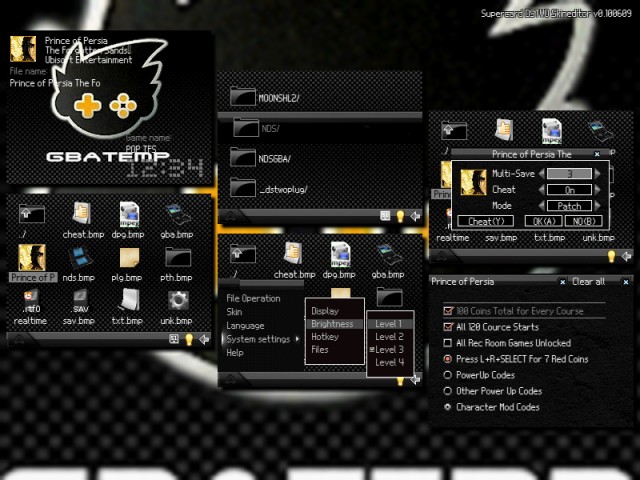
OK it's not perfect & I'm sure I've miseed a few (since all I've done is modified the 'BlinDedBlack' pack to include the LEDS2 graphics) but here's both a ds2skin pack & a standard ZIP that contains v1.00 of the LEDS2 skin(s) (v2.00 MAY contains the other 'new' GBATemp logo)

Both packs contain modified skins for EOS,Plugin,Loading,GBA & SNES/BAGSFC (the last 2 are nothing more than 'simple' black skins)

23571-preview.png

ds2skin pack

Multi Skin pack

All [real] credit should go to Chris77 for the BlinDedBlack graphics and Vatoloco for the gba/snes graphics
 
spinal_cord said:
Did someone say iMenu theme?....
-snip-
I'll put this in the next update
smile.gif
looking gooood, except the gba and dsgame icons (and the bar on the bottom kind of looks weird), and why is it pictured on a ds phat?

anyways, i'm really looking forward to iMenu's release, which i assume will be 1.0 (as in not beta)

and i like that you changed the font for the time and added the date (the old font was hard to read unless on a white background)

also, what is this dsnotes icon? what homebrew is that linked to?


cannonfoddr, i like everything about that pack except the dsgame skin, the picture makes the text hard to read, maybe just make it smaller and up higher and put all of the details along the bottom

bolded and underlined my edit
 
hey cannonfoddr,
like you said above, All [real] credit should go to Chris77 for the BlinDedBlack graphics,
but, how bout a lil cred to good ol' Vato in the LEDS2 theme for the included snes and gba skins. They are just desaturated versions of my greenneon gba and snes skins, and those fuggers were a task to make match each other, i'll tell ya, with their weirdly different file structure from each other lol.
(like in the blindedblack.skn where you gave me proper props).
 
@terminator: will take that into consideration. Don't forget I just replaced a few graphics not designed the whole thing

@Vatoloco: post above fixed. I'll change the wiki/filetrip later when I get back onto pc (I'm on mobile atm)

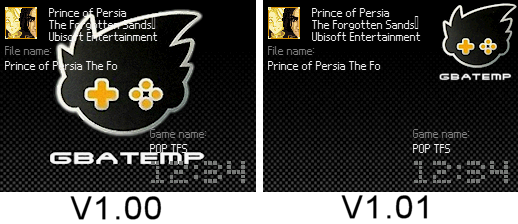
EDIT: OK back @ PC & I've done as requested - 'NEW' LEDS2 skins (v1.01) with top EOS screen with smaller logo
and I see Vatoloco, that you've already done the Wiki for me - thanks

23577-before%20after.png


ds2skin pack / Multi-skin pack
 
Terminator02 said:
jurassicplayer said:
CannonFoddr said:
Terminator02 said:
maybe you could just make a skin using what you previously created for iMenu and then wait to make a skin after the update comes, i just really want a skin for imenu to go with my le dstwo
Erm think you're mistaken - I've never made a skin for iMenu (yet)
xD It's obvious you are hiding it somewhere (...well at least half of it):
topbk.png

bottombk.png
sweet, i love you, i'll put it in my iMenu guide once i can be arsed

Edit: i'll also make this my loading screen
16gal3p.jpg


now i just need skins for dsgame, ndsgba, and ndssfc
Loading screen is not big enough... If I try to use it, the right (or left) side just leaves a little bit of pink of the original loading screen.. Can you make it a bit wider??
 
I fixed this problem myself, its easy, as you already might have noticed its the correct amount of pixels 192 or something like that but obviously its a bit to small. Cannon posted ones that are the correct size with the loading screen one, so open the wrong size one in paint, select all and copy it, then open a right sized one (either one will be ok, the gbatemp or the blank one) in paint and paste over it, the end result will be the right size.
smile.gif

HeadHunt said:
Terminator02 said:
jurassicplayer said:
CannonFoddr said:
Terminator02 said:
maybe you could just make a skin using what you previously created for iMenu and then wait to make a skin after the update comes, i just really want a skin for imenu to go with my le dstwo
Erm think you're mistaken - I've never made a skin for iMenu (yet)
xD It's obvious you are hiding it somewhere (...well at least half of it):
topbk.png

bottombk.png
sweet, i love you, i'll put it in my iMenu guide once i can be arsed

Edit: i'll also make this my loading screen
16gal3p.jpg


now i just need skins for dsgame, ndsgba, and ndssfc
Loading screen is not big enough... If I try to use it, the right (or left) side just leaves a little bit of pink of the original loading screen.. Can you make it a bit wider??
 
Firstly I apologize for the 'smaller' Loading screen in post #426 - don't know what happened there as the picture on my PC that I uploaded to the picture site IS the right size !!! - Weird
(FYI - all 3 pictures were in fact the same one but I had used 'layers' for each part required - then showed/hid certain layers for the appropriate screen required)

Anyway.....Alternatively - download any of the 'packs' since they have the right sized 'Loading' picture inside (with the 'ds2skin' pack just rename the '.ds2skin' to '.zip' & you can open it up as a normal ZIP file)

Then use one of the any of the programs in the 'DSTwo 'Loading...' screen' section on first post to 'hack' the DS_Game.nds file, & you should be good to go
 
that's weird cause i just copied the picture off of here and it worked fine, also, for the skin could you please switch around the game info and the clock? i would like the game info to have more room, like with blue lights, i want something like this with the game info stretching all the way across the bottom
Untitled.jpg
 
CannonFoddr said:
Eric345 said:
When I try to test my own skin I made its not working -_-Check the 'bit-depth' of the graphic (In WinXP - Right click on the graphic > Properties > Summary). Most of the time you need to save the BMP file as '16-bit' and not '24-bit'

Programs like Photoshop and GIMP will allow you to save as 16-bit, but PaintShopPro, MS Paint and (I think) Paint.NET will only save in 24-bit
dam I need those oh well Imma buy it anyways lol
QUOTEWould it be possible for one of the talented DSTWO skinners to make a nice GBAtemp style skin which would go well with the limited edition GBAtemp SCDS2. I'm kinda surprised that one wasn't made and released with the announcement.
Hmm nice idea.One question - on what 'style' should the skin be made ??

Should it be basically the same as the standard DSTwo skin, but with GBATemp logo's all over it, should it be a 'clean' white-ish skin to match the game card or should it match the GBATemp forum 'skin'... or something totally different (which MIGHT come about as there's been a few suggestion that the Logo on the card MAY indicate a change on the standard GBATemp forum graphics)

Who knows GBATemp may even start a contest up - 'Create a GBATemp skin for the DSTwo Special Edition & win one'

 
Terminator02 said:
for the skin could you please switch around the game info and the clock?
i would like the game info to have more room, like with blue lights, i want something like this with the game info stretching all the way across the bottom
Untitled.jpg
Well you COULD do it yourself using one of the skin editors on the first post...
but just because I'm in SUCH a good mood today (look @ my BLOG to the reason why) here's v1.02 of LEDS2

23600-top%20layout%20changed.png


ds2skin / Multi-skin pack

@ Eric345: What are you on ??? - what's the point of quoting that particular post ??
Is there something you forgot to ask/mention when you posted it ??
 

Site & Scene News

Popular threads in this forum