Hacking DSTWO Linux Beta1.0 release

  • Thread starter Thread starter tysong
  • Start date Start date
  • Views Views 77,098
  • Replies Replies 224
  • Likes Likes 11
@all : we already tested a lot dingux on the ismm so maybe it's good to have a look at those threads :
http://gbatemp.net/threads/ismartlinux-beta1-1-release.291045/
http://gbatemp.net/threads/ismartlinux-bug-report-thread.291741/
http://gbatemp.net/threads/dingux_emulators_patch_tools_for_ismartlinux.291614/
http://gbatemp.net/threads/ismartlinux-beta1-0-release.290133/

And last be careful to not use the ismm bin version, i bricked my dstwo trying to do that and the sc team never helped me to unbrick it. ;)
 
  • Like
Reactions: Boriar and sirocyl
i'm having no luck with this at all :(
even bought a new class 10 card to try it out and black screen
 
Is your SD card formatted using Windows format or Panasonic SD formatter?
pana sd formatter
32k cluster size, copied the files in the exact order suggested in readme and used z5 package linked in readme

edit: tried with z4 package in readme and no luck with that either D:
 
i read 32 clusters is also recommended to reduce risk of corruption.
you can use command prompt to get it formatted, 'X' being your SD card.
Code:
format X: /Q /A:32k /FS:FAT32

edit: has anybody tried to get the gmenu2x running? Looks like it'd be a nice GUI, but all i get is a black screen when ive tried to use it instead of the default XMB style dMenu.
 
Perhaps I should have posted my reply here instead of in the inactive iSmartDS thread from almost a year ago.

The iSmartDS and the SuperCard DSTwo flashcarts both support Linux. Both use an internal MIPS processor to run homebrew and Linux (are kernel sources available?). But very little is known about which chipsets they use. From IRC conversations I learned an existing Linux port is used with Dingux userland binaries. Which is far from running "Dingux". It's also quite disappointing you guys are not aware of OpenDingux. You guys are working with software dating back from 2009. New game and emulator ports, speedups and other fixes are not incorporated in the old legacy Dingux environment. For example, the FAT corruption bug was squashed with D-menu as the main culprit. Which is why gmenu2x is preferred as environment. OpenDingux offers a new packaging approach that allows the same .OPK packages to work on many different systems. These are SquashFS images with multiple binaries inside. For now the supported systems are the Dingoo A320 and the GCW Zero. It would be nice to officially support the DS and 3DS with the help of the iSmartDS and the SuperCard DSTwo flashcarts. I hope people can help us out with determining the chipset (which kernel drivers are loaded and so on). You can find most of the OpenDingux development team on #dingoonity at irc.freenode.net and we'll enjoy having help from people who own this hardware.
 
  • Like
Reactions: 2ndApex and sirocyl
i read 32 clusters is also recommended to reduce risk of corruption.
you can use command prompt to get it formatted, 'X' being your SD card.
Code:
format X: /Q /A:32k /FS:FAT32
brilliant, that worked a treat
now for some zelda time! (i originally bought a a320 just for this game and the sd slot in it was broken so i never ended up being able to play :P)
 
Didn't work on a 2GB Kingston, black screen, trying a 2GB Imation right now. Following sirocyl's guide, formatting using Disk Utility on a Mac. Did anyone get this working on a 2GB though? Windows won't let me format it to 32k clusters, and Disk Utility doesn't even have the option to change cluster size.


EDIT: Black screen with the imation as well :(
 
Did anyone get this working on a 2GB though?
I used a 2GB just for this, up from the 1GB I originally had used (needed more space). No problems here.

Windows won't let me format it to 32k clusters, and Disk Utility doesn't even have the option to change cluster size.
I don't think the cluster size is very important, as long as it's 4k or greater (the default, typically).
If you must format using 32768 byte clusters, do it through the command line:
i read 32 clusters is also recommended to reduce risk of corruption.
you can use command prompt to get it formatted, 'X' being your SD card.
Code:
format X: /Q /A:32k /FS:FAT32

[edit] Also, the DSTwoLinux uses a different SD card access layer/driver than the Dingoo, I think, so the tips/tricks from the Dingoo threads would be different for our hardware.
I'm doing research to see if formatting with a small Fat32, and keeping the userspace on ext2/3 would work better.

Still waiting on some source to work with, too.
 
Formatted to 32k clusters on a 4GB Kingston MicroSD, and now, it's kinda stuck on the penguin now...
How long does it take to load?

EDIT: I got the Chinese version working, no autoboot though. I need to tinker with it more.
EDIT 2: I followed the instructions in the download in the OP, but with the iSMM Z4 distro, so now I have plugin mode in English. Now to attempt autobooting with Bagplug

EDIT 3:
I got autobooting working. However, for some odd reason, it only works on my 3DS. Deducing from that, if you're using this on a 3DS(XL), use the original zImage_DS2 found in the OP. Don't use the iSMM zImage.

Playing ROTH right now, the text looks pretty terrible though, with and without the 3DS's filtering.. Any way to make it look nicer?
 
  • Like
Reactions: sirocyl
I got autobooting working. However, for some odd reason, it only works on my 3DS. Deducing from that, if you're using this on a 3DS(XL), use the original zImage_DS2 found in the OP. Don't use the iSMM zImage.

Thanks for taking the time to diagnose and fix this. I guess 3DS's NTR emulation isn't 1:1 after all?

Playing ROTH right now, the text looks pretty terrible though, with and without the 3DS's filtering.. Any way to make it look nicer?
You could try changing the display mode and attempting to center it, but since the Dingoo's display is larger, parts may be cut off.
The DS-side shim/bootloader seems to use the following shortcuts:
ds2Linux install.txt said:
ds2Linux function key
-------------------------------------------------------------------------------------------------------------------
START + L: switch display mode
START + LEFT/RIGHT: move x coordinate in display mode of the original size.
START + UP/DOWN: move y coordinate in display mode of the original size.
START + R: exit ds2Linux plug then return to ds2 main interface.

NOTE:Maybe these function keys conflict with simulator shortcuts.
I plan on making the framebuffer fit the DS screens eventually, but at the cost of some native Dingux app compatibility.
 
Anyone get this to work on a 3DS with Firmware 1.1.0-OE ? I just get the first tux, and then a black screen.

Using a 16GB Sandisk Class 4 Micro SDHC if it matters...

I'll have to try some other Micro SD cards that are lying around.
 
Anyone get this to work on a 3DS with Firmware 1.1.0-OE ? I just get the first tux, and then a black screen.

Using a 16GB Sandisk Class 4 Micro SDHC if it matters...

I'll have to try some other Micro SD cards that are lying around.

Back up all your stuff and format it using the windows formater (right click on the SD card).
 
Same thing on a 2GB Sandisk Micro SD. Must be because of 1.1.0-OE firmware...

Card was formatted using the Windows Panasonic SD Formatter.
 
Same thing on a 2GB Sandisk Micro SD. Must be because of 1.1.0-OE firmware...

Card was formatted using the Windows Panasonic SD Formatter.

Dingux won't work with Panasonic formatted cards, use the default windows sd formatter.
 
Default windows format worked. I wonder what is going on in the linux kernel for the DSTWO.

Is there any chance someone has the kernel source / patches for this yet?
 
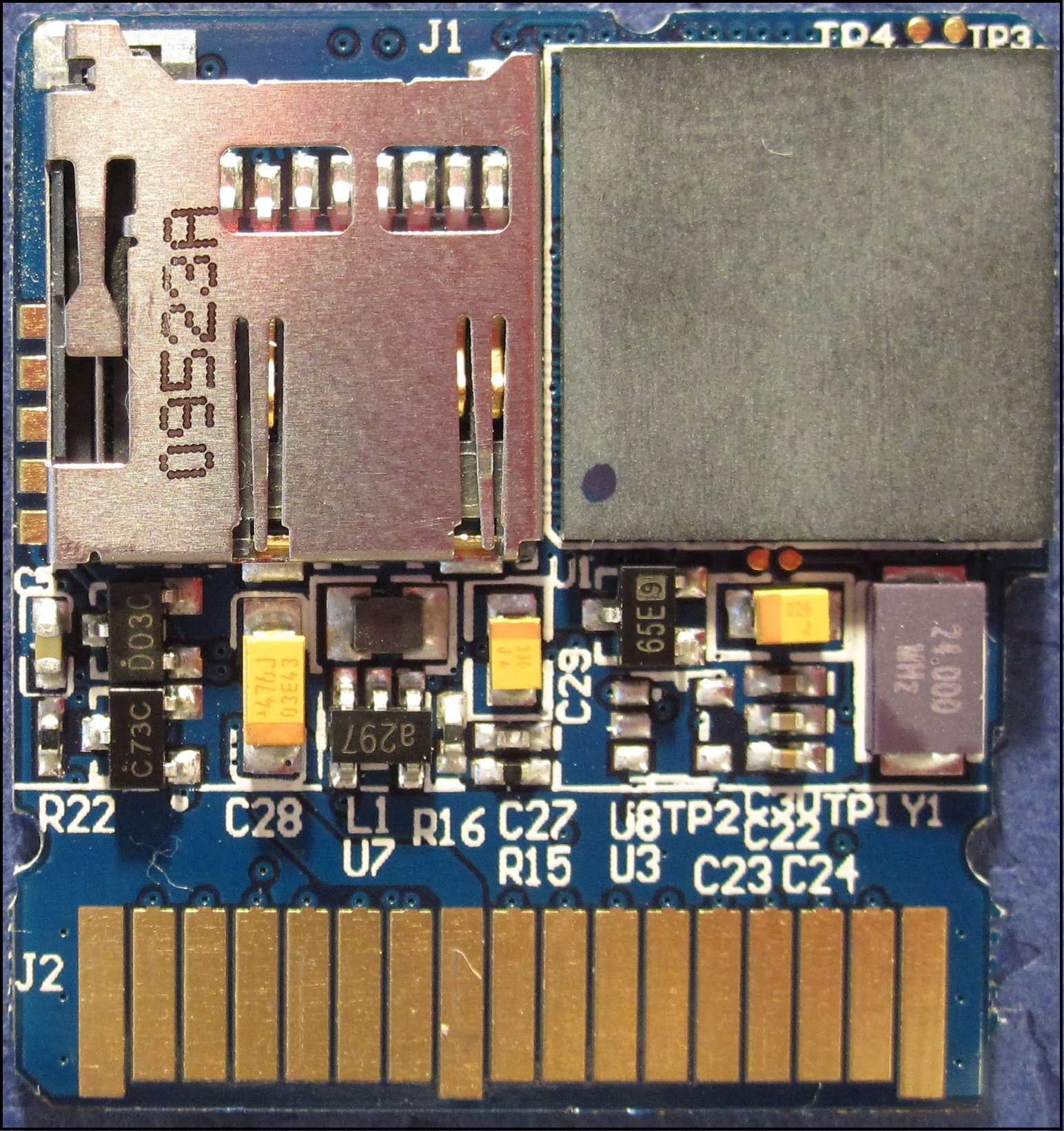
Anyone know where the serial port pins are on the DSTWO? I assume these are TP1 - TP4:

10_supercardds2_review_pcb_back.jpg


But I'm not sure of the pinout...

Interestingly the JZ4740 is the same chip used in the Sungale ID800WT picture frame.
 

Site & Scene News

Popular threads in this forum