Homebrew Custom Theme Thread

The same theme so that with alternative icons.
You can make a theme with color alternative is to place the icon you asked me.
Yeah, i will do that

@Ryumaru how come you made such detailed folders and bolders without bluring it, i everytime i edit one it always end up bluring, but yours always came out so detailed :/
 
Last edited by miraclaime,
Yeah, i will do that

@Ryumaru how come you made such detailed folders and bolders without bluring it, i everytime i edit one it always end up bluring, but yours always came out so detailed :/
You have to have the texture that I made available in this topic. These textures allow you to create icons without any error.
https://gbatemp.net/entry/tutorials-for-creating-custom-themes.11124/
Note 1: You can take a look at all the tutorials only discard the topic of items 5, 6 and 7.
Note 2: To make identical borders to Nintendo see item 2. For the folders see item 1.

To create these textures with quality HD I first make the texture full size then convert it to smart object and resize it within the textures that I made available.
I'll make a new definitive tutorial on how to create folders textures with the same parameters Nintendo so I have patience.

More detailed icons I made today were these.

Preview.png
Preview.png
 
Last edited by Ryumaru,
  • Like
Reactions: miraclaime
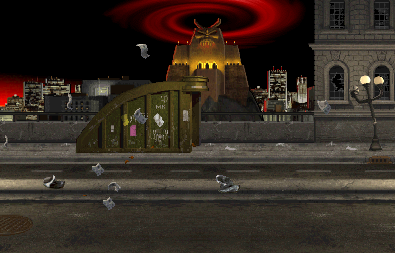
Hey can I make a request here? Im trying to make one from Mortal Kombat Ultimate but Usagi program just crash when I try to save.
I Just want those pictures.

latest
latest


And this music:
 
Hey can I make a request here? Im trying to make one from Mortal Kombat Ultimate but Usagi program just crash when I try to save.
I Just want those pictures.

latest
latest


And this music:

You have to change the Usagi compatibility mode if you're using Windows 7 or 10. By clicking the right mouse button on the icon go to the Properties menu and the Compatibility tab change to Windows XP. The Usagi will work perfectly.
 
Last edited by Ryumaru,
  • Like
Reactions: ImInsane
Hey can I make a request here? Im trying to make one from Mortal Kombat Ultimate...
If/when I get more time I can try to get back to this (Won't be until at least tomorrow). But for now I can at least give you this. (Images are set but the music isn't there.) If anyone else feels up to it I've included the resized images with it.
 

Attachments

Last edited by 8BitWonder,
  • Like
Reactions: ImInsane
If/when I get more time I can try to get back to this (Won't be until at least tomorrow). But for now I can at least give you this. (Images are set but the music isn't there.) If anyone else feels up to it I've included the resized images with it.

Dont work for me, CMM2

You have to change the Usagi compatibility mode if you're using Windows 7 or 10. By clicking the right mouse button on the icon go to the Properties menu and the Compatibility tab change to Windows XP. The Usagi will work perfectly.

I will try this. Thanks.
 
Thanks @Ryumaru for your instructions, i follow exactly what you told me and it turn out my folder is not bluring anymore :D
well, im still lacking in the idea / imaginative part tho haha

My folder design got better, i still need to work on the border part too, editing borders is harder than i thought :/
Folder Closed mei.png
Folder open mei.png

preview mei.png


*i will upload this chick tomorrow, still need to do some imporvement
 
Last edited by miraclaime,
Thanks @Ryumaru for your instructions, i follow exactly what you told me and it turn out my folder is not bluring anymore :D
well, im still lacking in the idea / imaginative part tho haha

My folder design got better, i still need to work on the border part too, editing borders is harder than i thought :/
View attachment 68141 View attachment 68142
View attachment 68143

*i will upload this chick tomorrow, still need to do some imporvement
To make the vo borders and can use the editable files that I made available. Just follow the tutorial that the texture will be perfect. You can make the borders making geometric shapes. You create borders using textures to Photoshop.
You borders create textures using Photoshop for applying textures over these geometric shapes.

Example:

Preview.png


I made the crack effects at the borders using an image with cracks then applied an effect Photoshop to brighten the image to overlay the image above the geometric shape.
 
Last edited by Ryumaru,
To make the vo borders and can use the editable files that I made available. Just follow the tutorial that the texture will be perfect. You can make the borders making geometric shapes. You create borders using textures to Photoshop.
You borders create textures using Photoshop for applying textures over these geometric shapes.

Example:

Preview.png


I made the crack effects at the borders using an image with cracks then applied an effect Photoshop to brighten the image to overlay the image above the geometric shape.

Yes i already take a look at your editable borders but it too complicated to me xD
I mean the way you use photoshop. And here i am still a noob at using photoshop
 
Yes i already take a look at your editable borders but it too complicated to me xD
I mean the way you use photoshop. And here i am still a noob at using photoshop
You can go look at the Photoshop tutorials available on YouTube.
 
You can go look at the Photoshop tutorials available on YouTube.
Yes i usually watch photoshop tutorials, but there're something that i dont even understand the name of the editing method you used in your borders, hence i couldnt search the tutorials ..

anyway..


New themes everyone
our lord harem and king loli is back
Bakemonogatari - Oshino Shinobu x Araragi Koyomi
normal sfx
bgm : kimino shiranai monogatari
preview.png


2nd theme, in the end i didnt do much about the border, i just do minor color change and edit the border a bit
Overwatch - Mei
with dva Sfx for now, i dont have mei voice yet
bgm: how much

preview mei.png
 
Yes i usually watch photoshop tutorials, but there're something that i dont even understand the name of the editing method you used in your borders, hence i couldnt search the tutorials ..

anyway..


New themes everyone
our lord harem and king loli is back
Bakemonogatari - Oshino Shinobu x Araragi Koyomi
normal sfx
bgm : kimino shiranai monogatari
View attachment 68207

2nd theme, in the end i didnt do much about the border, i just do minor color change and edit the border a bit
Overwatch - Mei
with dva Sfx for now, i dont have mei voice yet
bgm: how much

View attachment 68208
Look for the following tutorials. How to create cut mask. How to Create Smart Objects. If you can learn to use these two functions you can create any type of border.
 
  • Like
Reactions: miraclaime
Thanks, i'll try the cut mask, i already know how to creat smart object and edit it
I never use rubber or normal cuts because the cutting mask tool allows you to edit the icon inside the cut area. You can also edit the cut using the brush and other tools. This is very useful.

I'm going to do a little tutorial on the main effects used by Nintendo. I already know to make all the effects until the correction in the icon of 38px putting the kernel of the border perfectly centralized.

The stretched background effect in the border textures serves to correct resizing problems, it also serves to prevent the border corners from getting white dots.
 
Last edited by Ryumaru,
I never use rubber or normal cuts because the cutting mask tool allows you to edit the icon inside the cut area. You can also edit the cut using the brush and other tools. This is very useful.

I'm going to do a little tutorial on the main effects used by Nintendo. I already know to make all the effects until the correction in the icon of 38px putting the kernel of the border perfectly centralized.

The stretched background effect in the border textures serves to correct resizing problems, it also serves to prevent the border corners from getting white dots.
Yes yes please do, make one with video while you at it, or just edit your usual border for your next theme and record it in video :D
 

Site & Scene News

Popular threads in this forum