Homebrew Custom Theme Thread

dont know about the compression but the lz11 files i posted definitely work just fine as well so its highly possible.

With the RGB888 thing the RGB values are reversed in hex aren't they?. Eg BGR? (just checking as i plan on messing with this later)


Yeah, I'm seeing that. I had a little confussion of concepts, but I see the first two bytes of the offset references to another offset, that contains the actual colors.

Am I right?

 
The compsession is lz11 but every file explorer will only decompress it not re-compress it i have been using DSdcmp with a lz11 batch file i found on line dl link here
just drag your body_lz.bin to the batch file then press 0 to decompress or 1 to compress seems to work just fine for me

the wwcxtool.exe program in the "tools" folder that came with the theme creator can compress and decompress lz11.
 
thought offsets were 4 bytes Eg (D0001000) which is then rearranged to get the hex address of the required data (using previous example would turn into 001000D0) at least i think thats how it works (offset taken from decomp sonic boom theme at address 0x30)

Using the data taken from the above location you get 4 sets of RGB888 values in hex (16 88 00 41 DE 15 AB FF 78 5A FF 1A) taking the first one 16 88 00 (values are reversed) convert to decimal for actual values or search colour hex online to get colour
 
Since the folder colors need the R and B colors flipped to look right (discussed on a previous page), you can drag a bmp to this executable and get a look at how that will appear on the 3DS. Might come in handy for some. Source included if you are a cautious about running an executable I built. Basically, you can create your folders with the colors you like, save it as a bmp and drag it to bmpflip.exe, then import the output of that to the theme creator before you create the body_LZ.bin.

Awesome tool, but it looks like it doesn't like the .bmp files that the theme creator exports. It works if I open the .bmp in Paint.NET and then re-save it, though.
 
These themes are getting better and better!
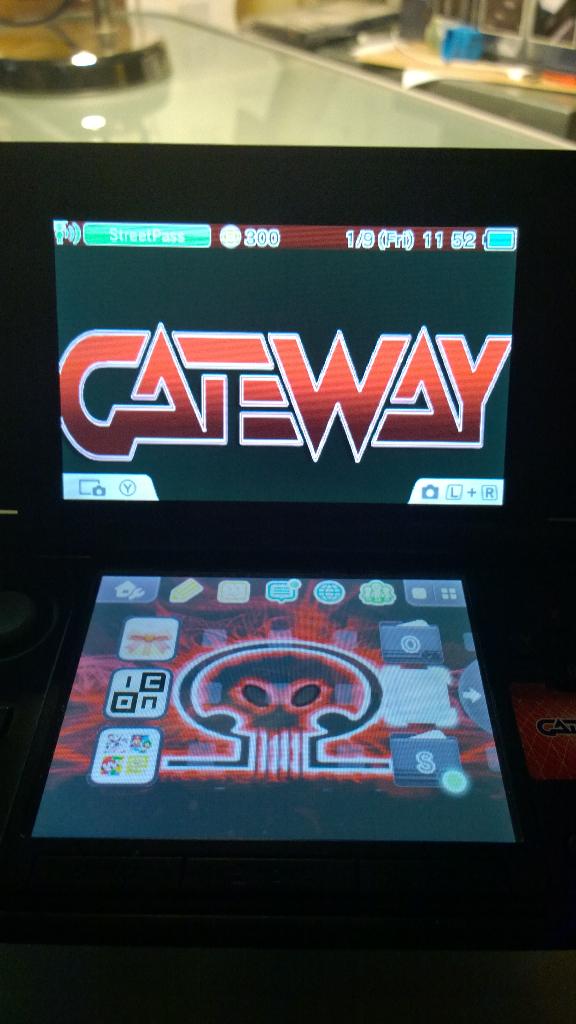
I am surprised no one made a Gateway theme yet so here it goes..

Version v3
Gateway red theme... More to come!

Oyno0bY.png
B67fWLZCcAArvTi.jpg
 

Attachments

  • Like
Reactions: Sirius64
Awesome tool, but it looks like it doesn't like the .bmp files that the theme creator exports. It works if I open the .bmp in Paint.NET and then re-save it, though.

That happens believe it or not because those files are actually PNG but the theme creator gives them a .bmp extension strangely.
 
thought offsets were 4 bytes Eg (D0001000) which is then rearranged to get the hex address of the required data (using previous example would turn into 001000D0) at least i think thats how it works (offset taken from decomp sonic boom theme at address 0x30)

Using the data taken from the above location you get 4 sets of RGB888 values in hex (16 88 00 41 DE 15 AB FF 78 5A FF 1A) taking the first one 16 88 00 (values are reversed) convert to decimal for actual values or search colour hex online to get colour


Hmm... I'm not seeing how these bytes are flipped. Think you can help?

Let's take a look at what's at 0xA4 in my decompressed body_LZ.bin:
Code:
90 39 09 00

This obviously needs to be flipped in some way, as the last offset in this file is
Code:
00 0B C6 98
which is much smaller than the offset at 0xA4. Based on your example, all I see happening is moving the first byte all the way to the end, but that doesn't work in this situation as it would produce too large of an offset.

So how is it flipped?
 
It's a little endian to big endian conversion, I think.

No, endianess doesn't change bytes but only their allignment (if you're refering to the last message)

If 0x0A0B0C0D is little endian so the same sequence will be 0x0D0C0B0A on a Big Endian CPU.

Ovewher, if the problem is the endianess, sounds strange the converter doesn't use some kind of function like htonl...
 
try flipping it like this from this
Code:
90 39 09 00
to this
Code:
00 09 39 90
which is smaller than
Code:
00 0B C6 98

Yep, that's where my colors are. Thanks!

Figured out Home Menu default themes:
tumblr_inline_nhwheua4q21rrpge4.jpg
It was really simple...

How were you able to get that in body_LZ.bin format? Can EveryFileExplorer open it?
 
In other news, I was able to put in debugging colors and figured out what one of the colors marked as "unknown" is :P

EDIT: Actually, after double checking, I found out what BOTH of the unknowns are :O
 
  • Like
Reactions: dronesplitter
which one as im trying to find the unknown in the flashing cursor set who's pointer is at offset0x30

EDIT: Actually, after double checking, I found out what BOTH of the unknowns are :O

from that im guessing its to do with the spinning folder icon on topscreen
 
which one as im trying to find the unknown in the flashing cursor set who's pointer is at offset0x30

I can probably get that for you in just a bit, but I've only just found out what each of the colors at the pointer 0xA4. After I make that edit on 3DBrew I can check that one as well.

It isn't hard to check yourself, though. All I did was assign extremely identifiable colors to each of the offsets (like FF0000, 00FF00, 0000FF, FFFF00 00FFFF, FF00FF, etc) and then loaded up the modified theme. All you have to do then is take a note of where each of the colors are and you're good to go. It's important that all of your colors are as different from one another as possible.
 

Site & Scene News

Popular threads in this forum