Added ability to generate font_uni.png files to customise the GUI font.
To generate your own font_uni.png for the GUI, follow these steps:
To add the new font to your existing theme:[*]Start the Configurator app[*]Click the "Read existing config.txt" button and select your existing file[*]Select yes when asked to use your theme.txt if asked.[*]Click the "Install all files" button[*]Click the "Select installed font" button.[*]Choose the font, style and point size of your font[*]Check the "Extended?" checkbox if it is not already checked.[*]Click the "Install all files to base directory" button.
To just generate the font file to copy to the appropriate directory on your own:[*]Start the Configurator app[*]Click the "Install all files" button[*]Click the "Select installed font" button.[*]Choose the font, style and point size of your font[*]Check the "Extended?" checkbox if it is not already checked.[*]Click the "Choose folder" button next to the base directory option and choose where to save the font.[*]Click the "Install all files to base directory" button (a blank config.txt file will be created too).
Spanish language files updated: http://www.mediafire.com/?izn24xodyjt. Many improvements so far. Changed *most* of the buttons statements. Now, the Overlay, Console and Instalation Wizards are totally translated. Maybe this is a beta2 (nevermind)? Well, here are some screenshots (updated):
As I said in my last post, I'm limited by the character limitation. Keep that in mind. Also, I translated the file-editing instructions on the configurator.cdb file (with the permission of Clip), if any spanish talker out there wanna improve this translation. Also, remember that in the parts I didn't translate I stablished some tooltips that you might want to read,
Great! I'm going to test it right now (not to mention that I'll update the translation in a few hours)!
EDIT: here's the beta3 of the spanish language files: http://www.mediafire.com/?wkontnivdmi. I have only corrected minor phrases and updated the configurator.cdb and the installwiz.cdb, due to the recently changes made by the Doc.
Just a warning, there was a minor bug in the released version that made the "Base Directory" label fail to show up on the install wizard. I've updated the file, so if you don't see the "Base Directory" label, download the file again.
... And here are the new Spanish translation files (beta4): http://www.mediafire.com/?vmamty30wjq. Thanks Clip, for extend the character limitation. That will come very handy in the next releases,
EDIT: here's the RC2: http://sharebee.com/90330506. There are some minor changes, like the translation of the "w:" (weight) and "h:" (height) labels from the console_coords option on the main page. Also, the Console Wizard is totally translated right now (with some space limitations. Don't get mad; I added tooltips,
Read your settings.cfg file and manage it on your PC
Use titles.txt or gameslist.txt to add saved options to a game without needing to use Cfg.
Automatically reads a titles.txt or gameslist.txt in the same directory as the .exe
Can be used to create patch lists of options on troublesome games to give to other people. They can load their own settings file, add your patch one and then save to get their games working!
Changes in 45.2:
Fixed naming of gamelist.txt
Altered to accept 6 digit IDs for saving options for compatibility with Cfg
Can only save options if you know the 6 digit version of the ID, but 4 digit versions are OK for hiding and favorites.
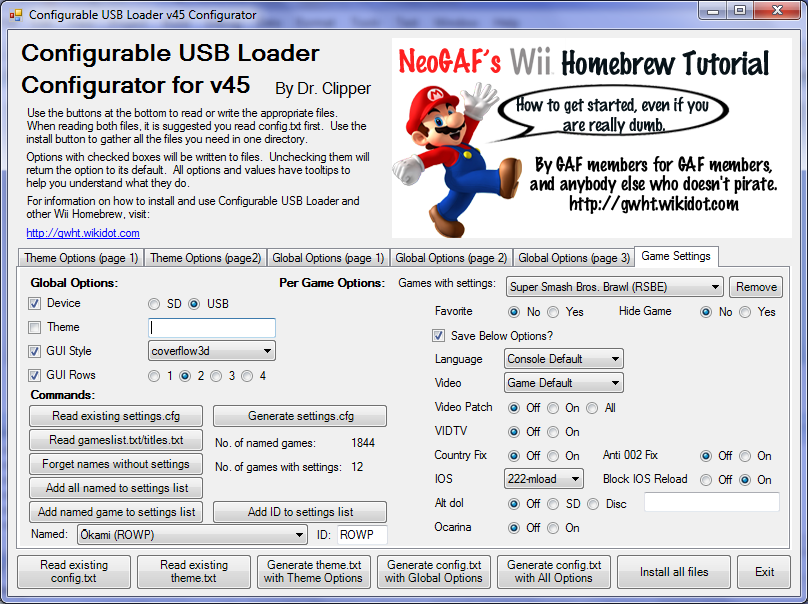
Here's a look at the interface for the new settings.cfg tab:
The sample_cdbs have also been updated to handle the new page.
v45.2 is now detailed in the previous post. This version should now work (hopefully). Please test it and let me know any bugs as the 4 character/ 6 character thing was very tricky to implement and I may have missed something.
It’s about that time of year again where I check in with the community to see if we can get the front page aligned with what people are interested in knowing and what...
WiiCompiled is a new project that lets PC gamers play Mario Kart Wii natively on PC without emulation. Using static recompliation to convert the code into native PC...
The long awaited Grand Theft Auto VI Extended Look gameplay trailer has finally dropped on YouTube. As you all know, it had dropped 6 hours earlier on Netflix, and...
After being announced last week, the first of two broadcasts is set to go live later today with a stark focus on The Legend of Zelda and its 40th anniversary...
Thanks to the recent decomplication efforts; The Minish Cap 3DS brings the Game Boy Advance classic Zelda title to your 3DS.
The port takes full advantage of the 3DS...
In the wake of Sony's shift to a digital-only ecosystem within the next year, Xbox have today announced a surprising scheme. Aiming to offer physical buyers the same...
It is with a heavy heart that I announce the departure of our beloved Chary from the position of Chief Editor. Chary took over early 2021 and has done a wonderful job...
It's that time again folks, an update for the Switch and Switch 2, and a surprisingly big one at that! At lease for folks on the Switch 2. The most notable feature...
GBAtemp is and always has been an independent community. Since 2002 our staff have voluntarily kept the site running, added new forums, features, provided constant...
The second of a two-part special, a more traditional Nintendo Direct is set to air today. Unlike the Zelda Direct the contents of this one is still relatively up in...
It’s about that time of year again where I check in with the community to see if we can get the front page aligned with what people are interested in knowing and what...
After being announced last week, the first of two broadcasts is set to go live later today with a stark focus on The Legend of Zelda and its 40th anniversary...
It's been something of a quiet week in the gaming space, with the deluge of big hitters trying to find their place before GTA 6 launches really kicking off next week...
In the wake of Sony's shift to a digital-only ecosystem within the next year, Xbox have today announced a surprising scheme. Aiming to offer physical buyers the same...
The long awaited Grand Theft Auto VI Extended Look gameplay trailer has finally dropped on YouTube. As you all know, it had dropped 6 hours earlier on Netflix, and...
It is with a heavy heart that I announce the departure of our beloved Chary from the position of Chief Editor. Chary took over early 2021 and has done a wonderful job...
The second of a two-part special, a more traditional Nintendo Direct is set to air today. Unlike the Zelda Direct the contents of this one is still relatively up in...
After an accidental leaking of their review video from Linus Tech Tips last week, we somewhat knew that news on Steam's latest VR venture was imminent. Today the...
Announced a few days ago, Nintendo of America have today launched their Customer Appreciation Sale. Featuring 30% discounts across a wide range of popular first-party...
A few days ago Chary stepped down as Chief Editor after 5 wonderful years, and everyone guessed the seat wouldn't stay empty for very long. Back in 2021 I proudly...