CLK (Point D) OLED Switch - Is my Switch dead?

  • Thread starter Thread starter imKylo
  • Start date Start date
  • Views Views 7,015
  • Replies Replies 4

imKylo

New Member
Newbie
Joined
Feb 11, 2022
Messages
2
Reaction score
0
Trophies
0
Age
24
Location
Lisboa
XP
65
Country
Portugal
Hello everyone,

I was attempting a picofly mod in my OLED Switch and this black stuff appeared in point D (CLK) after some tries at soldering a wire there. Here's how it looks:
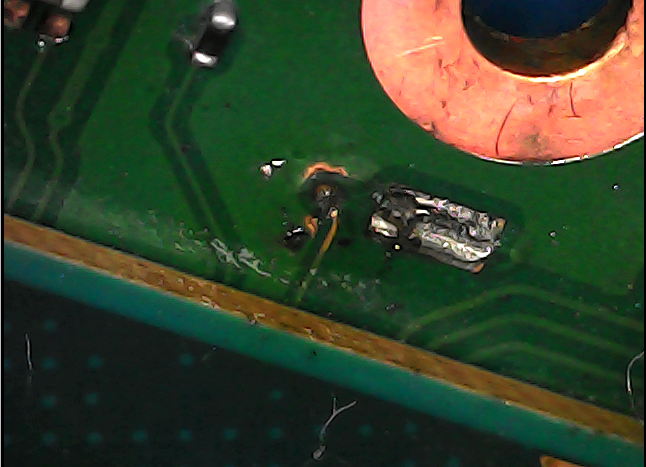
Screenshot 2023-07-21 185457.png


To me it looks like there's no connection between the line and the point anymore.

Furthermore, my Switch won't turn on (black screen) and I don't see any other possible reason.

Any idea if my Switch is definitely dead or if there's a way to check if it is or solve this problem?

Thanks in advance!

 
Hello everyone,

I was attempting a picofly mod in my OLED Switch and this black stuff appeared in point D (CLK) after some tries at soldering a wire there. Here's how it looks:

View attachment 384349

To me it looks like there's no connection between the line and the point anymore.

Furthermore, my Switch won't turn on (black screen) and I don't see any other possible reason.

Any idea if my Switch is definitely dead or if there's a way to check if it is or solve this problem?

Thanks in advance!
Measure diode reading on the trace and the via point.If you have reading on the trace but not via, you have a broken trace to via.
The black stuff I believe is just carbon oxide from the flux , clean them with IPA.

FYI, post the rest soldering location you worked on as well to make people easier help you
 
  • Like
Reactions: imKylo
Hello everyone,

I was attempting a picofly mod in my OLED Switch and this black stuff appeared in point D (CLK) after some tries at soldering a wire there. Here's how it looks:

View attachment 384349

To me it looks like there's no connection between the line and the point anymore.

Furthermore, my Switch won't turn on (black screen) and I don't see any other possible reason.

Any idea if my Switch is definitely dead or if there's a way to check if it is or solve this problem?

Thanks in advance!
If the connection is severed between the point and the line the Switch will not boot
 
  • Like
Reactions: imKylo
Measure diode reading on the trace and the via point.If you have reading on the trace but not via, you have a broken trace to via.
The black stuff I believe is just carbon oxide from the flux , clean them with IPA.

FYI, post the rest soldering location you worked on as well to make people easier help you

Thanks for the multimeter tip, I'll try it once I have the chance. I have tried cleaning it with IPA and even scratching it off and it doesn't go anywhere, that's what makes me think the connection is broken.
 
worst case you need a professional to lift soc (and/)or emmc and manually route a wire underneath
 

Site & Scene News

Popular threads in this forum