Can't plug Wii into TV

  • Thread starter Thread starter TiltedWii
  • Start date Start date
  • Views Views 2,346
  • Replies Replies 16

TiltedWii

Member
Newcomer
Joined
Apr 15, 2022
Messages
12
Reaction score
10
Trophies
0
Age
26
Location
Brampton
XP
76
Country
Canada
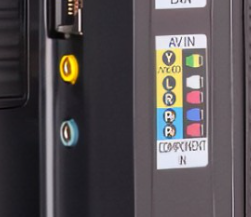
So, I don't know if this is the right place to post this, but I can't plug my wii's RCA ports into my tv, which is marketed as having rca ports. The only 2 remotely close ports are these blue and yellow ones. Is there anyway I can plug it into these without an adapter?
Screenshot 2022-04-20 230953.png
 
So, I don't know if this is the right place to post this, but I can't plug my wii's RCA ports into my tv, which is marketed as having rca ports. The only 2 remotely close ports are these blue and yellow ones. Is there anyway I can plug it into these without an adapter?View attachment 306911
You don't always have to use ALL of the RCA plugs, just try using two of each until it possibly may work.
 
  • Like
Reactions: Lostbhoy
Wow.... Never seen a blue rca myself either but Yeah, there's no harm in plugging into them to test, you won't break anything but I'd check your tv manual for a description on how to use it. It may be a dual signal port so one cable would suffice and you may have to play with your tv settings.
 
You have the Yellow, white and red cable right? You plug white and red in the L and R (audio) and the yellow, you plug in the green one, marked with Y, you see that it is green and has a bit of yellow, you need to plug it there. Tell me if it worked.
Did you even read the post or look at the picture?? They do not have red and white inputs on the tv.
 
I found this one on amazon and it's pretty cheap.
Or you can just buy a wii2hdmi, for better graphics.
 

Attachments

  • IMG_20220421_105916.jpg
    IMG_20220421_105916.jpg
    379.1 KB · Views: 70
  • Like
Reactions: KiiWii
It was that hard to tell by the picture that it was a P2 input? Yes, you will need an adapter, my samsung tv come with one in the box
 
  • Like
Reactions: KiiWii
I found this one on amazon and it's pretty cheap.
Or you can just buy a wii2hdmi, for better graphics.
iu

You got 3 options (in order of picture quality)
1) Get the Samsung TV adapter AND a Wii component cable.
2) Get a Wii2HDMI adapter.
3) Get just the Samsung TV adapter and plug in your Wii composite cables.
 
This may not be related, but I have an ATGAMES Sega Genesis, and it only has two RCA ports on the back: A yellow, and a white.
Yet, it still displays fine on my tv.
I say, try the white plug on top, and the yellow one on the bottom.
 
This may not be related, but I have an ATGAMES Sega Genesis, and it only has two RCA ports on the back: A yellow, and a white.
Yet, it still displays fine on my tv.
I say, try the white plug on top, and the yellow one on the bottom.
How is him supposed to plug a RCA cable into a P2 input?
 
For everyone wondering, it is a samsung tv. about a month ago I actually saw this cable floating around in my house so ill give you an update if i find it.
iu
 
  • Like
Reactions: Lostbhoy
It both worked and didn't work as the image is in black and white, is this normal or is something wrong?

Edit: Scratch that, the TV's too smart, I had both the blue and yellow plugged in instead of just yellow so it thought it was component not AV.
 
Last edited by TiltedWii,
  • Like
Reactions: Muliro and Lostbhoy

Site & Scene News

Popular threads in this forum