Hacking Can't boot Hourglass9 while holding start

  • Thread starter Thread starter Pyrmk
  • Start date Start date
  • Views Views 2,555
  • Replies Replies 15

Pyrmk

New Member
Newbie
Joined
Feb 4, 2017
Messages
4
Reaction score
1
Trophies
0
Age
39
XP
82
Country
France
Hi, I following this guide to install a custom firmware to my old 3ds.
I'm stuck at "Section IV - Restoring the System".
Which says "Boot your device while holding (Start) to enter Hourglass9".

booting to Luma3DS while holding select seems to work just fine.

I've tried to redownloading the files again and follow steps from the Section I, twice
I have these files on my SD cards:
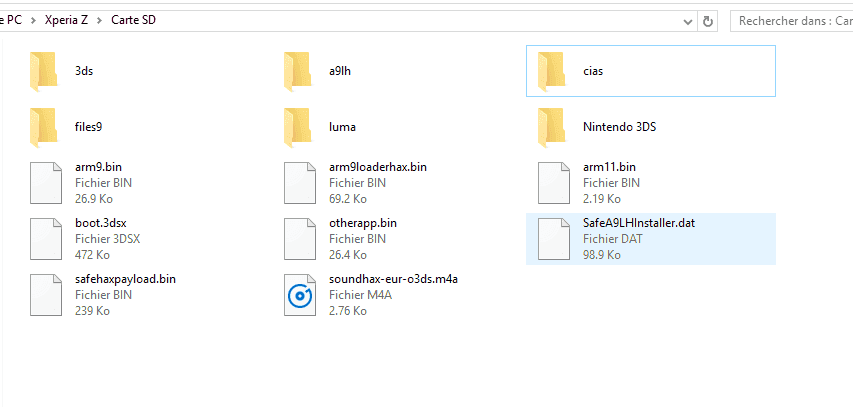
Capture.PNG

Capture.PNG


If someone have an idea for me, thanks !
 
I think, I can boot in Lumas 3ds configuration by holding select avec choose the options.
When I boot by holding start I'm on the 3ds classic menu, the same when I boot normaly
 
I think, I can boot in Lumas 3ds configuration by holding select avec choose the options.
When I boot by holding start I'm on the 3ds classic menu, the same when I boot normaly
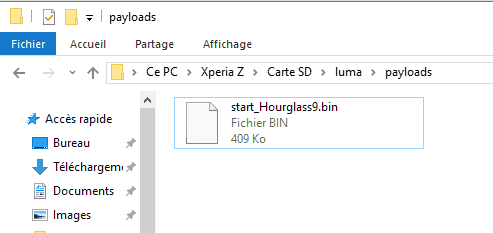
Not sure, i noticed you renamed "start_Hourglass9.bin" Try "Start_Hourglass.bin" You know Upper case "S" for Start? :unsure:

Make sure to hold start when powering on the system, make sure the button isn't broken first :P
 
If someone have an idea for me, thanks !

I don't know why you cannot boot into it, but it's definitely not the file name issue. I tested this myself the other day, I believe the name could be StArT_HoUrGlaSs9.bin if you really wanted and it'd still boot.

ANYWAY .. This is the solution from an another thread:

Temporarily remove the current arm9loaderhax.bin from your SD card. Copy the Hourglass9.bin file to the root of your SD card and rename it arm9loaderhax_si.bin. This should result in Hourglass9 immediately being loaded when the console is turned on.
 
Last edited by Distrance,
  • Like
Reactions: Sonic Angel Knight
Probably with start being the luma chainloader now give it a different button or none at all and load the chainloader with start.

Oh and what fw where you on? The system shouldn't have loaded on 2.1 - unless you meant the error screen
 
Last edited by HyperT,
My start button is ok !
I'm on step Section VI - Finalizing setup.


    • Open Health and Safety (which is now FBI)
When 3ds boot i'm on Hourglass9, I don't see Health and Safety in Menu, just :
SysNAND Backup/Restore
EmuNAND Backup/Restore
Gamecart Dumper
Miscellaneous
Validate NAND Dump.

Where I can find Healt & Safety ?

Edit : I solved my second problem. I rename the arm9loaderhax file and i boot in 3ds menu !
 
Last edited by Pyrmk,
  • Like
Reactions: proflayton123
I think OP is referring to the step after the injection.

It is on your home menu, just boot your 3DS normally. Not into Hourglass9.
The guide didn't tell you to boot into Hourglass9 again.
 
Just follow the 3ds.guide really closely, and take it literally. I mean CFW isn't the easiest of things to install, but if you follow the guide to the T, you should be okay. I'd just review the steps closely, and make sure you haven't missed anything out.
 

Site & Scene News

Popular threads in this forum