Can anyone help me? (bypass checking if software can be played)

  • Thread starter Thread starter Clivin
  • Start date Start date
  • Views Views 47,050
  • Replies Replies 25

Clivin

Member
Newcomer
Joined
Nov 20, 2021
Messages
9
Reaction score
0
Trophies
0
Age
26
XP
94
Country
United Kingdom
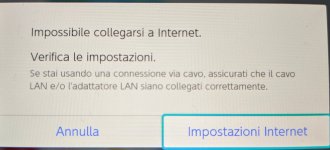
I have a banned nintendo switch (I know it can't be unbanned) dont mind playing offline, but cant verify games before playing. With internet it says account banned. Without it says unable to connect to network device.

Is there any way to bypass checking if software can be played.

help would be greatly appreciated

 
Are you using CFW? Do you have signature patches installed? Is your user account a linked account? Are the latest game updates installed?
 
Are you using CFW? Do you have signature patches installed? Is your user account a linked account? Are the latest game updates installed?
Right so im dumb at nintendo switch stuff. But if CFW means its running unsigned code then yes. its a linked account. some games are the latest update but they all say the same thing
 
Right so im dumb at nintendo switch stuff. But if CFW means its running unsigned code then yes. its a linked account. some games are the latest update but they all say the same thing
What game(s), and what is the error code specifically?
 
I tried botw and undertale
This shouldn't be happening with these games. Make sure you are using the latest version of Atmosphere, make sure you are using these signature patches, and make sure you are using the latest fusee.bin. You may want to delete the atmosphere folder from your SD card before updating Atmosphere.
 
I had this problem with a game I recently bought from the eshop and dumped with nxdumptool.nro the problem i ran into was that i dumped the game with the option Remove Console Specific Data set to no . after using nxdumptool again on the game that needed to connect to the internet with Remove Console Specific Data set to yes I deleted the game and reinstalled the game with the new dump.
 
Are you using CFW? Do you have signature patches installed? Is your user account a linked account? Are the latest game updates installed?
Hi, I'm using CFW after a rebuilt of NAND. I have installed sigpatches and linked my account. My problem is that if I try to launch a game a popup ask me to connect to internet to verify my account. What I can do with it?
 
Hi, I'm using CFW after a rebuilt of NAND. I have installed sigpatches and linked my account. My problem is that if I try to launch a game a popup ask me to connect to internet to verify my account. What I can do with it?
What have you tried?
When you say you linked your account…what did you do to do that? Linkhalo?
Do you have multiple profiles on your switch?
Have you reinstalled the games?
 
Last edited by binkinator,
What have you tried?
When you say you linked your account…what did you do to do that? Linkhalo?
Do you have multiple profiles on your switch?
Have you reinstalled the games?
I logged in my account on the switch using the qr code to confirm before starting any CFW. After that I tried to load a game with awoo installer... If I launch the game a popup appear asking a verification using the network,so didn't do that.
I'm attaching the messages and the system spec.
 

Attachments

  • IMG_20220519_144832.jpg
    IMG_20220519_144832.jpg
    2.5 MB · Views: 251
  • IMG_20220519_144807.jpg
    IMG_20220519_144807.jpg
    2.3 MB · Views: 202
  • IMG_20220519_144647.jpg
    IMG_20220519_144647.jpg
    1.4 MB · Views: 213
I logged in my account on the switch using the qr code to confirm before starting any CFW. After that I tried to load a game with awoo installer... If I launch the game a popup appear asking a verification using the network,so didn't do that.
I'm attaching the messages and the system spec.


Dude.

If you are saying what I think you are saying, you have:
1) installed CFW and are running it on Sysnand (not a horrible thing to do if you know what you are doing)
2) have installed an .nsp or .xci (this is the number one thing you should not do while Online with your Sysnand)
3) logged into Nintendo and linked your account to the official servers with a Sysnand with .nsp or xci files installed (which is possibly worse than #2…I’ve never seen such bravery!)

If these statements are true I’m thinking your switch might very likely be banned already.

It would be best to get rid of that profile on your switch and create a new profile and “fake link” the profile using:
  • Linkhalo — “link” your Nintendo account
Add some protection to you system if you haven’t already:

Exosphere/dns:mitmthe best way to set up exosphere.ini and default.txt.

Read up on switch bans:

Switch Banning Hub The @Draxzelex definitive place to read about console bans and how to reduce your risk of being next!

Head on over to Switch Noob Paradise if you have further questions…your issues are not the same as those in this thread…
 
I try to explain better, because I think this is the right thread (I'm sorry if it is not...)
1) Rebuilt the nand (handle mounting all the partitions) installing a 13.2.1 OFW manually downloaded
2) Power on the console normally for the start up configurations.
3) It asked me to update system and mandatory log in my nintendo account. At this point, before the restart, I delete the WiFi settings to avoid problems like ban.
4) After that I switched on using atmosphere 1 3 2
5) I loaded a nsp using ns-usbloader, I tried to launch with the problem explained.
6) I tried using linkhalo, verification required...
7) I tried using tinfoil, the same.

I hope I explained the case better... So, any suggestions?
 
No game should ask for online verification if you have proper sigpatches, used linkleho, and your console is in airplane mode. Simple as that.
 

Site & Scene News

Popular threads in this forum