Gaming Browser Redirect Problem

  • Thread starter Thread starter Teelow
  • Start date Start date
  • Views Views 1,878
  • Replies Replies 7

Teelow

Well-Known Member
Member
Joined
Jan 19, 2009
Messages
117
Reaction score
0
Trophies
1
XP
39
Country
United States
At first only links found through the Google search engine were being redirect no matter what browser i was using but now, yahoo, Bing, and other search engines are being the redirected as well, Can anyone help with this problem. No matter if i use FF or IE my searches will be redirected.
 
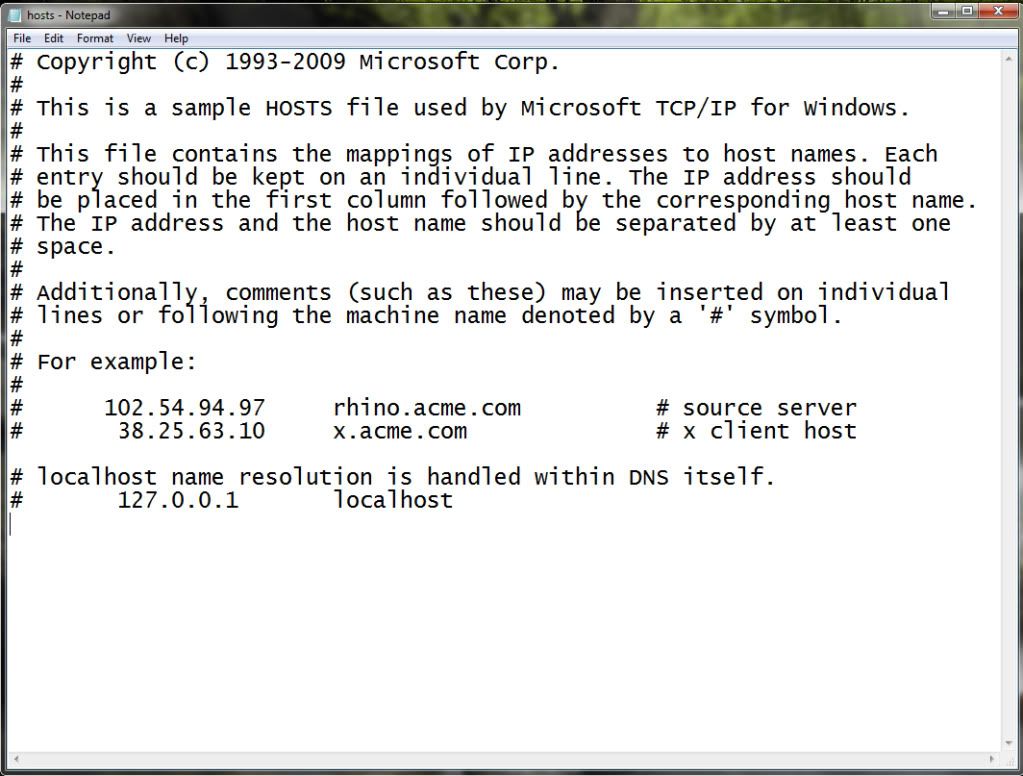
Make sure your Hosts file looks like this:

Hosts.jpg

You can check what your Hosts file looks like by opening Notepad (Run as Admin if you're on 7 or Vista), click "Open" and navigate to: C:\Windows\System32\Drivers\ect. Set the drop down menu of the "Open File" dialog box to "All Files". Open the file called "Hosts".

Delete all extra lines under "127.0.0.1 localhost" (DO NOT DELETE THAT LINE) unless you know that the lines under it are suppose to be there.
 
I have windows XP SP2, and there is no host files only lmhosts

i have openDNS btw
 
Redirects... browser hijacks... generally annoying internet behaviour... MALWARE! Have you considered keeping a commercial AntiVirus program?

In any case, there are many free anti-malware programs that can help. I like Ad-Aware, although, like AVG, it's been getting a bit useless these days since many adware and malware are finding ways to avoid detection. I even found one the other day on a friend's laptop that had been signed by Microsoft (seemingly) that caused ad-related popups every half hour.
 

Site & Scene News

Popular threads in this forum