

Boot Manager looking weird

  • Thread starter Thread starter emmanu888
  • Start date Start date
  • Views Views 4,971
  • Replies Replies 12

emmanu888

Can also be called Ruby.
Member
Joined
Jan 25, 2009
Messages
1,662
Reaction score
899
Trophies
1
Age
31
Location
Victoriaville,Québec
XP
3,374
Country
Canada
So this has been going on for a bit, my boot manager looks like its straight from an MS-DOS environment. What should I do to fix that problem? Its like there's missing files and it also prevents the boot screen from loading properly. I want my boot screen back! Not the boring Vista loading bar!
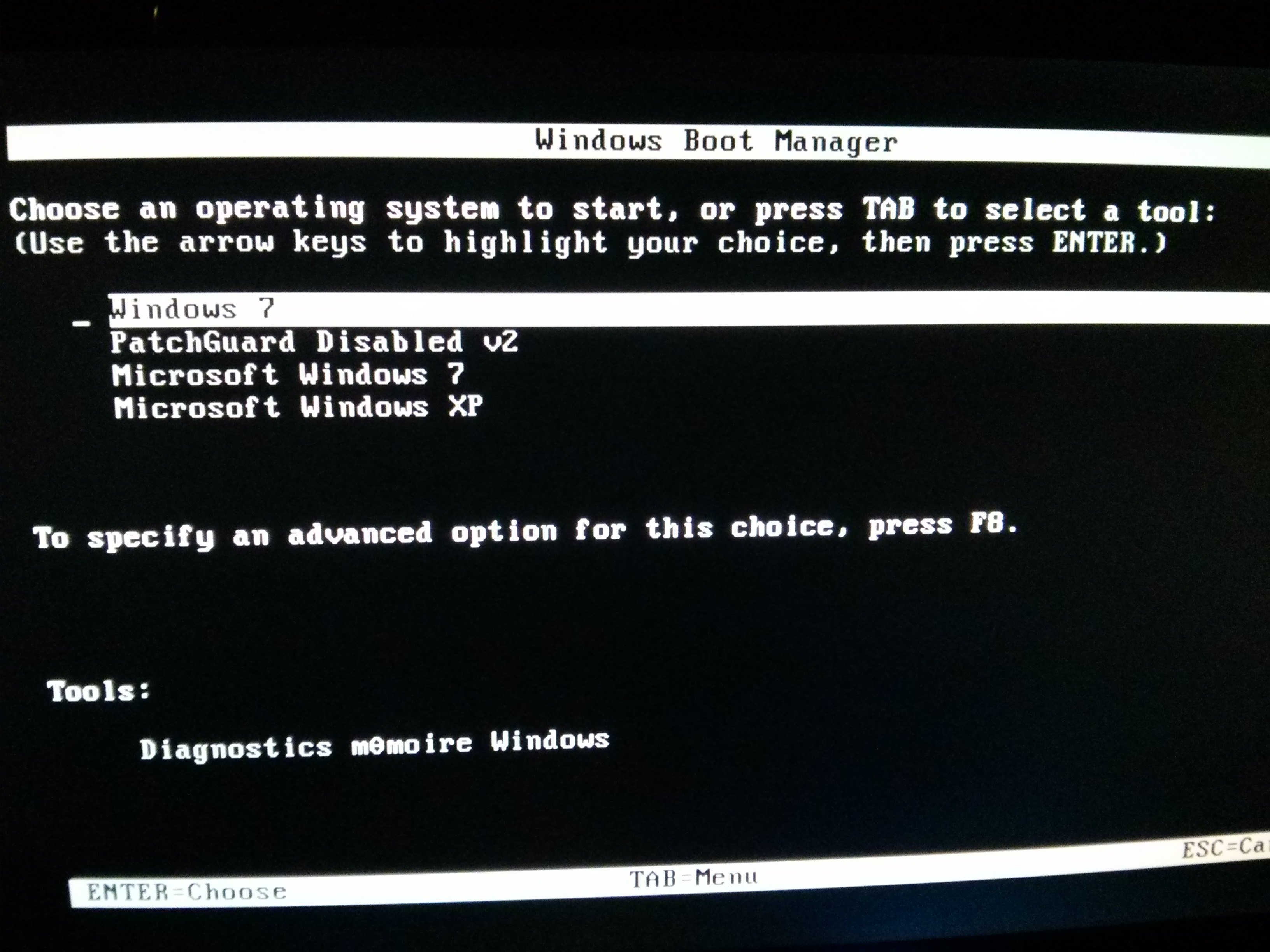
IMG_20150127_184617.jpg
 
No its not, it shouldn't look like i'm on MS-DOS, it should look more modern and all. My screen supports 1080p so the boot animation should appear but it doesn't.

That is what my Windows boot manager looks like.
If you want to disable it this should work.

1. Click Start
2. Click Control Panel
3. Click System and Security
4. Click System
5. Click Advanced System Settings (On left pane), then click on Advanced tab
6. Under Startup and Recovery, click Settings
7. Now, uncheck "Time to display list of Operating systems" then click on Apply and Ok.
 
That is what my Windows boot manager looks like.
If you want to disable it this should work.

1. Click Start
2. Click Control Panel
3. Click System and Security
4. Click System
5. Click Advanced System Settings (On left pane), then click on Advanced tab
6. Under Startup and Recovery, click Settings
7. Now, uncheck "Time to display list of Operating systems" then click on Apply and Ok.


That's how it normally looks like, compare it to my image.
 

Attachments

  • Boot_Manager.jpg
    Boot_Manager.jpg
    66.7 KB · Views: 393
Mine looks like that and I never really bothered to know why lol. Maybe a new OS which have overwriten your default boot manager and replaced it?


Does it looks like mine in the first post or like this? Because i also can't get the boot animation to show up anymore, instead i have the Vista loading bar.
 

Attachments

  • Boot_Manager.jpg
    Boot_Manager.jpg
    66.7 KB · Views: 320
Does it looks like mine in the first post or like this? Because i also can't get the boot animation to show up anymore, instead i have the Vista loading bar.

It looks like the ms-dos screen in the first post. Did you install anything before it goes like that? Mine still have its animation, but msdos screen (also have the "é" character messed up for an unknown reason.)
It happened when I installed windows XP on another partition on my HD.
 
It looks like the ms-dos screen in the first post. Did you install anything before it goes like that? Mine still have its animation, but msdos screen (also have the "é" character messed up for an unknown reason.)
It happened when I installed windows XP on another partition on my HD.

I have Windows XP installed, must have happened after that but for some reason, its forcing the boot animation to be the Vista boot screen, and looking in Windows 7 Boot Updater, for some reason the boot animation is in English instead of French.
 
I have Windows XP installed, must have happened after that but for some reason, its forcing the boot animation to be the Vista boot screen, and looking in Windows 7 Boot Updater, for some reason the boot animation is in English instead of French.

hmmm what exactly was the thing that made your boot screen change? I mean, when was the last time it appaired correctly? Funny mine also changed to english but the choices are in french, with the "é" showing as a zero lol
 
hmmm what exactly was the thing that made your boot screen change? I mean, when was the last time it appaired correctly? Funny mine also changed to english but the choices are in french, with the "é" showing as a zero lol


In 2013 i believe is the last time the boot animation appeared correctly.
 
In 2013 i believe is the last time the boot animation appeared correctly.

lol that would made things a bit more complicated. Mine appeared correctly until I reinstalled windows xp on a second partition. that is all. But windows 7 boot logo is fine for me. I guess I cannot help you with this, sorry :(
Just wait for someone with better experiences than me to help you here XD
 

Site & Scene News

Popular threads in this forum
