Hardware Black dots on screen

  • Thread starter Thread starter YayMii
  • Start date Start date
  • Views Views 9,855
  • Replies Replies 13

YayMii

hi
Member
Joined
Jun 24, 2009
Messages
4,916
Solutions
3
Reaction score
441
Trophies
1
Age
30
Location
that place
XP
798
Country
Canada
Whenever I use my Wii, there's black dots on the screen. I wanna know how to fix it without sending it to Nintendo.
I'm on 4.2U.

Here's some info about it
Game I first noticed it on: SMGalaxy
Where it doesn't appear: Homebrew Channel (and homebrew), VC, and Internet Channel
Most noticable on: FFCC My Life As a King, NSMBWii (when it appears), other region games (Forced NTSC)
Where it appears and disappears: Wii Menu, NSMBWii

Any help?

EDIT: I put 'this is old' because it's a known issue, and thought I'd get a bunch of "Google it" responses.
 
-GASPS- ARTIFACTS, NOOOOOOOOO!!!!! sorry to say that it has to be sent to nintendo. i had the same issue and there is not way to fix it other than sending to nintendo.

- VV
 
Yes, your problem is EXACTLY like mine. The games mentioned as well, it is like you have my Wii.

You can't fix this, you might as well send it to Nintendo. Mine is with them currently, they have had it for 8 days now, still no response from them.
 
frown.gif
I don't want to send it to Nintendo.
1. I has a custom array of cIOS on my Wii (cIOScorp 3.4 and a bunch of various cIOS from varying cIOScorp versions)
2. I don't want an LU70 with an unmodifiable DVD drive (which you probably can get as a replacement)
3. My warranty is out, and repair costs $75 CAD.

I also have a damaged DS lite that I don't want to repair for several reasons:
1. It's all gross-looking inside (green residue on the inside of the housing, ew gross)
2. Price (it's about $80 CAD)
3. I opened it, I don't think they accept opened DS lites
4. It's my fault that it's broken (blowing into DS too long, causing moisture buildup, causing the top screen to crack)
5. I want a DSi XL.
 
Yeah those are called artifacts. It is caused by an overheating GPU due to improper thermal gel application in the factory. I also have it. It usually begins to occur around a month or two of use after the thermal gel begins to melt or degrade. You can replace it yourself, but I honestly don’t see you putting your wii back together properly lol. The GPU is wayyyy in the back and is underneath a butt load of other stuff. They generally appear in areas where particle effects are present like glowing effects, bloom, fire, you know….particle effects lol. Particle effects can be very tasking to render & its no surprise to me that particles are usually the main cause. Other graphical elements can cause the issue aswell, but once again particles seem to task the GPU the most out of all the other effects present in a wii game. Don’t bother buying an external fan they don’t work. Make ur wii a virgin wii then send it for a repair. Don’t try to repair the GPU yourself. If you did that im pretty sure u will have a hardtime putting the heatsink back in place. Now that you mention it i think i should go and repair mine aswell lol. Dont worry ive had mine since December 13 of 06. My wii still works & will proably last me another 3 years or so. If you live in a cooler area it wont show up. A larger number artifacts show up more often during the summer because its hotter & the GPU gets hotter. During the winter there is a significantly smaller amount, but they are always there. The only time you will NEVER see them is if u are playing a gamecube game. The reason for this is because the Wii underclocks its hardware to the GC speeds when playing a GC game & therefore the hardware is never under full load and never gets very hot as compared to when playing a wii game with speeds at there max.

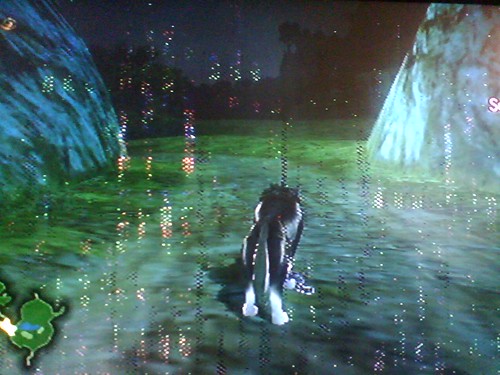
This is what your seeing right? First of I want to make clear that THIS IS NOT MY WII & this is Zelda TP incase u didnt know. as you can see there is some bloom & fog effects.
525752610_56a363e66f.jpg
 
Um, that's what I see, but not THAT much.

For some reason, it shows up in mostly detailed objects, usually blue.
Examples of where it shows: NSMBW's sky, FFCCMLaaK's sky, SMG Rosalina's face (lol), Wii Menu (random dots near the middle, more noticable on empty channels, DarkMii theme helps to hide it).

Yes, I have TP, but it seems that they don't show up there. And these 'artifacts' on the screen are always black, and only noticable in brightly colored games.
 
YayMii said:
Um, that's what I see, but not THAT much.

For some reason, it shows up in mostly detailed objects, usually blue.
Examples of where it shows: NSMBW's sky, FFCCMLaaK's sky, SMG Rosalina's face (lol), Wii Menu (random dots near the middle, more noticable on empty channels, DarkMii theme helps to hide it).

Yes, I have TP, but it seems that they don't show up there. And these 'artifacts' on the screen are always black, and only noticable in brightly colored games.

yeah it seems urs isnt as serious a case as the person who took that Pic lol. anyway its ur GPU. Color rly doesnt mean anything. Each dot is a pixel the GPU skipped during the rendering process to relieve stress of the chip. Just call nintendo & make sure ur virginize ur wii before u send it. And just for kicks try playing a GC game. I assure u no artifacts will appear. lol at Rosalina's face.
 
Nintendo AUSTRALIA (that is) called me up and said we can't repair it.

They said I would have to pay $210 to get a replacement Wii. LOL, they also said I had homebrew on it and they didn't seem to mind.

They are sending my Wii back to me.

Damn it!! Obviously they can't repair the GPU, they just replace the whole thing.
 
they didnt repair it because you had homebrew on it. they just tell you that they dont mind. You should have virginized your wii before you repaired it ohwell. trust me ull get used to it. lol
laugh.gif
 
I forgot I left the SD card in there. They wouldn't have known anything.

I found out they used AV cables on a CRT TV to test it. At first they said they couldn't see what the problem was. Those idiots, you can't see artifacts on standard definition TVs!! I tried it on 3 CRT TVs and no artifacts. I tried it on 4 LCD TVs and I see the artifacts!!

And the Wii's graphics look a lot better too.

Is this because standard definition TVs lack the clarity of LCD TVs, therefore it blurs the pixel dots in the background? Thats what I gather anyway.

I am waiting until my Wii gets worse and then get the black Wii. But, only if it gets worse! Or if a HD Wii comes out...
 
standby mode is the culprit. It wont fix your already "broken" console, but for anyone who doesnt have this issue, it is a warning: If you use riiconnect24, you can still use it fine, but disable standby (orange led. When disabled it will turn red when turning off),
This happens because of a Nintendo oversight: the console on standby turns off the fans, but it actually keeps working at full capacity. If you used the console constantly it wouldnt be an issue since when you turned on, the console would turn on the fans and cool itself, but if you keep it on standby for too long, heat builds up and this gpu error happens.

On any modern console, it enters on a low powered state or just turn on in certain times of the day (I remember the PS3 turns on around 3 am to check updates and turns off), some even keep the fan turned on a lower setting to make less noise but to keep it cool.
 
Last edited by Codemastershock,

Site & Scene News

Popular threads in this forum