Team [WAIN] Updates SX Autoloader to v1.20

Yet Another Great Release By Team [WAIN] For All SX OS Users To Enjoy!
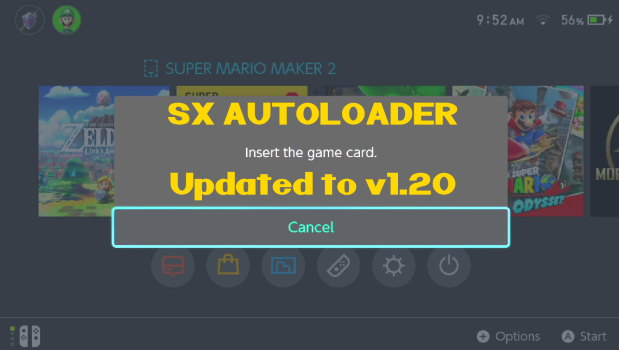
SXAL3.png

Team-Xecuter reports that thousands of SX OS users are loving the recently released SX Autoloader by Team [WAIN] and as such the developers have now release what seems to mount up to be 'general overall stability' update, so v1.20 does not bring nothing new to the table, except for faster speed in building and updating the database, for those that have vast overwhelming collections of XCI formatted games on their USB HDD's, so check out the updated changelog below, and grab their latest version! :)
Changelog v1.2
  • General overall stability fixes
  • Fixed bug with to many folders being searched
  • Fixed bug caused by layerfs
  • Fixed bug with long filenames
  • Hardware accelerated decryption
  • Cache directories created if missing
As usual, you can find their latest version of the SX Autoloader in the Resources section of the TX Community website.

—< Team-Xecuter - Rocking the Switch in 2019 and beyond! >—

:arrow: Source: MaxConsole
 
Where are news for the new products, I'm waiting for that. I heard there will be a new product for Patched Switch and another one for Switch Lite.
 
I extracted the .rar file and placed the “sxos” folder onto the root of my SD card and this is not working for me. When I click an xci ive previously loaded , it says “insert game cart” and stays there never switching to the XCI... is there something I am doing wrong or missing?

To clarify, my xci’s are in the root:/switch/Xci folder ... do they have to be in the root:/sxos/Xci folder instead to work propely?
 
Last edited by ILLPLEASA,
I extracted the .rar file and placed the “sxos” folder onto the root of my SD card and this is not working for me. When I click an xci ive previously loaded , it says “insert game cart” and stays there never switching to the XCI... is there something I am doing wrong or missing?

To clarify, my xci’s are in the root:/switch/Xci folder ... do they have to be in the root:/sxos/Xci folder instead to work propely?
That's where mine are sxos/xci works flawlessly

Sent from my SM-G965F using Tapatalk
 
I extracted the .rar file and placed the “sxos” folder onto the root of my SD card and this is not working for me. When I click an xci ive previously loaded , it says “insert game cart” and stays there never switching to the XCI... is there something I am doing wrong or missing?

To clarify, my xci’s are in the root:/switch/Xci folder ... do they have to be in the root:/sxos/Xci folder instead to work propely?
if not work just restart the console, it will work after restart, my xci file root:filename.xci
 
Last edited by themosteve,
but what good is it if some games are exclusively NSP with no XCI
if i am going to have to install NSP's for a few games then i might as well install them all
i mean AFAIK there is still no way to convert a NSP to XCI right
and if there were just how safe would it be to use a NAND to go online if it is clean (no NSP installs) with SXOS ?
what benefit does XCI have at this point exactly?

you are incorrect. In fact since i can bundle xci files with updates and dlc it is my preferred format. Of course because it allows me to boot from usb. This makes things pretty much perfect. There is a limitation in that if a game goes over 32gb you cannot make a large xci but this is rare. For the majority of games nsp to xci is certainly a thing and i do it all the time actually.

 
  • Like
Reactions: weatMod
you are incorrect. In fact since i can bundle xci files with updates and dlc it is my preferred format. Of course because it allows me to boot from usb. This makes things pretty much perfect. There is a limitation in that if a game goes over 32gb you cannot make a large xci but this is rare. For the majority of games nsp to xci is certainly a thing and i do it all the time actually.


thanks ,yeah i forgot why i decided it was not useful to me when i 1st heard of NSP conversion to XCI but it was when it was 1st released maybe it has changed now
so if you have a clean nand and use stealth mode and use XCI repacks online will you get banned?
i mean i know nothing is 100% safe but has it been done by anyone who has not been banned

or if you only use XCI on a clean nand and then use a legit cart online

or if you have a clean emunand and only use XCI repacks offline and then want to use a legit cart online from the clean emunand
 
Last edited by weatMod,
After loading xci from sx installer, Hot swapping from titles loaded from hdd do not auto load, to load from hdd i have to open The xci in the sx installer everytime.

Can you not implement hot swap for Hdd like you already have for SDMC ?

So to be clear, On home screen...
Can load titles once from sdmc, select them (Insert game cart) select again (play).
Load another title from home screen,(Insert game cart) select again (play)
No problem with SDMC Auto Load.

But HDD

run sxinstaller, navigate to hdd, select xci.. (Xci added to home screen )
Launch from home screen (Insert game cart) Select again (Game launches)
No problem there...

But after selecting multiple Xci from within Sx installer adding them to home screen,(They appear in Game library, Only the last one loaded will auto play, the others loaded before even tho i manual added each and returned to home menu to launch. Fail to hotswap after being loaded once..

So if i wish to play xci from hdd. I have to go into sx installer every time and launch if i wish to change titles..

@garyopa
Am i doing something wrong ? Will hdd support the same methods as sdmc ?

Thanks
 
Last edited by Canna,
Switch keeps freezing all over the place.. It seems to work"ish" as I saw one title autoloaded. But couldn't test further because of the constant freezes.
Home menu button seems a good way to freeze too.
(can still restart switch when freezing mostly)
 
I extracted the .rar file and placed the “sxos” folder onto the root of my SD card and this is not working for me. When I click an xci ive previously loaded , it says “insert game cart” and stays there never switching to the XCI... is there something I am doing wrong or missing?

To clarify, my xci’s are in the root:/switch/Xci folder ... do they have to be in the root:/sxos/Xci folder instead to work propely?

The game should pop to the first icon on the left after it says "insert game cart" - go all the way to the left and select the game again and it should load up... let me know if that works :)
 
except for faster speed in building and updating the database, for those that have vast overwhelming collections of XCI formatted games on their USB HDD's
According to the logfile it still need ~7 seconds to read one single game ...
 
That's where mine are sxos/xci works flawlessly

Sent from my SM-G965F using Tapatalk

if not work just restart the console, it will work after restart, my xci file root:filename.xci

The game should pop to the first icon on the left after it says "insert game cart" - go all the way to the left and select the game again and it should load up... let me know if that works :)


Thanks all!

Changing my XCI folder from sd:/switch/xci to sd:/sxos/xci worked like a charm after a reboot.

Problem solved!
 
since installing this. ive been getting errors when putting the switch back in the dock with hdd conneted. asking me to restart the device and showing error again. i think its because i have nsp on the HDD
 
Using the latest SXOS 2.9.2 and AutoLoader 1.20 WITH a 4TB USB HDD it was causing errors showing an SXOS restart screen just seconds after booting each time.
If I unplugged the USB HDD, there was no restart message at all.
Therefore there is an issue with this build and some USB HDD clearly.
 

Site & Scene News

Popular threads in this forum