

How to try and make the Tomodachi Collection Text to Speech engine say stuff
You'll need:
* Rom of Tomodachi Collection (https://dumping.guide/carts/nintendo/ds)
* Some kind of BMG editor (MSBT Editor)
* TinkeDSi (https://github.com/Wokann/TinkeDSi/tree/DownloadPlay-Signature) or this program that only runs on mac http://github.com/quatric/nintoolbox/releases/latest/
* https://talkmodachi.dylanpdx.io/ with the settings set to Japan (TC)
If you open up one of the BMG files that has dialogue like tmd_talk, there's text in quotes 「」and there's text under it that's all one line. That's the TTS part (the one I highlighted)
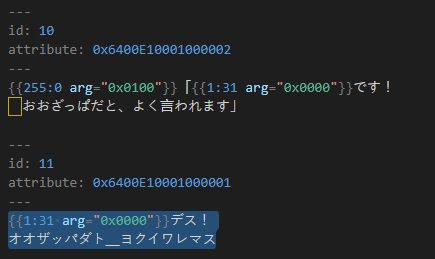
It's easy to alter, but there's a catch:
Miis only speak in Katakana. (Katakana is a part of the Japanese alphabet, along with Hiragana and Kanji)
Fortunately, there's some kind of solution to this:
You'll need to turn your text into Katakana syllables that sound like your language to ensure everything works.
For English, I looked up a website that turns English syllables to Katakana: https://www.sljfaq.org/cgi/e2k.cgi
https://www.katakanaconverter.com/english-name/
You also have to edit your sentence for punctuation. Here's a handy chart of things to copypaste:
??— question mark
! — exclamation mark
. — period or full stop
_ — underscore/...
, comma1
、 comma2
| pipe thing
You can test your speech if it sounds good enough by visiting this website: https://talkmodachi.dylanpdx.io/
Click on "More Settings" and select the option with the Japanese flag. Now you can test the Mii's speech.
Finally, you can copypaste that finished line back into the BMG file. Just don't overwrite stuff like {{1:31 arg="0x0000"}} since that will be said in-game.
And now you have stuff like this:
* Rom of Tomodachi Collection (https://dumping.guide/carts/nintendo/ds)
* Some kind of BMG editor (MSBT Editor)
* TinkeDSi (https://github.com/Wokann/TinkeDSi/tree/DownloadPlay-Signature) or this program that only runs on mac http://github.com/quatric/nintoolbox/releases/latest/
* https://talkmodachi.dylanpdx.io/ with the settings set to Japan (TC)
If you open up one of the BMG files that has dialogue like tmd_talk, there's text in quotes 「」and there's text under it that's all one line. That's the TTS part (the one I highlighted)
It's easy to alter, but there's a catch:
Miis only speak in Katakana. (Katakana is a part of the Japanese alphabet, along with Hiragana and Kanji)
Fortunately, there's some kind of solution to this:
You'll need to turn your text into Katakana syllables that sound like your language to ensure everything works.
For English, I looked up a website that turns English syllables to Katakana: https://www.sljfaq.org/cgi/e2k.cgi
https://www.katakanaconverter.com/english-name/
Despite using the website at first, I've had success telling AI this prompt:
Change the English text in the text box into Japanese katakana that sounds like English vowels. No spaces. When transcribing the word so, do not use "ソ" Use the following for punctuation:?! .、:
... then I added the line I need to translate below. ChatGPT keeps repeating a syllable in some sentences so I have to guess and take that out.
Change the English text in the text box into Japanese katakana that sounds like English vowels. No spaces. When transcribing the word so, do not use "ソ" Use the following for punctuation:?! .、:
... then I added the line I need to translate below. ChatGPT keeps repeating a syllable in some sentences so I have to guess and take that out.
You also have to edit your sentence for punctuation. Here's a handy chart of things to copypaste:
??— question mark
! — exclamation mark
. — period or full stop
_ — underscore/...
, comma1
、 comma2
| pipe thing
You can test your speech if it sounds good enough by visiting this website: https://talkmodachi.dylanpdx.io/
Click on "More Settings" and select the option with the Japanese flag. Now you can test the Mii's speech.
Finally, you can copypaste that finished line back into the BMG file. Just don't overwrite stuff like {{1:31 arg="0x0000"}} since that will be said in-game.
And now you have stuff like this:


