

NOTE:
This translation was made using Google Translate for my own personal use. Expect messy translations, cut-off text and untranslated elements
Monster Strike (モンスターストライク)
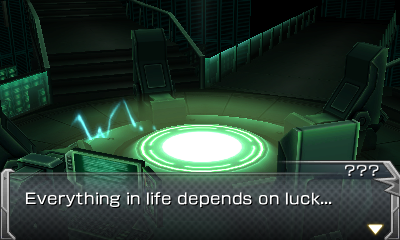
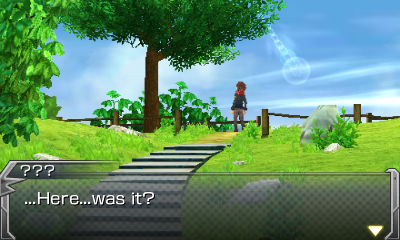
Based on the large (now defunct outside of Japan) mobile game of the same name, this 3DS game has a unique storyline which partially inspired the Monster Strike anime (which was translated into English). With the anime holding a special place in my heart, finding out that it was based on a 3DS game convinced me to pick it up and try to translate it, leading to this patch. While very rough, I hope that this patch can allow more people to enjoy this game
DOWNLOAD HERE
Installation
Real 3DS
With the game installed, extract the 7Z file (install 7-Zip if you cannot extract the file) titled "Monster Strike (English Patch).7z" to "\luma\titles\000400000017B300\romfs" on your SD card (creating the folder if it doesn't exist). When booting up the 3DS, hold down SELECT to boot into the Luma menu. Using the D-PAD and A button, select "Enable game patching" if not already enabled (will have an X if enabled). Press START to reboot and open the game!
Emulator
Follow the guide here for unpacking and repacking the game files, copying the contents of "Monster Strike (English Patch).7z" into the "ExtractedRomFS" folder, overwriting when prompted.
I hope you enjoy this hack even if it is a little basic! If you have any questions about installation, the game itself or the process of translating the game's unique file format, feel free to leave a comment
This translation was made using Google Translate for my own personal use. Expect messy translations, cut-off text and untranslated elements
Monster Strike (モンスターストライク)
Based on the large (now defunct outside of Japan) mobile game of the same name, this 3DS game has a unique storyline which partially inspired the Monster Strike anime (which was translated into English). With the anime holding a special place in my heart, finding out that it was based on a 3DS game convinced me to pick it up and try to translate it, leading to this patch. While very rough, I hope that this patch can allow more people to enjoy this game
DOWNLOAD HERE
Installation
Real 3DS
With the game installed, extract the 7Z file (install 7-Zip if you cannot extract the file) titled "Monster Strike (English Patch).7z" to "\luma\titles\000400000017B300\romfs" on your SD card (creating the folder if it doesn't exist). When booting up the 3DS, hold down SELECT to boot into the Luma menu. Using the D-PAD and A button, select "Enable game patching" if not already enabled (will have an X if enabled). Press START to reboot and open the game!
Emulator
Follow the guide here for unpacking and repacking the game files, copying the contents of "Monster Strike (English Patch).7z" into the "ExtractedRomFS" folder, overwriting when prompted.
I hope you enjoy this hack even if it is a little basic! If you have any questions about installation, the game itself or the process of translating the game's unique file format, feel free to leave a comment
Last edited by Taelyn,