


Hello everyone, using these tools you can easily add custom songs to your Let's Sing game.
Let's Sing UltraStar Converter - used to convert UltraStar karaoke files into the Let's Sing DLC format
Let's Sing Deluxe Mod (made by @Omnia) - used to extract the official songs from all previous Let's Sing games, the extracted songs can be imported into the newest versions of the game (2025/2026+)
But let me start off with some credits first:
One thing led to another, and now we've got a GUI to help make the whole conversion process more streamlined. Using this converter, you don't even need to have Python, you will still need to have FFmpeg and RAD Video Tools installed though.
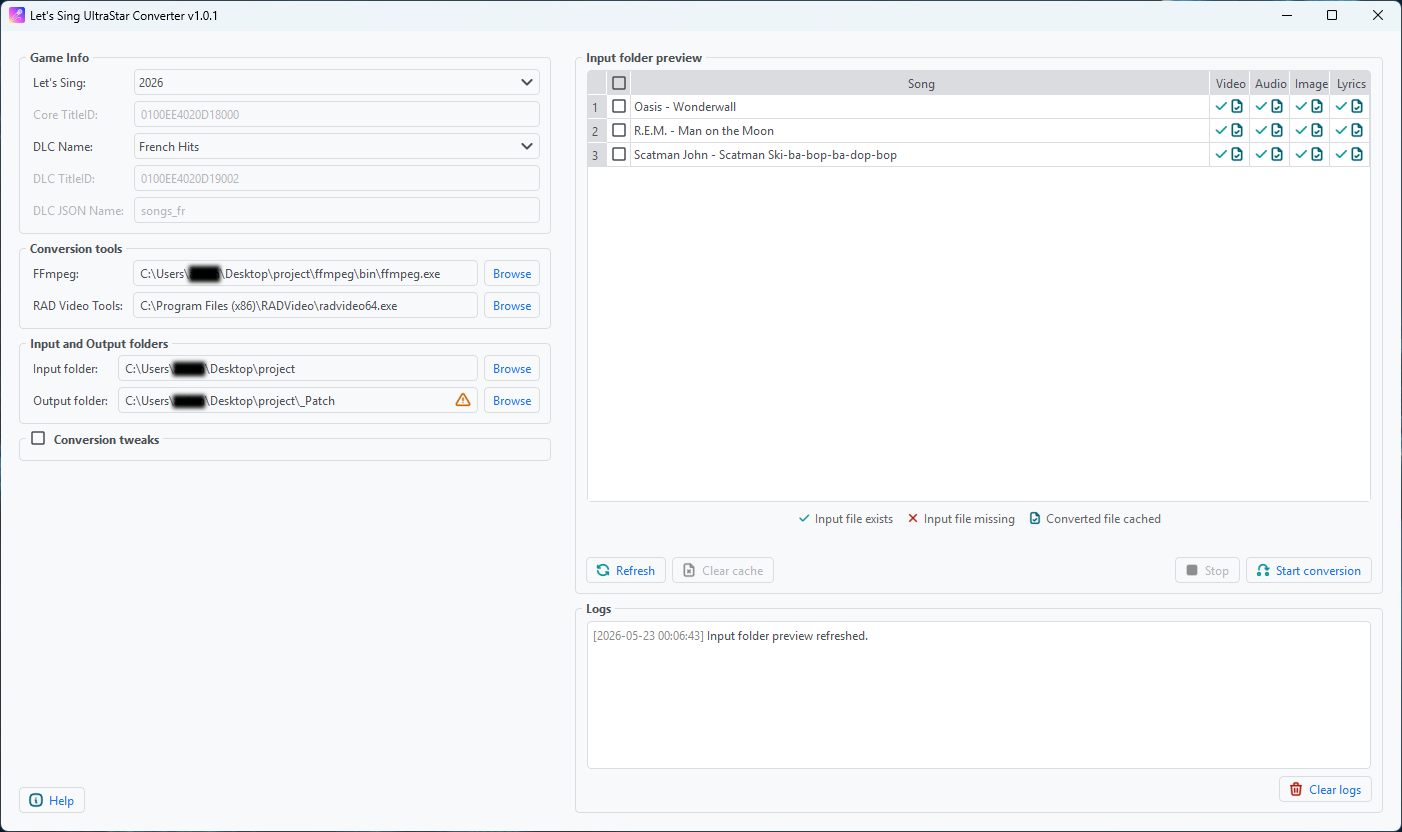
Here is what the GUI looks like, basic inputs on the left, preview on the right. If your version of the game is not listed, you can select the 'other' option and manually fill in the TitleIDs.
You can find the download link on my github
All the requirements and instructions are written up on github as well as in the converter itself, but I will include them below as well:
If you own multiple Let's Sing versions you quickly learn it's quite cumbersome switching between different game versions to sing just a few songs you like from each.
Let's Sing games contain 431 unique songs in Nintendo Switch releases with all DLCs as of 2026 and that grows to 576 if you happen to have older Wii versions as well.
This mod let's you put all songs you want into a single game, it can also be paired with the custom songs from Ultrastar converted through Let's Sing UltraStar Converter
The script will automatically convert all game files from previous versions to the correct format for the 2025 base game, you can use a simple spreadsheet to mark which game versions and DLCs you own and which songs you would like to keep, letting you save disk space for the jams you actually enjoy singing.
You can find the download link on Omnia's github
The instructions are written on his github, but I will include them here as well:
Let's Sing UltraStar Converter - used to convert UltraStar karaoke files into the Let's Sing DLC format
Let's Sing Deluxe Mod (made by @Omnia) - used to extract the official songs from all previous Let's Sing games, the extracted songs can be imported into the newest versions of the game (2025/2026+)
Let's Sing UltraStar Converter
This tool helps you add custom songs to an installed DLC for Let's Sing. It converts UltraStar karaoke files (downloaded from https://ultrastar-es.org or https://usdb.animux.de - best by using usdb_syncer) to the Let's Sing DLC format.But let me start off with some credits first:
- Major props go to dh4rry, the original creator of the ultrastar2singit script used for converting the UltraStar text files into Let's Sing's vxla format. Here is the link to the original post focusing on Let's Sing 2019 with discussions on how to replace the original DLC files with custom songs.
- Many props go to MRJPGames for writing a comprehensive tutorial on how to prepare all the needed files for adding new songs instead of replacing them for Let's Sing 2022.
- Overwhelming props go to kosei, for writing a script to automate this whole conversion process in the same thread. Kosei's converter script was the jumping off point for my contributions.
- Special thanks to omnialord also from gbatemp for contributing to the project with bug fixes and fresh ideas, as well as for helping keep this game's modding scene alive.
One thing led to another, and now we've got a GUI to help make the whole conversion process more streamlined. Using this converter, you don't even need to have Python, you will still need to have FFmpeg and RAD Video Tools installed though.
Here is what the GUI looks like, basic inputs on the left, preview on the right. If your version of the game is not listed, you can select the 'other' option and manually fill in the TitleIDs.
You can find the download link on my github
All the requirements and instructions are written up on github as well as in the converter itself, but I will include them below as well:
Requirements
- Windows 7+
- FFmpeg - I used a build from gyan.dev
- RAD Video Tools (needed for Let's Sing 2024+)
Instructions
- Install Let's Sing on your console and install one DLC song pack.
- Download a FFmpeg release to your PC. I used gyan's release from https://www.gyan.dev/ffmpeg/builds/.
- Install RAD Video Tools from https://www.radgametools.com/bnkdown.htm (needed for Let's Sing 2024 and onward, skip for earlier versions).
- Create a folder (e.g., "My Songs") containing all the UltraStar song folders you want to convert. This is what your "My Songs" folder should look like:
My Songs/
├── Oasis - Wonderwall/
│ ├── Oasis - Wonderwall.aac
│ ├── Oasis - Wonderwall.png
│ ├── Oasis - Wonderwall.txt
│ └── Oasis - Wonderwall.webm
├── R.E.M. - Man on the Moon/
│ ├── R.E.M. - Man on the Moon.jpeg
│ ├── R.E.M. - Man on the Moon.mkv
│ ├── R.E.M. - Man on the Moon.ogg
│ └── R.E.M. - Man on the Moon.txt
└── Scatman John - Scatman (Ski-Ba-Bop-Ba-Dop-Bop)/
├── Scatman John - Scatman (Ski-Ba-Bop-Ba-Dop-Bop).jpg
├── Scatman John - Scatman (Ski-Ba-Bop-Ba-Dop-Bop).mp3
├── Scatman John - Scatman (Ski-Ba-Bop-Ba-Dop-Bop).mp4
└── Scatman John - Scatman (Ski-Ba-Bop-Ba-Dop-Bop).txt - Run the 'Let's Sing UltraStar Converter' and fill in your game and dlc versions.
If your game/DLC versions aren't listed, choose 'other' and manually fill out the fields. If your base game is 2024 or newer, you will need to fill the 'DLC JSON Name' field as well. This name can be found in the name.txt file located in [DLC TITLEID]/romfs/name.txt, use DBI to browse the installed game folders. - If FFmpeg or RAD Video Tools fields are empty, point them to the executables for FFmpeg and RAD Video Tools, respectively
- Point the Input folder to your "My Songs" folder.
- Check the preview on the right to make sure your Input folder is loaded correctly. Green ticks will be displayed for each existing UltraStar file type (or a red X if it is missing). If you've run the converter before with your input folder, a blue checked-file icon may also appear next to the first icon. This icon means that a cached version of this file type is already present in the input song's folder (you can delete these by using the Clear cache button).
- Select an output folder for the converted songs. WARNING - The selected folder will be purged before starting the conversion, make sure you're not selecting an important folder! There are some guardrails put in place to prevent deleting something important, the contents of the selected folder are checked upon selection. The selected folder will be allowed only if it is empty or if it contains only folders named as Title IDs (i.e., from a previous conversion), but still be careful.
- Start the conversion and track the progress in the preview table above.
- When the conversion is done, copy the contents of the output folder to your SD card sd:/atmosphere/contents.
- Launch the game and Sing!
Let's Sing Deluxe Mod
Credits:- ratnapatka for the Ultrastar2singit repo, specially for his contributions on BK2 conversion and general script that served as a base for this one
- larsenv for the obscure mo2mp4 tool to convert wii video format into mp4
If you own multiple Let's Sing versions you quickly learn it's quite cumbersome switching between different game versions to sing just a few songs you like from each.
Let's Sing games contain 431 unique songs in Nintendo Switch releases with all DLCs as of 2026 and that grows to 576 if you happen to have older Wii versions as well.
This mod let's you put all songs you want into a single game, it can also be paired with the custom songs from Ultrastar converted through Let's Sing UltraStar Converter
The script will automatically convert all game files from previous versions to the correct format for the 2025 base game, you can use a simple spreadsheet to mark which game versions and DLCs you own and which songs you would like to keep, letting you save disk space for the jams you actually enjoy singing.
You can find the download link on Omnia's github
The instructions are written on his github, but I will include them here as well:
Before starting the conversion process, you need the actual files from the games you own, for this you will need to dump them, I won't focus on this here as there's plenty of tutorials around for the Switch (e.g. Nxdumptool) or Wii (e.g. dolphin).
You will also need to have the 2025 or 2026 version of the game with the free Song Pack DLC installed (International or Regional versions, e.g. German Hits, French Hits, etc), this is what we will mod through LayeredFS so you have the extra songs in your main game.
Besides the files in this project you will also need to have FFmpeg (I used gyan's release from here) in the same folder as the script and RAD Video Tools installed in your program files.
For base games, cover images are a little cumbersome to get, you will need to extract these with Asset Studio Mod (or similar) from the "resources.assets" file. Unfortunately there's no way to automate this, so instead, in case you don't have expected files in the folder, this will automatically run a Deezer search for alternate cover images.
After you have everything ready, you should have the following folders in place: videos, vxla, vxla_duet (or vxla_feat), audio, audio_preview, covers
To be clear, this is what your folder should look like
LetsSingDeluxeMod/
├── Lets Sing Deluxe DB - CSV.csv
├── songs_XX.json (optional)
├── lsdeluxe.py
├── MoDecoder/
│ ├── LibMobiclip.dll
│ ├── MobiclipDecoder.exe
│ └── NAudio.dll
├── ffmpeg
│ ├── bin
│ └── ...
├── audio
│ ├── 2BeLoved.ogg
│ ├── 7Years.ogg
│ └── ...
├── audio_preview
│ ├── 2BeLoved_preview.ogg
│ ├── 7Years_preview.ogg
│ └── ...
├── covers
│ ├── 2BeLoved.png
│ ├── 7Years.png
│ └── ...
├── video
│ ├── 2BeLoved.mp4
│ ├── 7Years.mo
│ └── ...
├── vxla
│ ├── 2BeLoved.vxla
│ ├── 7Years.vxla
│ └── ...
└── vxla_duet / vxla_feat
Next, make a copy of this spreadsheet, this is our song database, you will use this to define which songs you want to export, just click the checkbox for any songs you would like, then go to the main tab and click the "Export DB" button. Alternatively, I also included an offline version of the csv in this repo if you prefer using excel or just want to run the full list.
The list will cross check against the files you have in the folder, it will only attempt to convert a specific song if you have all required files in the folders (video, audio, vxla), otherwise it will skip that song to avoid crashes. To reduce issues with duplicate songs, make sure to only select a single version in the sheet and avoid selecting songs that are already present in the base game used to apply the mod.
If you want to keep your original DLC songs, copy the songs_XX.json (found in DLCID\romfs) file from the dumped game installation to the project folder.
Run with lsdeluxe.py in the same folder you have the files' folders, the ffmpeg build and the mo2mp4 folders. You should also have RAD Video Tools installed in your computer.
When you run, it will ask you for your supported game version, this is only used to define the folder ID for LayeredFS and the JSON song database name. Optionally you can choose to skip the original music videos, so it creates the files based on cover images (which is a lot faster and lightweight)
Please be aware that depending on the amount of songs, this will probably take a couple hours to finish, however you can stop anytime and resume from the last converted file by running the script again. The script will loop through all files you have in the folders and only convert the ones you have marked in the DB sheet.
If you have .mo (Wii) video files, these are first converted to .mp4, then all mp4 are converted to bk2. VXLA files also go through some reformatting depending on the version. Remaining files are left untouched.
At the end you should have all files ready in a folder to move to the Atmosphere Switch folder (e.g. sd:/atmosphere/contents)
You will also need to have the 2025 or 2026 version of the game with the free Song Pack DLC installed (International or Regional versions, e.g. German Hits, French Hits, etc), this is what we will mod through LayeredFS so you have the extra songs in your main game.
Besides the files in this project you will also need to have FFmpeg (I used gyan's release from here) in the same folder as the script and RAD Video Tools installed in your program files.
For base games, cover images are a little cumbersome to get, you will need to extract these with Asset Studio Mod (or similar) from the "resources.assets" file. Unfortunately there's no way to automate this, so instead, in case you don't have expected files in the folder, this will automatically run a Deezer search for alternate cover images.
After you have everything ready, you should have the following folders in place: videos, vxla, vxla_duet (or vxla_feat), audio, audio_preview, covers
To be clear, this is what your folder should look like
LetsSingDeluxeMod/
├── Lets Sing Deluxe DB - CSV.csv
├── songs_XX.json (optional)
├── lsdeluxe.py
├── MoDecoder/
│ ├── LibMobiclip.dll
│ ├── MobiclipDecoder.exe
│ └── NAudio.dll
├── ffmpeg
│ ├── bin
│ └── ...
├── audio
│ ├── 2BeLoved.ogg
│ ├── 7Years.ogg
│ └── ...
├── audio_preview
│ ├── 2BeLoved_preview.ogg
│ ├── 7Years_preview.ogg
│ └── ...
├── covers
│ ├── 2BeLoved.png
│ ├── 7Years.png
│ └── ...
├── video
│ ├── 2BeLoved.mp4
│ ├── 7Years.mo
│ └── ...
├── vxla
│ ├── 2BeLoved.vxla
│ ├── 7Years.vxla
│ └── ...
└── vxla_duet / vxla_feat
├── 2BeLoved_DUET.vxla
├── 7Years_feat.vxla
└── ...
├── 7Years_feat.vxla
└── ...
Next, make a copy of this spreadsheet, this is our song database, you will use this to define which songs you want to export, just click the checkbox for any songs you would like, then go to the main tab and click the "Export DB" button. Alternatively, I also included an offline version of the csv in this repo if you prefer using excel or just want to run the full list.
The list will cross check against the files you have in the folder, it will only attempt to convert a specific song if you have all required files in the folders (video, audio, vxla), otherwise it will skip that song to avoid crashes. To reduce issues with duplicate songs, make sure to only select a single version in the sheet and avoid selecting songs that are already present in the base game used to apply the mod.
If you want to keep your original DLC songs, copy the songs_XX.json (found in DLCID\romfs) file from the dumped game installation to the project folder.
Run with lsdeluxe.py in the same folder you have the files' folders, the ffmpeg build and the mo2mp4 folders. You should also have RAD Video Tools installed in your computer.
When you run, it will ask you for your supported game version, this is only used to define the folder ID for LayeredFS and the JSON song database name. Optionally you can choose to skip the original music videos, so it creates the files based on cover images (which is a lot faster and lightweight)
Please be aware that depending on the amount of songs, this will probably take a couple hours to finish, however you can stop anytime and resume from the last converted file by running the script again. The script will loop through all files you have in the folders and only convert the ones you have marked in the DB sheet.
If you have .mo (Wii) video files, these are first converted to .mp4, then all mp4 are converted to bk2. VXLA files also go through some reformatting depending on the version. Remaining files are left untouched.
At the end you should have all files ready in a folder to move to the Atmosphere Switch folder (e.g. sd:/atmosphere/contents)


