


Hi, I have a GBxCart RW + FlashGBX, and I'm trying to write an emulator .sav to a batteryless SRAM repro cart (FlashGBX identifies it as: Save Type: Unlicensed 512K SRAM 64KiB, Cartridge Type: 2006_TSOP_64BALL_6106 with W29GL128SH9B).

My emulator save is 131088 bytes ("Pokemon - Emerald Version.zip"; 128KB + 16 byte header I think). Every attempt to write it via FlashGBX ends in either "save file was erased due to corruption" or it reverts to a previous save.
I also tried patching a fresh Emerald ROM with the gbarompatcher website (SRAM Batteryless patch) and writing that instead, same result.
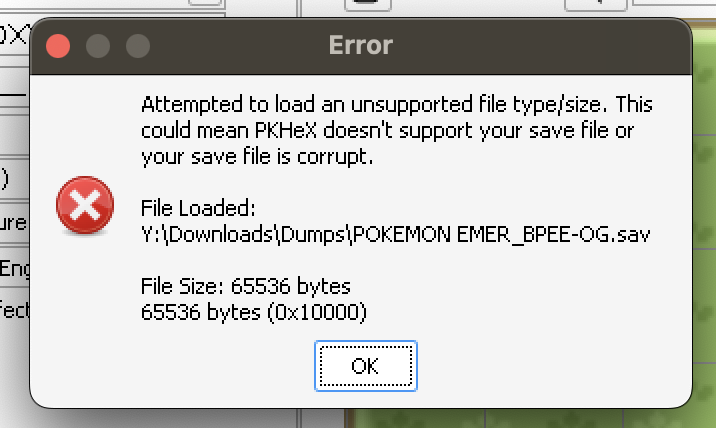
I dumped the SRAM after making a test save on the cart and ran it through Python to check the sector structure, the magic bytes don't match standard Emerald format (expected 0x08012025, getting values like 0x01006f4f). PKHeX also rejects the dumped .sav with "unsupported file type/size" even though it's 65536 bytes.
("FreshPatched.zip" is a rom and save dump from after I wrote the patched rom to the cart, and "TestSave.zip" is a save on said patched rom up to the point of acquiring a starter, and then saved at Route 101. I progressed to the same point for "OG.zip")
Writing to the OG, Patched, and Test-Saved roms through FlashGBX and injections all ended in errors, regardless of how many times I tried to read the bytes and find the save point.
At some point in the process, it started saying that the SRAM size was 64KiB even though I could have sworn it was saying 128KiB for a while but then it changed and I don't know how or why that might be. Maybe I'm just going insane. I've been doing trial-and-error for two days now.
Questions:
Thanks in advance.
My emulator save is 131088 bytes ("Pokemon - Emerald Version.zip"; 128KB + 16 byte header I think). Every attempt to write it via FlashGBX ends in either "save file was erased due to corruption" or it reverts to a previous save.
I also tried patching a fresh Emerald ROM with the gbarompatcher website (SRAM Batteryless patch) and writing that instead, same result.
I dumped the SRAM after making a test save on the cart and ran it through Python to check the sector structure, the magic bytes don't match standard Emerald format (expected 0x08012025, getting values like 0x01006f4f). PKHeX also rejects the dumped .sav with "unsupported file type/size" even though it's 65536 bytes.
("FreshPatched.zip" is a rom and save dump from after I wrote the patched rom to the cart, and "TestSave.zip" is a save on said patched rom up to the point of acquiring a starter, and then saved at Route 101. I progressed to the same point for "OG.zip")
Writing to the OG, Patched, and Test-Saved roms through FlashGBX and injections all ended in errors, regardless of how many times I tried to read the bytes and find the save point.
At some point in the process, it started saying that the SRAM size was 64KiB even though I could have sworn it was saying 128KiB for a while but then it changed and I don't know how or why that might be. Maybe I'm just going insane. I've been doing trial-and-error for two days now.
Questions:
- What save format does a batteryless SRAM cart like this actually use, and is it compatible with a standard emulator .sav at all?
- How can I write my save properly to a cart like this?
- Is there a tool to convert/inject an emulator save into the format this cart expects?
Thanks in advance.




