Hacking Sigpatches for Atmosphere (Hekate, fss0, fusee & package3)

  • Thread starter Thread starter ShadowOne333
  • Start date Start date
  • Views Views 5,183,049
  • Replies Replies 7,280
  • Likes Likes 266
Hi all,
I can't launch any .nsp.
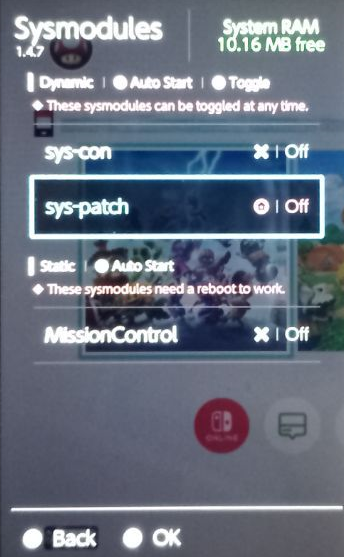
In the overlay menu, the sys-patch appears as "Off". When I try to toogle it "On" it turns itself off.
I have no idea why thisis happening. I am using Kefir which I think already comes with the latest sig patches
Sys Modules.png
 
Hi all,
I can't launch any .nsp.
In the overlay menu, the sys-patch appears as "Off". When I try to toogle it "On" it turns itself off.
I have no idea why thisis happening. I am using Kefir which I think already comes with the latest sig patchesView attachment 559334
Not trying to be rude but have you read what sys patch does? It's turned on when you boot, patches what it needs to patch then turns off. Look at the log to see what patched. That'll help you and us figure out what's wrong
 
Not trying to be rude but have you read what sys patch does? It's turned on when you boot, patches what it needs to patch then turns off. Look at the log to see what patched. That'll help you and us figure out what's wrong

When I read "toggled" in the overlay menu, I thought it should be toggled ON to be in effect, incorrectly assumed it was part of the problem

I can see 2 Unpatched things, but I don't know what it means
Here is my log:
Log: fs
noncasigchk_new Patched
nocntchk2 Patched

Log: ldr
noacidsigchk Patched

Log: erpt
no_erpt Unpatched

Log: es
es4 Patched

Log: nifm
ctest3 Patched

Log: nim
nim_new Patched

Log: ssl
disablecaverification1 Patched
disablecaverification2 Patched
disablecaverification3 Unpatched

Log: stats
version 1.5.8-8d4d183
build_date 19.11.2025 06:56:34
fw_version 21.2.0
ams_version 1.10.2
ams_target_version 2.0.0
ams_keygen 20


EDIT:
I realized 1.5.8 wasn't the latest version, updated to 1.5.9. Still can't launch nsp, I am asked to purchase the game in the eShop.

Here are the new logs:
Log: fs
noncasigchk_17.0.0+ Patched
nocntchk_21.0.0+ Patched

Log: ldr
noacidsigchk_10.0.0+ Patched

Log: erpt
no_erpt Unpatched

Log: es
es_19.0.0+ Patched

Log: nifm
ctest_20.0.0+ Patched

Log: nim
blankcal0crashfix_17.0.0+ Patched
blockfirmwareupdates_12.0.0+ Patched

Log: stats
version 1.5.9-f407d0d
build_date 27.12.2025 18:18:12
fw_version 21.2.0
ams_version 1.10.2
ams_target_version 2.0.0
ams_keygen 20
 
Last edited by grunglurn,
i update my switch to 21.2.0 and atmosphere to 1.10.2, and then i installed the latest sigpatches on this thread, and now pokemon ZA doesnt open. can somebody help me :c?
 
  • Like
Reactions: mauroalexand
I updated my emuMMC to 21.2.0 AMS 1.10.2 and now my dumped titles won't boot in my emuMMC
"This requires you to uninstall the game and reinstall it. You have at some point booted without patches, and that has caused your instaled titles to become invalidated."

OR use sys-patch. much easier
 
This requires you to uninstall the game and reinstall it. You have at some point booted without patches, and that has caused your instaled titles to become invalidated.
I uninstalled the game. Rebooted the console, and installed from the nsp again.
The same thing happens, it tells me to get the game from the shop. Attached pictured from the game options menu.
 

Attachments

  • Game Options.jpg
    Game Options.jpg
    128 KB · Views: 20
Last edited by grunglurn,
I uninstalled the game. Rebooted the console, and installed from the nsp again.
The same thing happens, it tells me to get the game from the shop. Attached pictured from the game options menu.
either means you do not have patches, or that you boot into example sysnand without patches (no cfw / "stock"), and then back into cfw.

it might be you're only installing the game update, and not the actual game.
 
either means you do not have patches, or that you boot into example sysnand without patches (no cfw / "stock"), and then back into cfw.

it might be you're only installing the game update, and not the actual game.
I am gonna check to make sure is not a game update. Going to look for another copy of the game. I am very new to all of this, and not confident if I am doing the right thing.
Didn't boot into the sysNand, I would have to use the RCM Jig again, and inject a new payload.


I copied the latest sigpatches from this thread into my sd card.
Here are the new logs: I saw that some Patched turned orange, and nifm is unpatched.
Log: fs
noncasigchk_17.0.0+ Patched
nocntchk_21.0.0+ Patched

Log: ldr
noacidsigchk_10.0.0+ Patched

Log: erpt
no_erpt Unpatched

Log: es
es_19.0.0+ Patched

Log: olsc
olsc_19.0.0+ Patched

Log: nifm
ctest_20.0.0+ Unpatched

Log: nim
blankcal0crashfix_17.0.0+ Patched
blockfirmwareupdates_12.0.0+ Patched

Log: stats
version 1.5.9-f407d0d
build_date 27.12.2025 18:18:12
fw_version 21.2.0
ams_version 1.10.2
ams_target_version 2.0.0
ams_keygen 20
 
I am gonna check to make sure is not a game update. Going to look for another copy of the game. I am very new to all of this, and not confident if I am doing the right thing.
Didn't boot into the sysNand, I would have to use the RCM Jig again, and inject a new payload.


I copied the latest sigpatches from this thread into my sd card.
Here are the new logs: I saw that some Patched turned orange, and nifm is unpatched.
Log: fs
noncasigchk_17.0.0+ Patched
nocntchk_21.0.0+ Patched

Log: ldr
noacidsigchk_10.0.0+ Patched

Log: erpt
no_erpt Unpatched

Log: es
es_19.0.0+ Patched

Log: olsc
olsc_19.0.0+ Patched

Log: nifm
ctest_20.0.0+ Unpatched

Log: nim
blankcal0crashfix_17.0.0+ Patched
blockfirmwareupdates_12.0.0+ Patched

Log: stats
version 1.5.9-f407d0d
build_date 27.12.2025 18:18:12
fw_version 21.2.0
ams_version 1.10.2
ams_target_version 2.0.0
ams_keygen 20
you only need ES to work for signature intact games from eshop, addition to FS if you want to install cartridge games / signature broken games.

The ones that matter says patched. (ES -> FS -> LDR)
 
  • Like
Reactions: grunglurn
I am feeling a bit dumb. It was a game update after all!
I already read similar cases, and people installing game updates thinking it was the actual game, and not being able to launch it.
I was so convinced it was the game, and not an update, and that I got tunnel vision and could only think that the problem was with the patches.

Thank you all for the help. It's fixed
 
  • Like
Reactions: bth and Blythe93
Hi all, sorry to ask this question but I've been struggling with this for a couple of months now and can't seem to find the solution (although I've read people having the same issue here). For some recent games (e.g. FC 26) my switch always links to eShop.

I've done full clean install, using HATS, and only booted into emuNAND running 21.2.0 and installed the game via Tinwoo installer. I believe by using HATS I have both sig patches and sys-patch install (confirmed via overlay menu). But it still refers to that eShop when trying to boot.. I only boot in emuNAND, nothing else..

All help is appreciated!:bow:

UPDATE : Almost unbelievable but I just seem to have fixed it. While it was clearly marked as the game, it probably was an update. I found the original game file and that worked just fine.
 
Last edited by Dirty Wizard,
  • Like
Reactions: Blythe93
Where can i find a sigpatch for 1.10.1?
Sigpatches are backwards compatible, just get the latest if you need them. I'd suggest switching to sys-patch instead as it's much more reliable and you don't have to update it every time new firmware and/or Atmosphere gets released.
 
  • Like
Reactions: cvskid
Where can i find a sigpatch for 1.10.1?
patches for atmosphere are loaded by /bootloader/patches.ini (for FS and Loader) - .ips for ES/NIM/NIFM patches load whenever needed if you have all)


#loader Atmosphere-1.10.1-master-21c0f75a2
[Loader:C35504BA1B31B41E]
.nosigchk=0:0x005F7A:0x1:01,00
 
  • Like
Reactions: Blythe93
What leads you to believe that this is a sigpatch issue? You're in applet mode and ran out of memory... Don't use applet mode.
 

Site & Scene News

Popular threads in this forum