Homebrew Need a bit of graphics help for GX emulator mod

  • Thread starter Thread starter giantpune
  • Start date Start date
  • Views Views 143,783
  • Replies Replies 470

giantpune

Well-Known Member
Member
Joined
Apr 10, 2009
Messages
2,860
Reaction score
131
Trophies
1
XP
213
Country
United States


Please test this out and see if I have broken anything that was not broken before. And if there are any coders who wouldn't mind, please review my code. I would like to submit a patch for the official versions, but I want to squash any bugs I might have made before hand.

covers should be 316x224 and placed in sd:/snes9x/images. the naming rules for images...
1) take the full name of the rom and drop the extension
2)if the name contains "[" drop that, everything after it, and the spaces directly before it
3)truncate what you have left to fit in a char[64]
4)add .png

source and executable
http://www.mediafire.com/?f1qdjnnngmd
http://www.mediafire.com/?ymozjmetnn4

please don't make any stupid requests, i am just wanting to make sure this works properly.
 
https://en.wikipedia.org/wiki/Category:Super_Nintendo_Entertainment_System_game_covers
https://en.wikipedia.org/wiki/Category:Nintendo_Entertainment_System_game_covers

smile.gif
 
Last edited by shadoxXx,
For which system do you need box art? I got some for nes, snes, atari, sega, genesis. Just let me kow. Would love to see a cover flow for the classic emaulators.
 
NES covers should be just about the exact proportions as an SNES cover, just turned standing vertical, rather than horizontal.
Not sure about the dimensions of a GBA cover.
I don't have one handy.

Any idea when there might be a beta of this to test out?
I'm itching to see this in action.
 
i cant get triiforce to load consistently enough. i think it is best to let the masters get all the bugs squashed and make their own gui. then if somebody feels the need, they can improve on it.

as far as the covers, i have gotten a few more nes/snes. i m just having to dl and name them 1 at a time. i was kinda hoping somebody already had a pack. but what i really really really would like is the screen captures from the USB Loader GX coverwall. i think if somebody could get those, i have photoshop and i can lay out the boxes from there.
 
Seems to work great. Only "bug" is that it doesn't work for USB at all. Not even by placing the images on SD. If the games are on USB drive it's no no.
 
I've been running my games from USB with covers on SD and my games are booting fine. I just double checked and played through some "Link to the Past" & "Gradius 3" to be sure.

Only issues I noticed were:
- When you scroll backwards, the last 2 covers for some reason become out of alignment, appearing about - 15% higher than the rest of the covers.
- One cover didn't display, but caused a massive black square to spread across 2 or 4 screens.

Also, there are just a couple personal suggestions (I know you said "no suggestions"):
- It feels weird pressing Left to move to the covers on the right and Right to move to the covers on the left. That just felt kind of funky to me.
- It would be nice if there were a way to hold down a direction and fast scroll. When you have a lot of games on there, it take a lot of tapping to get to the middle of the alphabet.

Beyond the couple minor issues and personal preferences, you did a fantastic job. I can't wait to go through and get a complete collection of covers for all of my games on there. Its really a feature I hope gets integrated into the official emulator.
 
QUOTE said:
When you scroll backwards, the last 2 covers for some reason become out of alignment, appearing about - 15% higher than the rest of the covers.
what do you mean backwards? and what are the last 2 covers? they should always be in the same spot. there is only 1 list of coordinates for the whole of the program.

QUOTE said:
- One cover didn't display, but caused a massive black square to spread across 2 or 4 screens.
can you post the image that didn't display right so i can test it out?

QUOTE said:
- It feels weird pressing Left to move to the covers on the right and Right to move to the covers on the left. That just felt kind of funky to me.
absolutely not. i started this with usb loader GX and now there are 4 different possibilities for pushing a direction and what covers come up next. im not doing that again.

QUOTE
- It would be nice if there were a way to hold down a direction and fast scroll. When you have a lot of games on there, it take a lot of tapping to get to the middle of the alphabet.
press + and -

as far as the stuff with covers not being displayed when using USB i have no idea. the fat stuff from the emulators doesn't like my usb drive so i cant test it out, but i don't see why it wouldn't work.
 
could you add an option to automatically start in boxcovers mode? instead of the usual list view.

thank you.
 
Valguerra said:
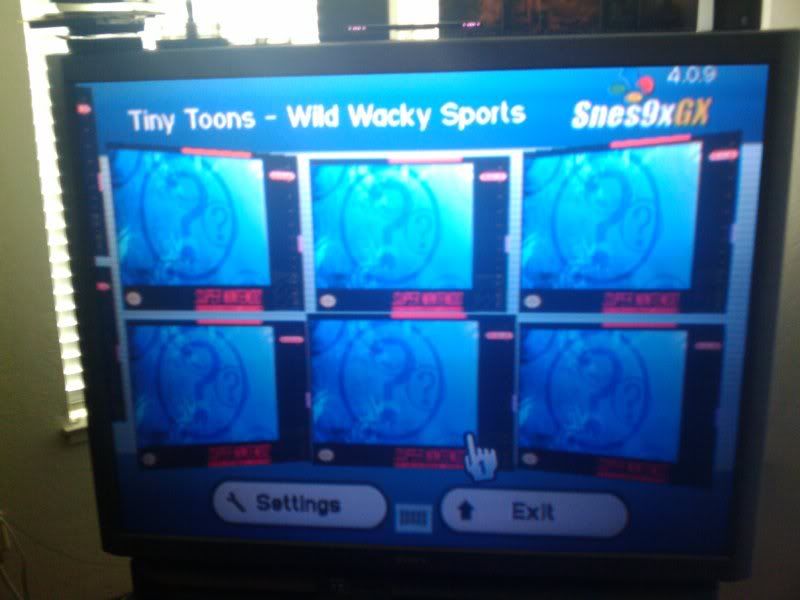
Pretty kool. But what box art does it show if there is no box art?
did you notice in the video how i have 70% of my games with the same blue "?" boxart?
 
giantpune said:
QUOTE said:
When you scroll backwards, the last 2 covers for some reason become out of alignment, appearing about - 15% higher than the rest of the covers.
what do you mean backwards? and what are the last 2 covers? they should always be in the same spot. there is only 1 list of coordinates for the whole of the program.

Sorry if that wasn't specific enough. I was really late by the time I got the covers ready and tested it, so I was typing that up half awake.

The bug in question appears when you have the coverwall zoomed in to be 2 covers high and you scroll backwards alphabetically, to the left.

Check out what I mean on the left hand side of this pic:

2009-10-11101200.jpg
 
giantpune said:
QUOTE said:
- One cover didn't display, but caused a massive black square to spread across 2 or 4 screens.
can you post the image that didn't display right so i can test it out?

Doing research, that one was my fault. The image size was off on that one cover. Disregard that issue.
 
I notice that if you have a wrong cover size or anything you get a glitch. I got one, notice the problem and fix it.. Would not mine going straight into the cover than selecting the option. Other than that is been working good.
 
I just noticed another unusual one.
There are big gaps in my roms, as far as what is displayed in the cover wall.
For instance my coverwall jumps straight from Earthbound to Frogger, as if Frogger was the next rom in sequence after Earthbound, but it is actually leaving out almost all of E and F.
When I switch to the rom list, all of my roms are listed in their entirety.
 
aml435 said:
There are big gaps in my roms, as far as what is displayed in the cover wall.

I have a fix for this, but I would like to know more about what causes it for you. Do you have close to the max limit (700) for the coverwall? the extra roms are cut based of date they were added to the SD card, not based on alphabetical order. another cause could be caused by long titles being cropped.
 

Site & Scene News

Popular threads in this forum