

 Anbernic RG Rotate Retro Handheld GBAtemp review
Hardware
Product Information:
- Official Store: https://www.keepretro.com/products/rg-rotate
Review Approach:
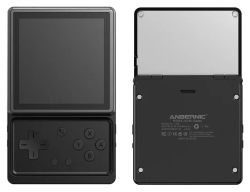
We’ve seen Game Boys, we’ve seen PS Vitas, and we’ve seen every which form factor Anbernic can throw a H700 into. So what are we looking at this time? Instead of going retro, this time the company have opted for something more unique, featuring a 1:1 aspect ratio screen that rotates out of the way to reveal a gamepad underneath. In terms of concept it’s not too dissimilar to the RG Slide, albeit with a bit of a weaker CPU in the Unisoc T618. It’s strong enough though, and it’s certainly found a place for me.
Pulling it out of the box you get a relatively standard assortment of fanfare. Beyond the device itself you get a single tempered glass screen protector, USB A to C charging cable, a folded-up manual, and a wrist strap that you can loop around one of the corners of the system. There is one interesting addition, this being a set of raised shoulder buttons for those who don’t mind opening their system up and have a preference for such things. I personally quite like the flush design they went for, but having the option is always a good thing.
If I had to come up with a single word to describe the design of the RG Rotate, it’d probably be “basic”. And that’s not necessarily a bad thing. It’s a square with a screen when you pull it out of your pocket. No frills, nothing especially out there. It’s something I enjoy having on my desk, and I can see why Anbernic did a small push for this as a music player alongside its more traditional retro gaming use case. Aesthetically it’s all there, albeit missing something of a key feature for a music player in a headphone jack. You do at least get a Micro SD slot, supporting the otherwise-lacking 32GB of internal memory.
Rotating the display is something especially satisfying, with the mechanism being in the top-right corner of the handheld. The screen is held closed with enough force that it's difficult to open by accident, but easy enough to flick with one hand when you want to. Having used this a decent amount over the past few weeks the pivot point still feels great, though with these kinds of things it is always going to be one extra point where the device can fail. Time will tell, but I'm feeling positive on it.
Tactile Controls
The controls of the RG Rotate fall into that category of being distinctly fine. You’re getting a set of fairly tactile buttons that bottom out to a satisfying bump. There’s not quite as much travel as I’d like here for how tall the buttons feel, but they feel responsive and aren’t too loud. The D-Pad is incredibly similar to the buttons in terms of larger feel, with a pivot in the middle of the cross to prevent you holding opposing directions at the same time. Though I think the face buttons are nice enough, I’m still not sure about the D-Pad.
It just feels a touch off to me, with one direction not rolling into the next especially nicely. For games like Pokemon where you’re spending a lot of time either holding one input or doing singular menu movements, it certainly does the job. For something like a platformer where you might be transitioning between moving, ducking, and whatever else in rapid succession, I would have more problems. Though not a killer for me, I can see it putting some off.


Rounding out the face buttons we have start and select, as well as a home and back combo button depending on whether it’s pressed or held. Each of these have the same tactile feel to them as the other face buttons. There’s notably no analogue stick here, but in this form factor I do struggle to see where they would’ve fit it. Moving around the edge of the device we get a volume rocker, in-line digital L1, L2, R1, and R2 buttons, a power button, and a quick launcher button. Most of these are fairly self-explanatory, with the quick launcher button being the only real oddity, used to launch Anbernic’s emulation frontend. Said frontend is fine enough, though doesn’t hold a candle to something like ES-DE, or any of the now-numerous options available to an Android handheld. I personally just opted to remap this using third-party software.
It Does What It Needs To
When it comes to performance, the T618 is fairly well documented. The last Anbernic handheld we covered, the RG Vita, has the same CPU under the hood. For a bit of a more thorough breakdown of what it’s capable of, I’d recommend checking out Eric’s review. With the RG Rotate, power isn’t as much of a problem. Your biggest challenge will be finding content that works well on the 720x720 display. Any 16:9 systems are out of the question, and even the more common 4:3 aspect ratio leaves a lot to be desired. There’s only a handful of major systems that are really worth checking out here, with the Game Boy being the real standout.
With an aspect ratio of 10:9, it comes close enough to that 1:1 aspect ratio where you can feasibly get away with stretching the image to fill out the screen. Of course for those who don’t want to do that, the black bars will be minimal too. Add a nice shader into the mix and you’re golden. The entire reason I wanted to take a look at this system in the first place was to get my hands on a Game Boy Color I could throw in my coat pocket, and in that regard it really does do well. It should go without saying that it can run Game Boy and Game Boy Color games normally, with the system able to get to around 5x speed up if you want to rush through certain events.
I was a little disappointed by the spec sheet when I first saw the battery. It’s a small device, so battery life was always going to be something of a question mark, and a 2000mAh battery isn’t exactly massive. In reality though I’ve found it to be more than enough, especially with the system’s best use case really not being that demanding. For those who just want to play Game Boy games on the go, disabling WiFi with around 50% screen brightness at 1x speed, you’ll get around seven hours of play time. I tested this with Pokemon Crystal on the mGBA RetroArch core. Pushing the system a little more, adding in WiFi and setting the speed to be unlimited (hovering around 300fps), that drops to around four hours. For the form factor I’m happy enough. The smaller battery does at least mean less to charge, taking a pretty reasonable 90 minutes to fully recharge using a USB A to USB C cable. After the SP I don’t necessarily trust Anbernic to handle USB C to USB C charging properly.
Powered by Android
I’ve seen mixed views when it comes to Android powering these emulation handhelds. I’m certainly on the side of it being a positive for most devices though, with it allowing for a major degree of customisation without a huge amount of technical knowledge from the user. At least on paper. The RG Rotate has some frustrations you’ll have to deal with, most of these stemming from Anbernic’s incredibly persistent launcher.
Out of the box though, it’s not so bad. It’s a fairly clean Android install with some common emulators thrown on top, as well as this cassette-themed music player they seemed pretty eager to push. Preferring to install things for myself I cleared everything out, but before doing so I did try a few of the pre-installed emulators and they seemed to work as expected. The RG Rotate comes with Google Play Services installed, so you can log in and grab whatever apps you need from the Play Store, or just side-load them via APK files. All of this is pretty simple. What’s less simple is disabling the default launcher. Regardless of what you might set it to in your settings, it’ll just randomly keep coming back. You can’t freeze it through normal means either. I ended up having to use a third-party app called Ice Box to do so, and even that seems to have some weird quirks in completely removing my ability to access the menu that shows the apps you have open.
Beyond the frustration setting up a good default launcher though (I went with Cocoon if you’re curious!), it’s a pretty good experience. You can customise the behaviour of the rotating the screen, with my personal preference being to auto lock and unlock the handheld. A quick swivel and you’re good to start playing!


Naturally with this being Android you do also have access to native Android games, but you shouldn’t go in expecting them all to play nicely with the screen. Most games are designed for higher resolution displays, longer displays, or a combination of both. Dead Cells, though appearing to run well, was scaled abhorrently to the point of being unplayable. Both Disgaea 1 Complete+ and Stardew Valley were both better, but I’d be hard pressed to call this the ideal way to play either.
Though Android app compatibility should be relatively universal, I will mention that I couldn’t get Nintendo Music to work properly. For some reason every track will just stop after playing for two seconds, regardless of whether it’s being streamed or is playing after being downloaded. I’m still not entirely sure what causes this, but be aware other incompatibilities may exist if you’re straying too far from just using the RG Rotate for emulation.
A Solid Offering
The RG Rotate is a fun handheld that I expect won’t be for the majority of people. Only really shining with a handful of classic systems, it’s a niche product within a niche hobby. If you’re looking for a compact way to replay your favourite Game Boy and Game Boy Color games, this might have some merit. If you’re wanting more though, there are better and more versatile systems out there.
If you’re wanting to pick up the RG Rotate, you can find a link to it below from KeepRetro, who provided the unit featured in this review. As always we don’t get any affiliate kickback from these links, so take a moment to think about whether this one out of the many available handhelds will be the one to fit your needs.
Verdict
- Nice bright screen
- More than enough power to play older titles
- Solid battery life
- Android OS makes it fairly versatile
- Fun rotating mechanism for the display
- Expandable storage via Micro SD card slot
- Relatively pleasant tactile controls
- 1:1 aspect ratio of screen limits its scope
- Difficult to disable the default launcher
- No headphone jack
- Some Android app incompatibilities
