

Problem with apt update in debian

  • Thread starter Thread starter godreborn
  • Start date Start date
  • Views Views 2,061
  • Replies Replies 29

godreborn

Welcome to the Machine
Member
Joined
Oct 10, 2009
Messages
38,464
Solutions
14
Reaction score
24,175
Trophies
3
XP
29,465
Country
United States
I don't know why this is happening all of a sudden, but whenever I do sudo apt update in debian, I get this:
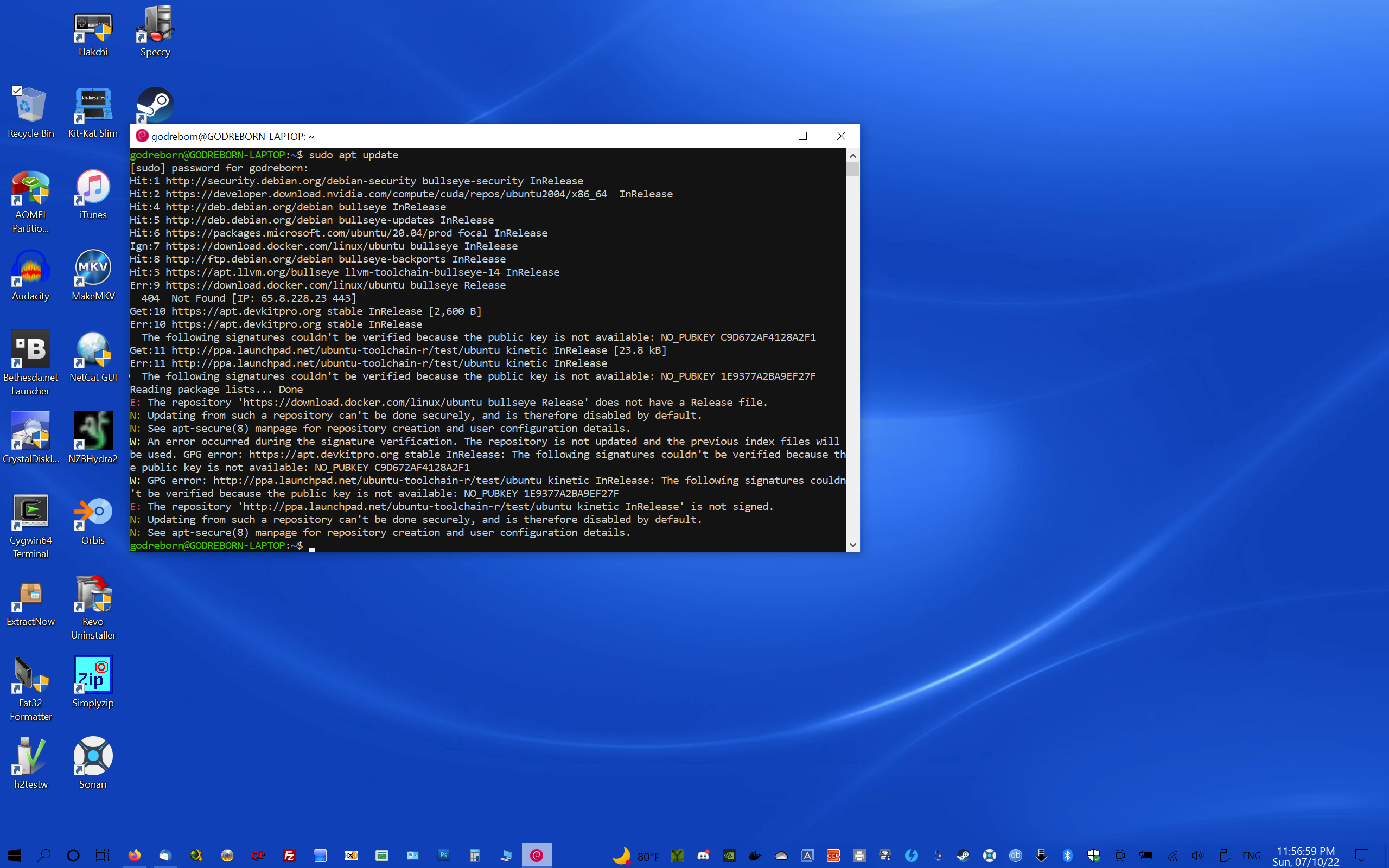
1657515468270.png


there are so many suggestions on what to do, so I have no idea what to do with this problem.

 
Debian is known as stable but is a lot stuff to know and need to be set up/ configured manually. I tryed once, too. But it took to many time for research everything so i changed to ubuntu. Maybe now after some time i would try Debian again with my knowhow.
 
Debian is known as stable but is a lot stuff to know and need to be set up/ configured manually. I tryed once, too. But it took to many time for research everything so i changed to ubuntu. Maybe now after some time i would try Debian again with my knowhow.
I think I know how to fix it. I'm still an amateur at Linux, but I'm learning a lot as I go.
 
I fixed all errors except for one. it's one of the devkitpro keys. I've searched for the key everywhere.
 
still can't figure this out. it makes no sense. it's like the key doesn't exist. I have to uninstall debian entirely just to fix the error, and that's not something I can do. all of my projects are in there.

1657582432062.png
 
still can't figure this out. it makes no sense. it's like the key doesn't exist. I have to uninstall debian entirely just to fix the error, and that's not something I can do. all of my projects are in there.

View attachment 317610

Try this:

sudo apt-key adv --keyserver keyserver.ubuntu.com --recv-keys C9D672AF4128A2F1
 
  • Like
Reactions: godreborn
I tried that, but it can't find the key. I've tried multiple key sites and searched them. It's like the key doesn't exist. A fresh Debian install doesn't have this problem, which makes me wonder if my build is too old?
 
I had to change one location from bullseye to eoan, because of a release issue, where bullseye isn't compatible with Debian afaik.
 
I tried that, but it can't find the key. I've tried multiple key sites and searched them. It's like the key doesn't exist. A fresh Debian install doesn't have this problem, which makes me wonder if my build is too old?
I had to change one location from bullseye to eoan, because of a release issue, where bullseye isn't compatible with Debian afaik.

It might be that you need to re-add the apt.devkitpro.org repository (might be out of date.)

To be honest I use pacman to update everything from Devkitpro.

https://apt.devkitpro.org/dists/stable/InRelease
 
  • Like
Reactions: godreborn
How do I do that? Readd?
Look under /etc/apt/sources.list.d/ where you should find something along the lines of <filename>.list.

Just move that file to <filename>.list.bk where <filename>=something_devkitpro_related

Then just run sudo apt-get update to re-read the list of repots.
(Reverse everything to put it back.)

https://devkitpro.org/wiki/devkitPro_pacman will get pacman on your machine to manage packages from Devkitpro....
 
  • Like
Reactions: godreborn
Look under /etc/apt/sources.list.d/ where you should find something along the lines of <filename>.list.

Just move that file to <filename>.list.bk where <filename>=something_devkitpro_related

Then just run sudo apt-get update to re-read the list of repots.
(Reverse everything to put it back.)

https://devkitpro.org/wiki/devkitPro_pacman will get pacman on your machine to manage packages from Devkitpro....
I think I found the source of the problem. what do you have for devkitpro in the sources list? does it say bullseye?
 
I removed devkitpro from the sources list. I think it's a mistake, because the apt.devkitpro.org doesn't seem to exist. I get a not found when I go to that link. I tried different releases, and none worked.
 
  • Like
Reactions: binkinator
I think I found the source of the problem. what do you have for devkitpro in the sources list? does it say bullseye?
Bullseye is a release of Debian
I removed devkitpro from the sources list. I think it's a mistake, because the apt.devkitpro.org doesn't seem to exist. I get a not found when I go to that link. I tried different releases, and none worked.
I had to go here to see it: https://apt.devkitpro.org/dists/stable/InRelease

That link talks about pacman...at which point I figured you might be better served to keep Debian stuff under apt and devkitpro products under pacman.
 
I'm thinking that the apt url was something used before pacman to distribute their packages. It's no longer usable. Don't know how it got there.
 
  • Like
Reactions: binkinator
  • Like
Reactions: binkinator
I'm thinking that the apt url was something used before pacman to distribute their packages. It's no longer usable. Don't know how it got there.
right there with you.
Bullseye seems to have been used since 2021. I read the next release name is bookworm.
Bullseye is still the right one. Bookworm is under testing.
 
  • Like
Reactions: godreborn
right there with you.

Bullseye is still the right one. Bookworm is under testing.
how do you execute an executable in msys considering sudo doesn't exist for it? before it came to me that the site for apt update probably didn't exist, I was going to install devkitpro on msys to see if it showed the correct site. however, it said something about it needing to be on the root like it would if you didn't chmod or use sudo on Debian. I did chmod the file too.
 

Site & Scene News

Popular threads in this forum
