Hacking Question Switch Unpatched but no RCM

  • Thread starter Thread starter chronoss
  • Start date Start date
  • Views Views 9,771
  • Replies Replies 63
If you did installed APX driver.. Do this:

Connect your Switch to your PC via USB and ensure it is powered off
Enter RCM on your Nintendo Switch
Insert your RCM Jig into the Right Joycon slot, sliding it all the way downHold down the [Vol+] button and press the [Power] button, the Switch will now enter Recovery Mode (RCM) but the screen will stay off
The icon in TegraRCMGui should now read [RCM O.K.]
 
  • Like
Reactions: chronoss
does it have an RCM x86 ?
no but nothing with that

TegraRcmGUI come with the APX driver. Did you installed APX driver ?
Driver is OK, my switch work fine on it

on my switch with my rcm x86 i always had to hold the button on the chip down then it showed rcm on

--------------------- MERGED ---------------------------

then i could inject a payload
This chip work well an another Switch
 
  • Like
Reactions: spotanjo3
Driver is OK, my switch work fine on it

So you did installed APX driver.. Then do this:

Connect your Switch to your PC via USB and ensure it is powered off
Enter RCM on your Nintendo Switch
Insert your RCM Jig into the Right Joycon slot, sliding it all the way downHold down the [Vol+] button and press the [Power] button, the Switch will now enter Recovery Mode (RCM) but the screen will stay off
The icon in TegraRCMGui should now read [RCM O.K.]
 
@chronoss The right joy-con works well plugged?

So you did installed APX driver.. Then do this:

Connect your Switch to your PC via USB and ensure it is powered off
Enter RCM on your Nintendo Switch
Insert your RCM Jig into the Right Joycon slot, sliding it all the way downHold down the [Vol+] button and press the [Power] button, the Switch will now enter Recovery Mode (RCM) but the screen will stay off
The icon in TegraRCMGui should now read [RCM O.K.]


He have two switch and one works well with RCM he know how to enter in rcm mode.
 
  • Like
Reactions: chronoss
Since you have a problem and the right joy-con works well plugged then can you try this:

Hold down the [Vol+] button and press the [Power] button for about 30 seconds, the Switch will now enter Recovery Mode (RCM) but the screen will stay off
 
  • Like
Reactions: chronoss
Since you have a problem and the right joy-con works well plugged then can you try this:

Hold down the [Vol+] button and press the [Power] button for about 30 seconds, the Switch will now enter Recovery Mode (RCM) but the screen will stay off
I know that and i've a black screen for RCM mode but when i connect the switch on TegraRcmGui, i have no green RCM message and with a SX Dongle too, i have no red icon on my screen :(
 
  • Like
Reactions: spotanjo3
I know that and i've a black screen for RCM mode but when i connect the switch on TegraRcmGui, i have no green RCM message and with a SX Dongle too, i have no red icon on my screen :(

You will need to check to make sure your Nintendo Switch is function properly. And are you sure that your Nintendo Switch is unpatch and jailbreakable as you said it is ?
 
  • Like
Reactions: chronoss
U can check you too, this is the serial : XAJ70015785476

I dont know where you find one that said it is hackable but I realize when I test it on legit site from gbatemp. Yes, you gotta trust GBATEMP. To trust the one you should check it out at GBATEMP.

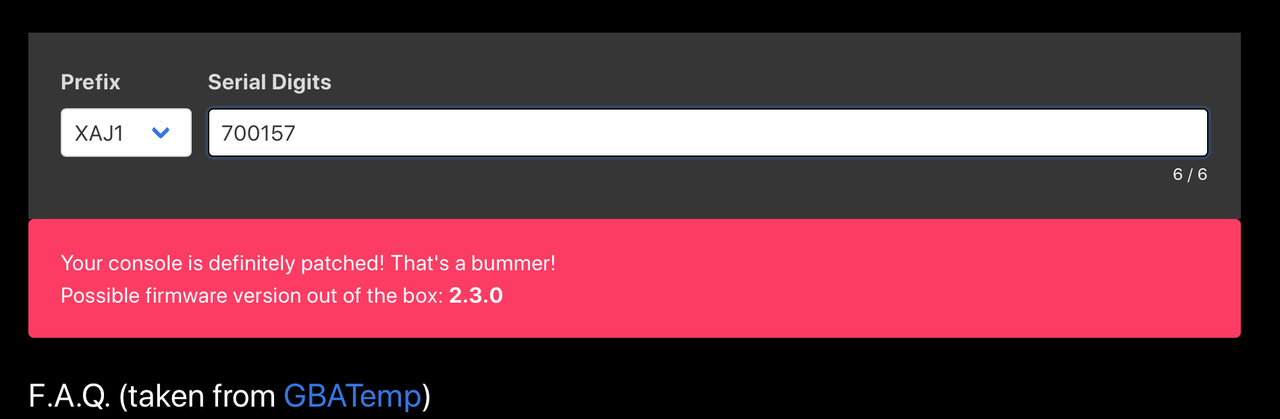
Unfortunately. A bad news for you. I found the legit one. Look at below. I check again for legit one. Your is definitely patched!

Your console is definitely patched! That's a bummer!

This site is legit. Here:

https://ismyswitchpatched.com

Did you get it new or used? Ninty has been known to patch models in repair.

Actually. his Switch is patched!
 
Last edited by spotanjo3,
unknown.png


it would be the first time that my system is wrong ? x)
 
Last edited by Zoria,
  • Like
Reactions: chronoss
I dont know where you find one that said it is hackable but I realize when I test it on legit site from gbatemp. Yes, you gotta trust GBATEMP. To trust the one you should check it out at GBATEMP.

Unfortunately. A bad news for you. I found the legit one. Look at below. I check again for legit one. Your is definitely patched!


This site is legit. Here:

https://ismyswitchpatched.com


Actually. his Switch is patched!
I don't know what you entered, but for me it shows that the Switch is unpatched. Also, wouldn't a patched Switch be recognized by the RCM tools as well but just wouldn't be able to actually exploit the Switch?
My thinking is that maybe something is wrong with the USB port of the Swtich.
 
Last edited by Essometer,
Last edited by spotanjo3,

Site & Scene News

Popular threads in this forum