
Hacking SD Card upgrade error

  • Thread starter Thread starter IliasM
  • Start date Start date
  • Views Views 7,561
  • Replies Replies 17

IliasM

Member
Newcomer
Joined
Apr 11, 2021
Messages
13
Reaction score
1
Trophies
0
Age
33
XP
95
Country
Morocco
Hi all,

I currently have a 128gb card working great on switch. Strictly following the tutorial "Changing SD cards" on NH Switch Guide (I have an sd raw partition), I tried upgrading to a brand new 512gb card (same make and class as the original, with more space).
When I try launching into atmosphere, I get the attached error message.
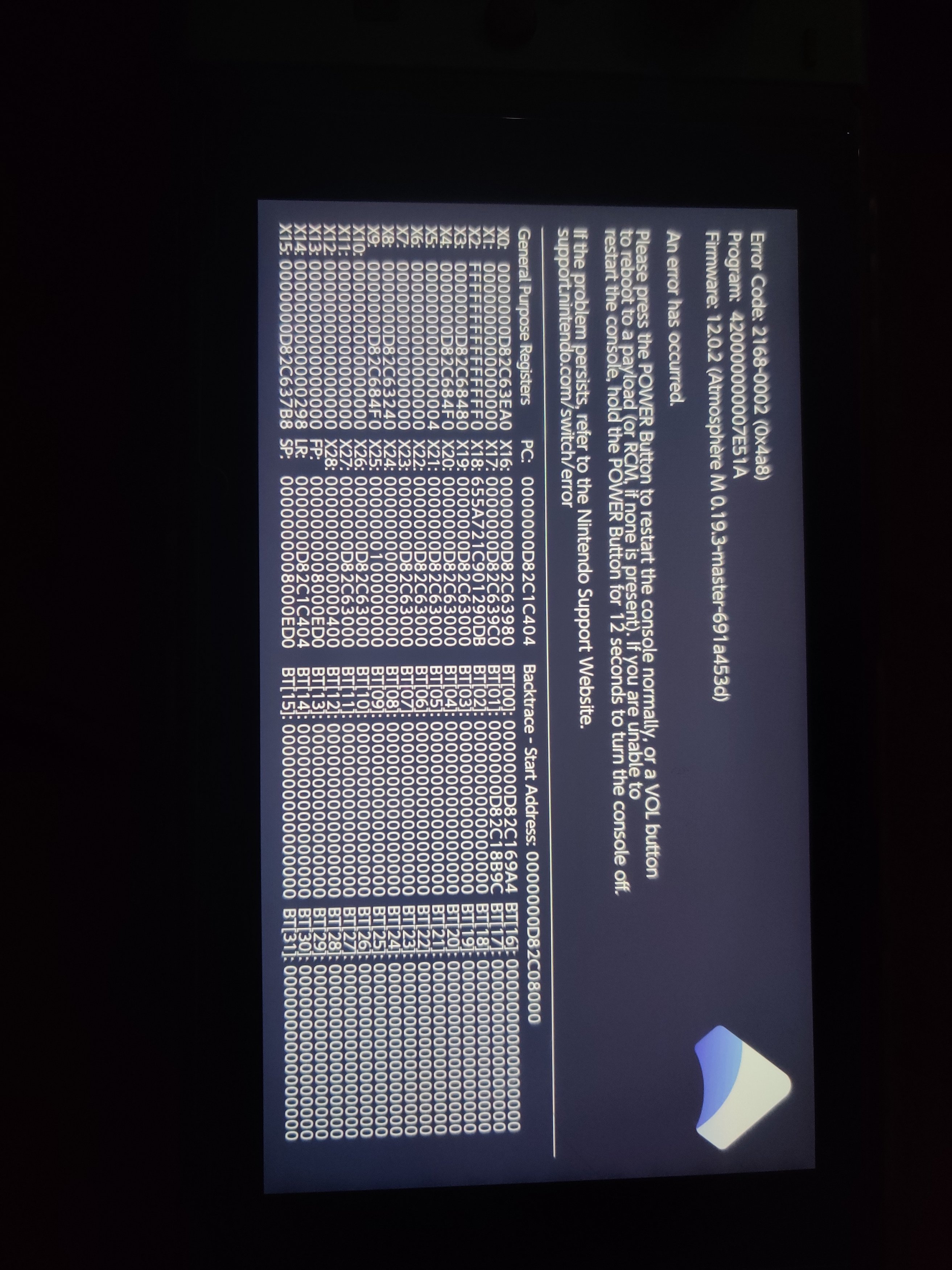
IMG_20210617_023103.jpg

I've searched everywhere, and I can't find any info on what could've gone wrong.
Could you please provide any insight on what mistake I could be doing?
 
Hi all,

I currently have a 128gb card working great on switch. Strictly following the tutorial "Changing SD cards" on NH Switch Guide (I have an sd raw partition), I tried upgrading to a brand new 512gb card (same make and class as the original, with more space).
When I try launching into atmosphere, I get the attached error message.
View attachment 267215
I've searched everywhere, and I can't find any info on what could've gone wrong.
Could you please provide any insight on what mistake I could be doing?

Did you have Tesla installed on your old SD card....if you did remove it see if it works...that error code 420000000007E51A is a Tesla error I think but remove any custom sys modules and try it but I think either Tesla or the Overlay is causing that
 
Last edited by burhansalih,
Did you have Tesla installed on your old SD card....if you did remove it see if it works...that error code 420000000007E51A is a Tesla error I think but remove any custom sys modules and try it but I think either Tesla or the Overlay is causing that
Thanks for this info. I removed the culprit folder and indeed the switch started normally. However, I could not launch any of the games I previously had. Do you happen to know why?
 
Thanks for this info. I removed the culprit folder and indeed the switch started normally. However, I could not launch any of the games I previously had. Do you happen to know why?

Yes....are you running the latest versions of Horizon and Atmosphere?

If you are use the sig patches below depending on how your booting through Hekate or Fuse

https://github.com/ITotalJustice/patches/releases
 
Last edited by burhansalih,
No, but my first thought was trying to update deepsea through AIO switch updater. It gets stuck at 16% however.

Ohhhh your using deep sea.......you should still be able to use these patches just manually update

--------------------- MERGED ---------------------------

https://github.com/Team-Neptune/DeepSea/releases/tag/v2.3.0

--------------------- MERGED ---------------------------

Manually update deep sea also
 
Ohhhh your using deep sea.......you should still be able to use these patches just manually update

--------------------- MERGED ---------------------------

https://github.com/Team-Neptune/DeepSea/releases/tag/v2.3.0

--------------------- MERGED ---------------------------

Manually update deep sea also
Thanks for your reply. I did both these updates manually.
First, I'm back to the initial error because deepsea contains the same folder (which you called Tesla). After deleting this folder, the console starts again, and I'm still not able to launch the games.
 
ok...you do have another option remove all the folders other then the Nintendo folder and revert to Atmosphere...but thats your call.

I have always used Atmosphere on the 4 switches that I own/hack 3 hacked and 1 legitimate
 
Last edited by burhansalih,
ok...you do have another option remove all the folders other then the Nintendo folder and revert to Atmosphere...but thats your call.

I have always used Atmosphere on the 4 switches that I own/hack 3 hacked and 1 legitimate
What I find strange is that the old card still works fine, and it has exactly the same files as the new one. Is there a possibility that I made a mistake somewhere in the process? Is this tutorial still valid?
 
The only way I got this to work was by cloning the card (using AOMEI) and then expanding the partition on the new, bigger card (I used a paid version of EaseUS) - dunno if that helps? It might take a while to get it set up, I needed to use a bit of trial and error and different cloning/partition programs!
 
To be honest I have used that tutorial with AMS on all of my switches and never had a problem I suspect it could be a Deepsea thing
I followed your recommendation, and got the switch to stop giving me an error at the start. Then, I figured out the issue with the games : they're still listed, they're taking up space on the sd card, but the console doesn't detect them as installed (they show up as taking up 0mb).
Is there an explanation for this? How can I safely remove the files corresponding to each game from the sd card, so that I can reinstall them?
 
I followed your recommendation, and got the switch to stop giving me an error at the start. Then, I figured out the issue with the games : they're still listed, they're taking up space on the sd card, but the console doesn't detect them as installed (they show up as taking up 0mb).
Is there an explanation for this? How can I safely remove the files corresponding to each game from the sd card, so that I can reinstall them?

Under the settings option data management then software does it list the titles..if it does and they are all 0mb just use TinWoo installer to reinstall them and you should be ok.
 
Under the settings option data management then software does it list the titles..if it does and they are all 0mb just use TinWoo installer to reinstall them and you should be ok.
The issue when I try to reinstall games that were already installed through Tinwoo, is that I systematically get this error, even if I uninstalled the games from data management.
IMG_20210618_221403.jpg

I also looked up the game info on the tinfoil website, removed the corresponding content meta from the sd card, but still the same error.

Is there a way to "clean" the sd card from the old game data?
 
The issue when I try to reinstall games that were already installed through Tinwoo, is that I systematically get this error, even if I uninstalled the games from data management.
View attachment 267369
I also looked up the game info on the tinfoil website, removed the corresponding content meta from the sd card, but still the same error.

Is there a way to "clean" the sd card from the old game data?
Do you have the patches to launch backups on your SD card?
 
Do you have the patches to launch backups on your SD card?
I ended up backing up the saves, reformatting the SD card from scratch, and reinstalling the games one by one. Took a lot of time, but worth it to avoid all the hassle.
 

Site & Scene News

Popular threads in this forum
