Hacking Sx Core and Sx Lite , test Units Received

  • Thread starter Thread starter matias3ds
  • Start date Start date
  • Views Views 923,011
  • Replies Replies 3,454
  • Likes Likes 35
Let me mark the lines; the file itself (the one you linked) says that is not know if it is safe to use:

# NOTE: This is not known to be safe, as data may be
# cached elsewhere in the system. Usage is not encouraged.
Yepp! It the same with Incognito. It's not known to be 100% safe either. So it's always a gamble.
 
Make sure the whole chip is inside like this.
Can you take some pictures for us to help you better?
Make sure your nand chip is actually clipped into the SX Core modchip itself like in the picture.
Also make sure ribbon cable is plugged in correctly into SX Core modchip.

Sorry I'm late.
I gave my switch to friend for un-install sx core yesterday night, so I don't have photos and switch now, but I can see what is different with yours... The soldering in mine is more dirty... maybe he fail at first and try more times:rofl:
Thanks for all you help!

In order to verify that the mod chip is installed properly you can take the MicroSD card out of the Switch and power it on, if you see the "sad" microsd card logo asking for the boot.dat file that means that the modchip is installed correctly.

Another way to test it would be powering on the Switch and open the photos app from the menu and see it the SX menu opens.

I know it might be confusing bc some people expects a different OS when the SX core is installed, it looks exactly the same as the original OS but with the big difference that when you open the photos app you have got access to the SX menu..

Try those steps and let me know how it goes

I actually try you advice yesterday but it's not work. I never see the sad 'boot.dat?' face even there's no sd-card and photo app is same as original firmwares.
The core is fine but there is an install problem i supposed...

I decided remove sx core and just buy second hands un-patched switch...
But all advices are helpful. Thank you guys:)
 
I decided remove sx core and just buy second hands un-patched switch...
But all advices are helpful. Thank you guys:)

Wouldn't it have made more sense to send it off to get it done properly than buy a totally new switch ?
 
Wouldn't it have made more sense to send it off to get it done properly than buy a totally new switch ?
You’re right. But this failed experience make me anxious about modchip.....
I don’t have any knowledge with soldering or modchip process and I can do anything If there is something wrong. just like yesterday.
Also I worried about I choose wrong installer again. So I think buy new one is more safe and easy to me....
 
Last edited by ,
  • Like
Reactions: ChronoTrig
Some SX Pron for you nerds:

jIveOuj.jpg

jnf0kpn.jpg

Njn8nPu.jpg

So according to picture you leave USB debug port out of installation ? You leave it laying under your desk or you return this to customer (for whatewer reason) ?
 
  • Like
Reactions: Deleted User
You’re right. But this failed experience make me anxious about modchip.....
I don’t have any knowledge with soldering or modchip process and I can do anything If there is something wrong. just like yesterday.
Also I worried about I choose wrong installer again. So I think buy new one is more safe and easy to me....

Or you could have messaged the guy posting pictures of his installs and even offering installs as well to fix it for a fraction of the price of buying a new one and not using the mod you already paid for.
 
Got my v2 switch today and got it all setup and transferred. Also ordered supershieldz screen protectors and a 512gb extreme sd card which will be here tomorrow!

The joycons are super tight fitting! My v1, it's very sloppy, even after adding a piece of electrical tape on both sides lol
 
new update out also helps resolve bricked switchs from using choij
*SX OS v3.0.3 Beta and SX Core/Lite Flasher Application Announcement*

We are back with a minor (yet important!) update for SX OS, as well as an PC utility for updating your SX Core/Lite firmware over USB. The latter is required for people who ran tools that were not designed for their Switch console. One example is the popular `Choi Du Jour NX`, which people use to upgrade/downgrade their firmware. This tool was designed for classic erista/rcm consoles, and as such is dangerous to use on mariko consoles.

*That said, lets have a look at the official changelog:*

- *SX Core/Lite firmware v1.3*
SX Core/Lite users will be prompted to install a firmware update upon first launch of SX OS 3.0.3. This is a mandatory update that improves the stability of SX Core/Lite. It also adds hardening against accidental bricks that were caused by running tools designed for Erista/RCM consoles on. People who are unable to run SX OS v3.0.3 because they bricked their consoles are advised to run the standalone USB updater application.

- *New functionality added to SX Core menu*
The SX Core menu in the SX OS boot menu has been enriched with some new functionality for advanced users:
-- *Cleanup:* Will remove any trace of SX Core/Lite on your NAND.
-- *Genuine Boot:* Boot straight into original firmware without going through the typical SX OS bootchain. This is *different* from using the regular boot original firmware functionality, for example you won't be protected from getting your fuses burnt. Only use when you know what you are doing!

- *Minor stability improvements*
You know the drill! Under the hood we're always changing things, to increase both stability and performance of your beloved SX OS.

Both SX OS 3.0.3 as well as the `SX Flasher` application (Currently only for Windows, if there is enough demand we will consider releasing ports for OSX and Linux)

That's it for today. Stay tuned for more news!

—< Team Xecuter - Pushing the limits of every Switch in 2020 and beyond ! >—

 
Last edited by izy,
I'm not sure why, but the website I'm using for tracking isn't giving a delivery estimate this morning. It was earlier though. If you want to track your shipment I believe this one, parcelsapp.com/en/tracking gives you the most detail for your shipment when you put in that really long destination postcode.
IT'S MOVING!

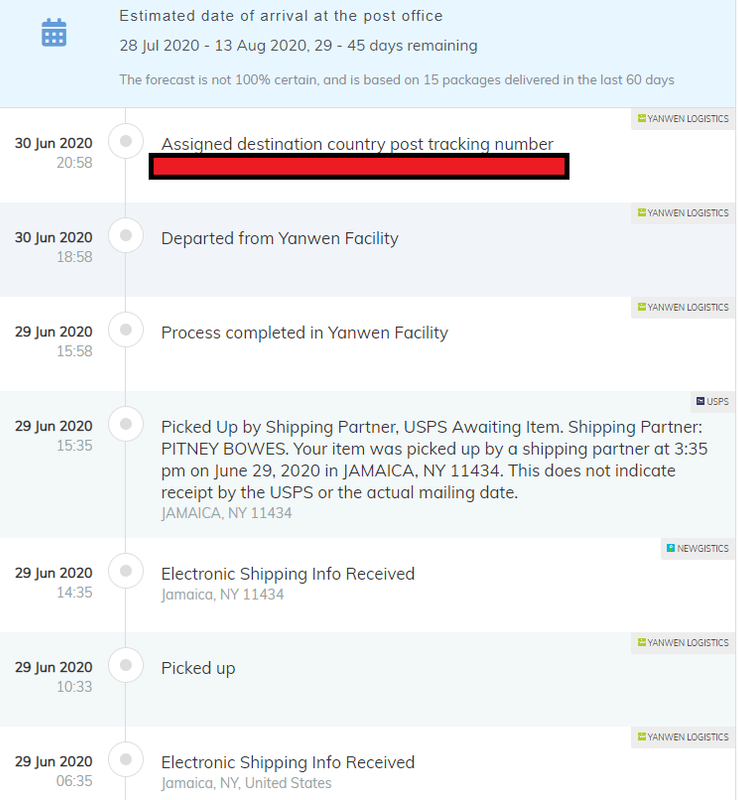
of course the tracking don't make no god damn sense at all though ,

sx-lite-tracking.png


Jun 29th says it was "picked up by a shipping partner at 3:35 PM in Jamaica NY"

then it says "Jun 30th assigned destination country post tracking number"

wait i thought it was already in the destination country on the 29th and shipped out from NY , now its back in China on the 30th?

or is that it was handed off to the USPS on the 30th and that number is the USPS tracking number?
but 45 days from NY to Boston? makes no sense at all would make sense if was China to Boston via Yan never

EDIT: hmm seems the number is a legit USPS tracking number says it has been handed off to USPS already so i expect by the end of the week
 
Last edited by weatMod,
new update out also helps resolve bricked switchs from using choij
*SX OS v3.0.3 Beta and SX Core/Lite Flasher Application Announcement*

We are back with a minor (yet important!) update for SX OS, as well as an PC utility for updating your SX Core/Lite firmware over USB. The latter is required for people who ran tools that were not designed for their Switch console. One example is the popular `Choi Du Jour NX`, which people use to upgrade/downgrade their firmware. This tool was designed for classic erista/rcm consoles, and as such is dangerous to use on mariko consoles.

*That said, lets have a look at the official changelog:*

- *SX Core/Lite firmware v1.3*
SX Core/Lite users will be prompted to install a firmware update upon first launch of SX OS 3.0.3. This is a mandatory update that improves the stability of SX Core/Lite. It also adds hardening against accidental bricks that were caused by running tools designed for Erista/RCM consoles on. People who are unable to run SX OS v3.0.3 because they bricked their consoles are advised to run the standalone USB updater application.

- *New functionality added to SX Core menu*
The SX Core menu in the SX OS boot menu has been enriched with some new functionality for advanced users:
-- *Cleanup:* Will remove any trace of SX Core/Lite on your NAND.
-- *Genuine Boot:* Boot straight into original firmware without going through the typical SX OS bootchain. This is *different* from using the regular boot original firmware functionality, for example you won't be protected from getting your fuses burnt. Only use when you know what you are doing!

- *Minor stability improvements*
You know the drill! Under the hood we're always changing things, to increase both stability and performance of your beloved SX OS.

Both SX OS 3.0.3 as well as the `SX Flasher` application (Currently only for Windows, if there is enough demand we will consider releasing ports for OSX and Linux)

That's it for today. Stay tuned for more news!

—< Team Xecuter - Pushing the limits of every Switch in 2020 and beyond ! >—
Thanks for the fresh news....so if we want to update the SX Core we need to reopen the switch or is there an easy way.....please advise....thank you.
 
Thanks for the fresh news....so if we want to update the SX Core we need to reopen the switch or is there an easy way.....please advise....thank you.
Just update as usual
yeah update like usual
unless you like me and sx website is blocked in UK
then download the files manually and transfer it via ftp

updating firmware means when you copy boot.dat over and reboot the modchip says it has an update pending
just update
 
Last edited by izy,
yeah update like usual
unless you like me and sx website is blocked in UK
then download the files manually and transfer it via ftp

updating firmware means when you copy boot.dat over and reboot the modchip says it has an update pending
just update
Thanks...sorry I couldn’t get it...can you explain it in an easy way please...I am noobie...and thanks
 
  • Like
Reactions: matias3ds

Site & Scene News

Popular threads in this forum