Hardware Switch wont turn on - component short - any ideas?

  • Thread starter Thread starter tr1p1ea
  • Start date Start date
  • Views Views 2,777
  • Replies Replies 6

tr1p1ea

Member
Newcomer
Joined
Jun 22, 2017
Messages
12
Reaction score
0
Trophies
0
Age
46
XP
89
Country
Australia
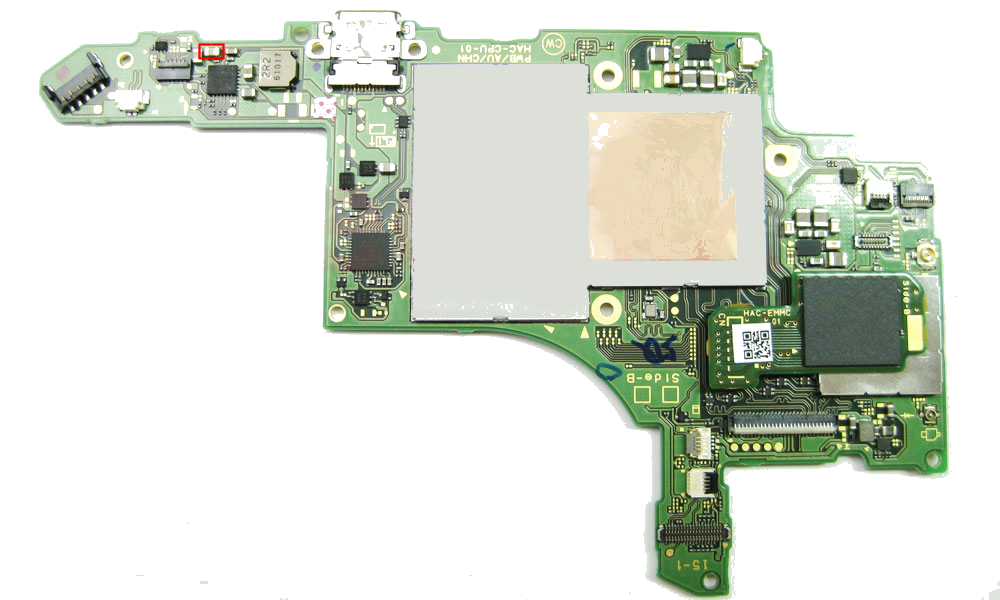
I have a switch that wont turn on or charge. I identified a short shown below (outlined in red):

switch%20board.png


I removed the BQ24193R chip and unfortunately the short is still present. Anyone know the likely fix for this?

Any help would be greatly appreciated!
 
You mean a power to ground short? That is exactly what that is, its a filter cap to knock AC noise out of the DC supply voltage..

To properly test a capacitor you must remove it from the board. If that cap is really bad, removing it should allow the Switch to boot.
One pad should be + and the other - on the Switch PWB


If you dont have a meter that can do caps you can see if its broken by using your meter and seeing what the res is across it. Should be pretty high 500k Ohms.. or no connection.

FOD - foreign objects & debris, if you have a short somewhere it would be from that, not a component on the board just sitting there, those caps don't fail at a high rate.
 
  • Like
Reactions: FXDX
OK basically I did a quick test for continuity across both pads of the cap and both were shorted to ground it seems. You're saying this is normal for this cap?

None of the other caps shows this result, only this one.

I scrubbed the entire board with iso alcohol in an attempt to remove any debris to no avail.
 
Last edited by tr1p1ea,
so putting your probes on both pads gives what resistance(ohms)?

When you place probes on cap that was removed (metal ends) what is the resistance(ohms)?
 
OK basically I did a quick test for continuity across both pads of the cap and both were shorted to ground it seems. You're saying this is normal for this cap?

None of the other caps shows this result, only this one.

I scrubbed the entire board with iso alcohol in an attempt to remove any debris to no avail.
- try follow his tips. It might be the graphic chip that is busted.
 
Well to be honest you said this was a water damage, so lets run down some things I would do. So i will assume it was submerged. First thing will be to remove ALL moisture. And water is not always clean. So find some 90% alcohol. wash the entire board (no batteries) in alcohol, submerge it if needed. Now you need to dry it out. Heat is best, but let the alcohol evaporate.

Do not wash touchscreen.

To get all the moisture out, the right way is to use a 100deg oven. No plastics, just the mainboard. Capacitors are the thing that can be damaged by heat, so thats why 100-125deg MAX for drying. I have seen people put a lightbulb in a metal tool box with a pcb to make a tiny oven.

Without doing that to ensure that water is gone, you could be chasing ghosts. This is a good project, and if you bring it back to life, then you should be proud -- if not then lesson learned.

Keep asking questions -- maybe this thing will live. I will see what i can find for more complete schematics

 

Site & Scene News

Popular threads in this forum