TX Presents SX Installer v3.0.0 - Now with Cheats and NSZ Support!

Last week, TX released SX OS v2.9.1 BETA with v9.0.1 support! And now today, they are releasing a large v3.0.0 update to our SX INSTALLER App.
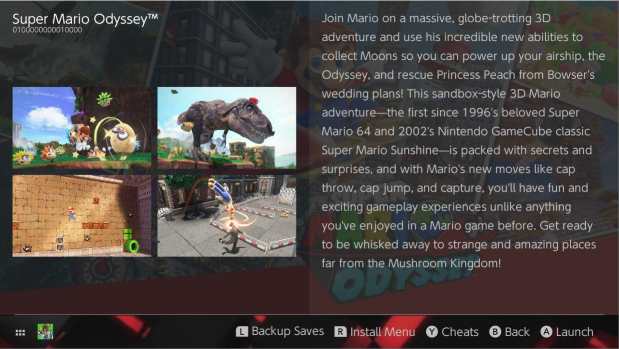
SX300.png

Earlier today, Team-Xecuter released finally their much needed update to their SX Installer app, now with their v3.0.0 release it integrates 'cheats' into it, and also adds support for compressed NSP's, called NSZ that have recently hit the underground channels, read on for vast list of changes they made in this release, and as usual you can find the download on their SX Portal website! :)
  • Improved boot time.
  • Reduced memory usage.
  • Ability to enable / disable cheats.
  • General UI performance improvements.
  • Firmware v9.0.0 / v9.0.1 compatibility.
  • Support added for NSZ games (compressed NSP).
  • Added uninstall option.
  • Added option to disable music.
  • Added ability to abort downloads.
  • Added authenticated gdrive support.
  • Added ability to write files to dropbox.
  • Added ability to search to the hex editor, and you can also now write / change files using the hex editor.
  • Added ability to copy and paste NSPs from the new games / XCI section, and paste to SD card. (Users can paste files over 4gb on FAT32 by auto-splitting).
  • Added czech, danish, greek, finish, hungarian, norwegian, vietnamese, polish, swedish, tagalog, ukrainian, croatian, turkish, arabic, farsi, hebrew, and hindi.
  • Fixed options screen scrolling.
  • Fixed bug with google drive folders.
  • Fixed incomplete box drawing around game icons.
  • Fixed issue with gdrive directories sometimes being limited to ~50 files.
  • Fixed install all bug not showing the correct names for dlc and updates in the queue.
  • The styling on the keyboard was improved.
  • Locations can now be edited or added from the file browser (use to be add only).
  • Locations now have an extra option: enabled, which flags the location to be loaded automatically at boot.
PLEASE NOTE: After extensive internal testing of this update, TX reports there is still an small issue when scanning your connected USBHDD for files/games contents. And they will addressed this bug in a future update, and are looking forward to your valuable feedback on any other oversights they may had missed during their testing.

SX300-1.png

As usual stay tuned to the TX website, as they are not finished, there are more great updates coming from them over the next few weeks.

—< Team-Xecuter - Rocking the Switch in 2019 and beyond! >—

:arrow: Source: MaxConsole
 
how do you use cheats? I enabled them before launching or after launching game, don't see sny effects on few games I've tried

Same here, nothing at all has worked. I was hoping they would be applied before booting to avoid the slowdown issue that occurs after going into the album the standard way.
 
Last edited by Calzy_G,
Why does the SX installer look like tinfoil somehow? Are the dev terms working in tandem with each other?
Yup you nailed it even HBG has cheats support so its nothing really new if you had been using it. But atleast that gives us more apps with cheats.
 
  • Like
Reactions: NoNAND
Open the app, highlight a game and select info, and then there is a button command at the bottom for cheats. You turn them on / off as you please.

I have done that but they don't work in game. No such problem doing it through the sxos cheats menu.
 
  • Like
Reactions: matias3ds
Does it detect split .xci??

Installer is great for mounting ROMs as album is slow but installer doesn't recognise split xci

The new SXOS supports normal horizon split XCI's. SX Installer will auto split the files if you try to copy+paste a 4gb+ file to your SD card.
 
  • Like
Reactions: gizmomelb
I pop my sdcard into my pc and copy and paste ROMs. What method are you meaning to have TXOS auto detect and split? FTP?

it auto splits files above 0xFFFF0000 size when pasting to SD in the file browser. Works on any source tinfoil can read in the file browser. USB HDD has an issue where it does not like to list files, however if you mess with it it will list then you can copy from there.
 
It's only compressed for the download or package. Its still a normal nsp inside it decompresses during the install.
But what about XCZ (which seem to be compressed XCIs I guess?) that I store on an HDD to mount and play them in SX OS? They would need longer loading times I assume?
 
  • Like
Reactions: RahFah
Cheats activation on sx os is not perfect (yet)
But here is a set of steps you can follow to get them working.

Start your game then press the Home button
go into sx installer
find your game
press Y
press Y again
activate your cheat
exit sx installer and enter sx os menu
go to cheats
enable your cheat(s)
return to game

As this is the first iteration of the feature, these extra steps are necessary currently. But it works. This may be improved in the future. :)
 
How do you use the cheats function?
is it different for the one in the main menu? or it download the cheats automatically?
 

Site & Scene News

Popular threads in this forum