
Homebrew RELEASE NX Activity Log - View (slightly) more detailed play statistics!

  • Thread starter Thread starter tallbl0nde
  • Start date Start date
  • Views Views 93,780
  • Replies Replies 345
  • Likes Likes 78

tallbl0nde

Well-Known Member
Member
Joined
Jan 11, 2019
Messages
147
Reaction score
424
Trophies
0
Age
26
XP
1,563
Country
Australia
My first homebrew project, NX Activity Log, reads and displays the amount of information about our play activity that we should have been given on the User Page. The UI has been designed to feel familiar and is navigated in a similar manner to the Switch's firmware.

I'm essentially aiming to create a better version of the user page, but we'll see if I can actually do that :P

It currently has the following features:
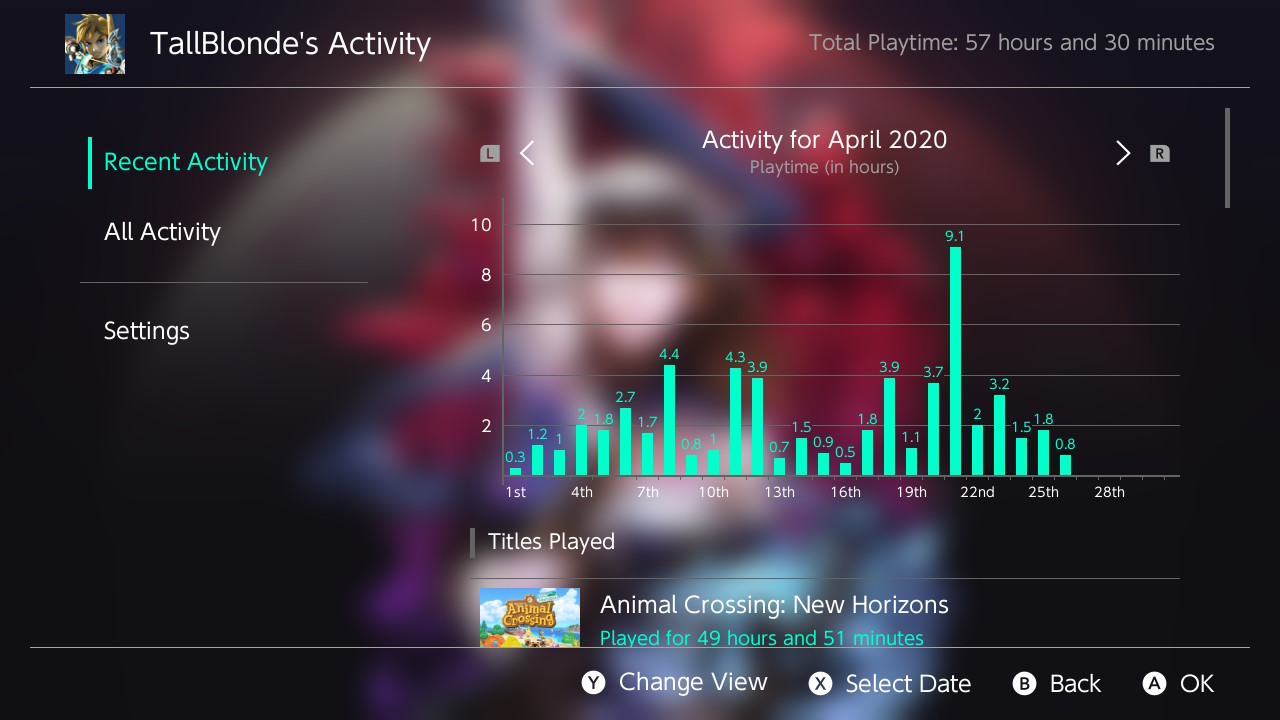
  • Viewing Play Activity (per user)
    • All Time Activity
      • Total Playtime in minutes
      • Number of times a game has been launched
      • Date of first launch
      • Date/time of most recent launch
      • Average time spent in a game
      • Sorting games by time played, recently played, etc.
    • Recent Activity (see note below)
      • Graph visualizing play time
      • View by day, month or year
      • Total playtime in seconds
      • Number of launches
      • Viewing each 'Play Session'
    • Event-by-event breakdown of your activity
  • Multi-language Support
    • English, French, German, Italian, Portugese and Russian
  • Theme Support
    • Automatic theme detection to match the Switch's colour scheme
    • Custom Themes
      • All colours used in the app can be adjusted
      • Set a custom background image
        • Requires a PNG saved at /config/NX-Activity-Log/background.png
  • Update in-app
    • Checks for updates automatically and displays an icon if one is available
    • Update completely within the app
  • User Page Replacement
    • Requires LayeredFS and either Atmosphere 0.10.0+, ReiNX or SXOS (or build and copy the forwarder to your CFW-specific titles folder)
    • Requires .nro to be at /switch/NX-Activity-Log/NX-Activity-Log.nro
Note: The data shown in Recent Activity and Details may be slightly inaccurate over larger periods of time (ie. off by a few minutes) but I will try to improve this over time. If activity is not being shown for earlier periods of time it is likely your switch has been reset at some point, which wipes the data used to calculate playtime in this way.

sc_recent.jpg


More information and the latest release can be found on GitHub: https://github.com/tallbl0nde/NX-Activity-Log
Please report any bugs (or feature requests) as issues on the GitHub page!
 
Last edited by tallbl0nde,
Thanks for posting the link @Garou :)

On my switch my main account is linked, however I did create new user accounts, left them unlinked and everything worked fine.

I'm not sure about the backup/restore side of things, I'd have to look into it but for now I'm focussing on just using what's available.
 
@tallbl0nde
Now that's a tool for me!
Since as the dev of it you already know how to deal with the log stored on SYSTEM:/save, can you tell me how to inject the play log from a NAND dump (or at least read that out) to edit it to the new one?
I know my case is pretty unique and special, but I'm one of the few people that really care for the play log.
My Switch got stolen and I bought a new one. Fortunately I have a NAND dump of the old one from less than a month before it was stolen and I would be pretty happy to merge the play log from there into my current emuMMCs play log if possible in any way.
I know that it's 80000000000000F0 in SYSTEM:/save but somehow I don't dare to simply copy it over from my old NAND dump to my new Switch's emuMMC.
 
@tallbl0nde
Now that's a tool for me!
Since as the dev of it you already know how to deal with the log stored on SYSTEM:/save, can you tell me how to inject the play log from a NAND dump (or at least read that out) to edit it to the new one?
I know my case is pretty unique and special, but I'm one of the few people that really care for the play log.
My Switch got stolen and I bought a new one. Fortunately I have a NAND dump of the old one from less than a month before it was stolen and I would be pretty happy to merge the play log from there into my current emuMMCs play log if possible in any way.
I know that it's 80000000000000F0 in SYSTEM:/save but somehow I don't dare to simply copy it over from my old NAND dump to my new Switch's emuMMC.
not tested but you might be able to inject system save using https://github.com/Adubbz/Compelled-Disclosure, just change the VMDB_SAVE_ID in main.c to 0x80000000000000F0 and compile the app

and as for your last sentence, why not backup your current save for 80000000000000F0 before overwrite it with the one from your old dump?
system save is not encrypted with console specific key afaik, though I have no idea if the files within are console specific

as for editing play log, 80000000000000F0 save itself contains 3 files
migration.ok
BaseTimePoint.bin
PlayEvent.dat

with PlayEvent.dat as the biggest one (mine is about 16MB)
unfortunately I couldn't find any documentation about this file on switchbrew so no clue how to edit it, but based on the look it doesn't seem to be encrypted
 
Excited to try this - really have missed an activity log.

Does this still track games that have been uninstalled?
 
Wow this is amazing, so many people requested this. Good luck with the dev process!

Goldleaf supports it as well, but I suspect this dev will add more features to differentiate it.

op: messing with the libnx calls to get this data is a dead end, you have to parse the save file to get the good data. I wrote a grapher for this data if you have any specific questions.
 
Last edited by blawar,
not tested but you might be able to inject system save using https://github.com/Adubbz/Compelled-Disclosure, just change the VMDB_SAVE_ID in main.c to 0x80000000000000F0 and compile the app

and as for your last sentence, why not backup your current save for 80000000000000F0 before overwrite it with the one from your old dump?
system save is not encrypted with console specific key afaik, though I have no idea if the files within are console specific

as for editing play log, 80000000000000F0 save itself contains 3 files
migration.ok
BaseTimePoint.bin
PlayEvent.dat

with PlayEvent.dat as the biggest one (mine is about 16MB)
unfortunately I couldn't find any documentation about this file on switchbrew so no clue how to edit it, but based on the look it doesn't seem to be encrypted
Nice, thx. This seems a bit easier than creating a dump of my emuMMC, do the magic there with HacDiskMount and restore the emuMMC dump on my Switch.
But what is frightening me is that restoring a savefile of system stuff while being in Horizon doesn't sound very smart.
 
Hi! This may be a very noobish question, but how do you download the nso file for this homebrew? It doesn't look like it is in GitHub.
 
Hi! This may be a very noobish question, but how do you download the nso file for this homebrew? It doesn't look like it is in GitHub.

Look near the top where it says "1 release" - click there to go to the releases page.
 
Dear tallbl0nde, here's my another humble feature-request: please make an average time counter per 1 launch of the game: for example — playtime of the one's game is 29 hrs 29 min, it was launched 70 times, so average playtime is ~25 minutes per play session.

Thank you in advance!
 
Last edited by mathew77,
Answered my own question in the fact that it does not show games that still have the save, but are currently uninstalled.

Hopefully there is a way to fix that.
 
They aren’t encrypted with console unique keys, but they are signed with the console’s device key.
yes but what i meant was whether for example PlayEvent.dat has console info, but that doesn't seem to be the case. already figured out the format and it only has user info
thanks for reminding that the save needs to be signed though
 
  • Like
Reactions: ZachyCatGames
@lordelan Sorry to hear about your switch... but I have no idea about that as I'm just using some functions that libnx provides, not actually reading the save file (well at least not yet)

@veekay Unfortunately it doesn't show uninstalled games just yet, that's on the to-do list!

@blawar Thanks, I didn't even know where the save file was before so I'll probably have some questions ;)

@mathew77 I'll add that in soon!
 
Amazing thanks! Been wanting something like this since the switch launched without a proper user history of any kind.
 

Site & Scene News

Popular threads in this forum