ClawSwitch - a Captain Claw port for Nintendo Switch

ClawSwitch - a Captain Claw port for Nintendo Switch based on OpenClaw project
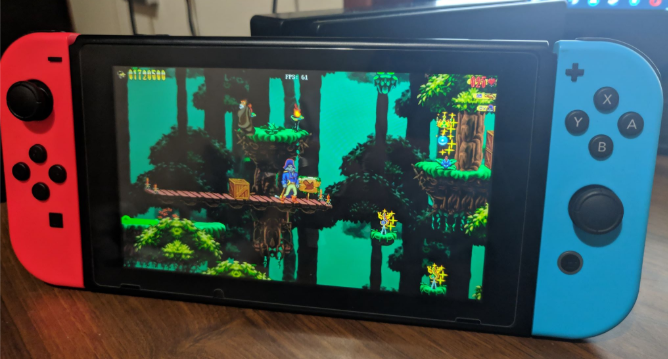
upload_2019-1-17_19-21-1.png


First, I want to say a big thank you to these people:
  • pjasicek - creating the OpenClaw project
  • mialy - adding basic controller support
  • denispapec - implementing basic level 11 support
  • usineur - adding background music support
  • fgsfdsfgs - porting fluidsynth to the Switch
What is this:
Captain Claw is a side-scrolling action platformer released on PCs by Monolith in 1997. The difficulty of the game is quite high, but still the game is really fun to play. Your goal is to defeat enemies, collect treasure and defeat bosses on your way. More about the game here:


Controls:
A - Fire (Pistol/Magic Claw/Dynamite)
B - Jump
X - Switch weapon
Y - Melee attack
Minus - open in-game menu
D-Pad - walk left/right, look up/down, climb up/down
You can also use the left analog to do anything the d-pad does.


Bugs:
- OpenClaw project has not implemented the last level yet, other levels should be more or less playable

Cheats:
You can modify your game saves by editing /switch/claw/SAVES.XML file.

Installation:
OpenClaw.nro needs to be in the /switch/claw/ directory with all other files and assets needed to run the game.

WARNING: You need to run the game from a hbmenu NSP/Atmosphere title takeover, it will not work from the Album! (it will make the system crash)

Download (current release - beta 4 - updated 12 October 2021):

All versions will be available here: https://github.com/djmuted/ClawSwitch/releases
 
Last edited by djmuted,
Oh man... I wish this would be released on the E-shop for people that do not have their Switch hacked. I loved this game back when I was a kid!
 
Hehe nice work. I was more or less working on this too, few months ago. No time to finish the port.

Btw, here is a version based on your sources, with music supports: OpenClaw.nro

Notes:
I think I will make some PR for this and a few more things.

This patch works great to enable the music! Thank you!
 
  • Like
Reactions: usineur
Updated the game with fixed analog controls, background music and other various bugfixes. Remember not to replace your SAVES.XML file while updating the game with new files!
 
  • Like
Reactions: rsn8887
the game get error and close ! when I get game-over in the game !
please fix this problem
 
I tried the beta 3, and it crash at the first loading screen.
No problem with me try to launch the game from hbmenu.nsp and if this stall not work delete the claw folder and replace the new-one and off course don't forget to backup your save Data !

--------------------- MERGED ---------------------------

Can any one make an NSP file for the game when it completely finished and hope if the game support the custom levels !
and very Very many thanks for every one who make this game come again for Nintendo switch ♥
Very thank you djmuted ♥ great work man keep it until the END !
thank you usineur0 ♥
thank you All ♥ ♥
 
No problem with me try to launch the game from hbmenu.nsp and if this stall not work delete the claw folder and replace the new-one and off course don't forget to backup your save Data !

It's a fresh install. I didn't install the prior beta.

I just reread the first post. I can't read thing when they are in different color, so I didn't know I needed the nsp version of the homebrew channel.
 
Last edited by medoli900,
It's a fresh install. I didn't install the prior beta.

I just reread the first post. I can't read thing when they are in different color, so I didn't know I needed the nsp version of the homebrew channel.
ok try it agan lanch the game from hbmenu.nsp Not from Album !
 
Hi!
Thanks for your work!
It worked great.. until I picked up the fire sword on the second level, than it crashed. I'm running it from hbmenu.nsp, not from album.
 
Comn we are waiting for beta 4 it been long time today I want to play the game with my brother and it crash every time in second level ! please release a stable version and thanks .
 
  • Like
Reactions: Slushyberry
Hey man I'm really interested in this. I used to play this game as a kid and its definitely my favorite. In no way am I trying to rush you I'm just asking are you still supporting or planning to work on this later on? I'm still painfully waiting for my payload injector to ship. Anyway amazing work so far!
 
Are you still working on the project? My partner is a big fan of the game, and she's really looking forward to your work.
 
Are you still working on the project? My partner is a big fan of the game, and she's really looking forward to your work.
This project is just a port of the OpenClaw project, which hasn't updated much since last ClawSwitch release. However there are some more projects like ClawJS working on reimplementing the Captain Claw game engine. Just a matter of time until the game will be fully playable.
 
This project is just a port of the OpenClaw project, which hasn't updated much since last ClawSwitch release. However there are some more projects like ClawJS working on reimplementing the Captain Claw game engine. Just a matter of time until the game will be fully playable.

Thank you for your feedback, both she and I who have already entered this hype are waiting anxiously!
 
hello all,
for some reason the joy cons is not responsive in the game, press and button but wont do anything
installed latest VER , few weeks ago, it worked without issues/
tried to delete everything and installed again but same thing
 
hello all,
for some reason the joy cons is not responsive in the game, press and button but wont do anything
installed latest VER , few weeks ago, it worked without issues/
tried to delete everything and installed again but same thing

which is the result expected with an old homebrew compiled with an old Switch library (beta 3 was compiled in january 2019) under the latest revision of Atmosphère (0.10.2) on 9.x firmware

Atmo's hid-mitm patch for old homebrews is now disabled by default, because it will be removed in the near future.
put this (without the quotes) "enable_deprecated_hid_mitm = u8!0x1" in atmosphere/config/system_settings.ini


but it's just a temporary trick. Old homebrew will need recompilation (with newest libraries) in the near future:teach:
 
Last edited by Badablek,

Site & Scene News

Popular threads in this forum