Official hakchi2 - NES Mini very simple pimp tool

  • Thread starter Thread starter Cluster
  • Start date Start date
  • Views Views 4,398,761
  • Replies Replies 18,558
  • Likes Likes 138
The biggest issue was developers didn't make N64 games follow any standards. Many used shortcuts, and even holes in the system to get the games do things they weren't normally intended to do. So it makes it highly dififcult to emulate for every game the same way.

Yep, old consoles where devs wrote against bare metal or at least with developer/publisher specific codebases that did whatever worked to get speed. Inaccurate emulation requires a ton of game-specific hacks and accurate emulation requires more power than the mini has to offer.Perhaps one day we'll see an emulator that strikes a good middle ground, for now at least the price of a conker cart pushed me to get a 64drive instead years ago. :)
 
hello
i've make an home made otg cable :) ( simply take an OTG cable and solder a power usb cable )
try to perform USB-HOST but some problem :
- for preinstal game i put them in /hakchi/games/ directory , i can load them but i got an error c3 before game launch
- for all other it simply doesn't work , i change the path in .dektop but without luck
Anyone have it work?
 
@KMFDManic
can you hel me with usb boot?
what make i wrong in the desktop file?
the games is visible but everytime when i want to start it i got C7 error.
Code:
[Desktop Entry]
Type=Application
Exec=/bin/clover-canoe-shvc-wr -rom /var/games/CLV-U-WYSZK/SD3.sfrom -rollback-snapshot-period 100  -no-lowlatency
Path=/var/saves/CLV-U-WYSZK
Name=Secret of Mana 2 - DE
Icon=/var/games/CLV-U-WYSZK/CLV-U-WYSZK.png

[X-CLOVER Game]
Code=CLV-U-WYSZK
TestID=777
ID=0
Players=1
Simultaneous=0
ReleaseDate=1995-09-30
SaveCount=3
SortRawTitle=secret of mana 2 - de
SortRawPublisher=SQUARE ENIX
Copyright=hakchi2 ©2017 Alexey 'Cluster' Avdyukhin
 
Last edited by Liriel,
@Liriel Seems we have same problem but if you take a desktop of preinstall game and replace the .sfrom with your it must be ok

--------------------- MERGED ---------------------------

@Liriel Seems we have same problem but if you take a desktop of preinstall game and replace the .sfrom with your it must be ok ( think to rename it with the same name of the orginal game )

EDIT : only donkey kong country seem works , i'll try other thing to understand
EDIT 2 : All my games original game with a save folder work
EDIT 3 : exec must be : "Exec=/usr/bin/clover-canoe-shvc"
EDIT 4 : I've make a folder for each original games in hakchi/saves/ now all my original games launch :)
EDIT 5: Problem with save folder gone when my USB key is FAT32
 
Last edited by bandicoot37,
that was the error!
thx.
the folder in save are created automatic at my system.

know we need hakchi support and with it folders. ^^
ANd the Modul support!
--------------------- MERGED ---------------------------

for all others the desktop file must look like this for usb drive use
Code:
[Desktop Entry]
Type=Application
Exec=/usr/bin/clover-canoe-shvc -rom /var/games/CLV-U-WYSZK/SD3.sfrom
Path=/var/saves/CLV-U-WYSZK
Name=Secret of Mana 2 - DE
Icon=/var/games/CLV-U-WYSZK/CLV-U-WYSZK.png

[X-CLOVER Game]
Code=CLV-U-WYSZK
TestID=777
ID=0
Players=1
Simultaneous=0
ReleaseDate=1995-09-30
SaveCount=3
SortRawTitle=secret of mana 2 - de
SortRawPublisher=SQUARE ENIX
Copyright=hakchi2 ©2017 Alexey 'Cluster' Avdyukhin

and i use a SD card adapter as usb drive
 
Last edited by Liriel,
When I was transferring my Famicom Mini with from the portable version to the web-installer version, everything seems to work just fine. When I try to play Famicom Disk System games though, it just goes back to the main menu. Why is this happening? What did I miss?
 
mmh that is wrote von kmfdmanic to modules in the readme but i dont test it.
Once you flash, hakchi2 will not work, except for installing hmods. (retroarch
and/or other system emulator cores). It is recommended to
install the HMODS you plan to use before flashing for USB Storage, for best
results.
i hope that hakchi support comes in near future but cluster is ill
 
Last edited by Liriel,
i've made it ( install before ) , i try to dump /var/lib/hakchi/rootfs/bin/ and put it on my usb key to /hakchi/bin/ and aim exec in desktop to but no luck
 
@KMFDManic
can you hel me with usb boot?
what make i wrong in the desktop file?
the games is visible but everytime when i want to start it i got C7 error.
Code:
[Desktop Entry]
Type=Application
Exec=/bin/clover-canoe-shvc-wr -rom /var/games/CLV-U-WYSZK/SD3.sfrom -rollback-snapshot-period 100  -no-lowlatency
Path=/var/saves/CLV-U-WYSZK
Name=Secret of Mana 2 - DE
Icon=/var/games/CLV-U-WYSZK/CLV-U-WYSZK.png

[X-CLOVER Game]
Code=CLV-U-WYSZK
TestID=777
ID=0
Players=1
Simultaneous=0
ReleaseDate=1995-09-30
SaveCount=3
SortRawTitle=secret of mana 2 - de
SortRawPublisher=SQUARE ENIX
Copyright=hakchi2 ©2017 Alexey 'Cluster' Avdyukhin

Did you CHANGE the desktop file?
 
@KMFDManic
Can you tel us what we need to write in .desktop to enable retroarch when we flash to hakchi usb-host
thanks

Desktop Files do not need changed. I am posting an Updated Core Set, along with bundled Prototype.

--------------------- MERGED ---------------------------

Today's Core Set Update:) UPDATE 11-11-17


UPDATE 11-11-17

Fixed Broken MAME 2003 Core, as well as Updated it! Sorry about that:) Updated MGBA, Vecx, Mednafen Virtual Boy, SNES 9X (Resolution Fix for Chrono Trigger, to account for the disorientation when switching from Normal In-Game to Battle Scenes (Thanks retro-wertz & twinaphex)! I also Updated SNES9X 2010. Additionally, I added MrBoom Core! This is a fantastic Dynablaster (BomberMan) Clone! To run it, Install the HMOD, THEN, you can load via NESC/SNESC RetroArch, Load Core Option:) I still plan on doing a video about alternative ways to run this and other embedded Games! I updated the ReadMe for USB-HOST, in Advanced Users Section. For those of you having difficulty using the Official Release, feel free to try out the Prototype (although it is buggier). I will do my best to continually update the ReadMe to make using Official Release as user-friendly as possible! Finally, per request, I included the hakchi2 I personally use, 2.21e Debug Version. Use it if you are having issues with 2.21f. Enjoy today's Update!!!

https://github.com/KMFDManic/NESC-SNESC-Modifications/releases/
 
Last edited by KMFDManic,
  • Like
Reactions: Truchen
I won't be actually opening my snes classic until christmas, it's a present, but I'm getting ready by collecting the games I want on it. I tried to put Wario's Woods, one of my favourites from the nes, because the snes version looked cool. But a little window popped up that said the game wouldn't work correctly and to install a different emulator. HOW exactly doesn't Wario's Woods work properly ?
 
Yes but we found the error.

it must be "Exec=/usr/bin/clover-canoe-shvc" instead of "Exec=/bin/clover-canoe-shvc"

that must be change too

I updated my Core Set to include a few things, as far as examples, readme, etc, along with the prototype, to try to help people along more. And, I will post a video this upcoming week showcasing some of the stuff we can do with USB-HOST:)
 
  • Like
Reactions: artemus3 and dulux
Haxchi newest build. Black screen on tv after syncing games to Snes mini, I can hear sound but no video.

Figured it out - Extra Space module was bugging it out.
 
Last edited by ,
Good morning to all!!!

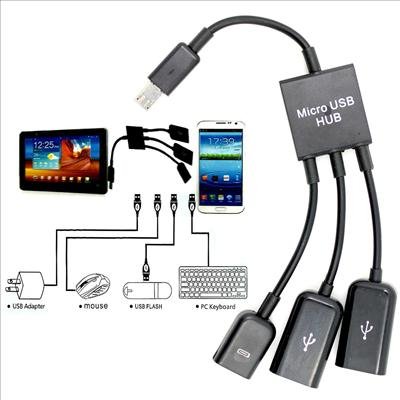
https://www.amazon.es/SODIAL-Micro-...=UTF8&qid=1510469776&sr=8-60&keywords=usb+hub

I've put a link with a cheap adapter for the usb ...

The question will serve ??? And if so....

41aG-StK15L.jpg


We can play Doom with a keyboard like on the PC.
The keyboard can be used for Msx games.

The keyboard and mouse could be used for the core of the Amiga 500 and Atari 520 ST that is used in the Raspberry pi 3.

If possible this is a breakthrough.
 
  • Like
Reactions: Deleted User

Site & Scene News

Popular threads in this forum