Good Operating System for a Very Shitty Laptop?

  • Thread starter Thread starter VinsCool
  • Start date Start date
  • Views Views 4,237
  • Replies Replies 29

VinsCool

Silly Catgirl
Global Moderator
Joined
Jan 7, 2014
Messages
15,118
Solutions
1
Reaction score
67,617
Trophies
5
Location
Lost Lands
XP
29,887
Country
Canada
Hiya!

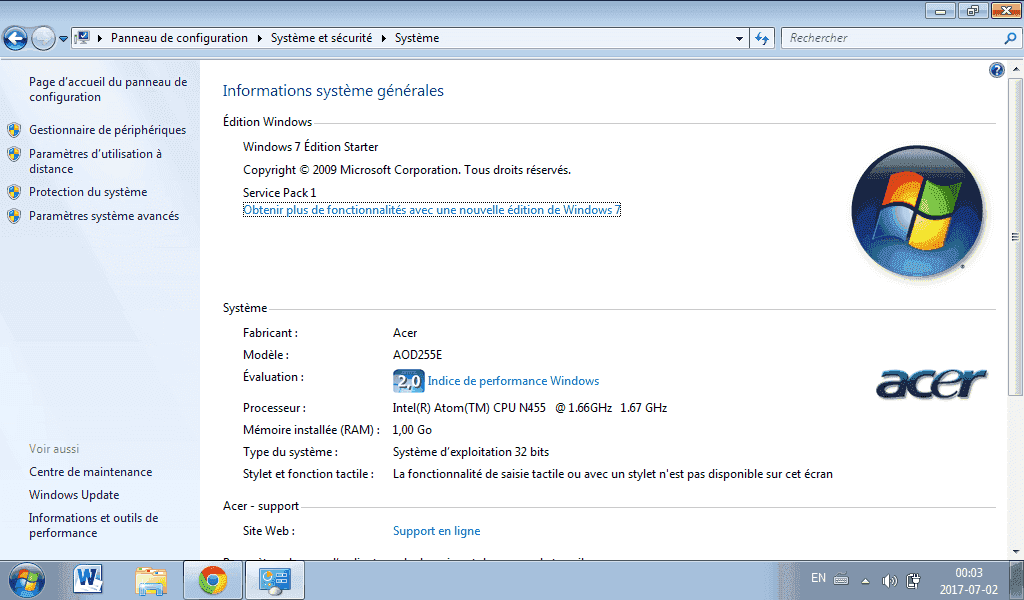
So I have in my possession a Acer Aspire One, that has really bad specs, running Windows 7, as shown below:

upload_2017-7-2_0-3-37.png


I wanted to ask you people if you could recommend me a good OS that will at least be functional on this machine? As long as web browsing and very lightweight work could be done on it, I will be happy :p

Thanks in advance :grog:
 
If it can run 64Bit, Solus Linux
If only 32Bit, Linux Mint XFCE
Hmmm, I have no idea if this machine supports 64 bits. Only one way to know: testing!

I will go look further tomorrow or Monday night, but these options will be taken in consideration :yay:
 
Hmmm, I have no idea if this machine supports 64 bits. Only one way to know: testing!

I will go look further tomorrow or Monday night, but these options will be taken in consideration :yay:
If those don't tickle your fancy, then here's some lovely list of distros to test
Netbook
Old Computers
If I can't find an OS, I spam test EVERYTHING until I find one I like and works the best.
Even though those specs are enough for Windows, I honestly suggest Linux for something lighter. Not because Linux > Windows, but to get the most out of those low resources.
 
Last edited by The Catboy,
If those don't tickle your fancy, then here's some lovely list of distros to test
Netbook
Old Computers
If I can't find an OS, I spam test EVERYTHING until I find one I like and works the best.
That would be fun to try stuff! I have nothing to lose, really. This minuscule laptop has no purpose at all.
 
That would be fun to try stuff! I have nothing to lose, really. This minuscule laptop has no purpose at all.
If you really want something fun to test, give FreeBSD a test.

(Lilith secret freeBSD >>> Linux)
 
  • Like
Reactions: Gray_Jack
What "distro", based on FreeBSD, would you recommend? I'm open to any option, really :P
There aren't that many freeBSD based distros and less desktop orientated ones.
If 64Bit: TrueOS
If 32Bit: GhostBSD
 
Windows 10 generally has better performance than Windows 7. If I were you, I'd update the computer to Windows 10 and give it a try. If it's still not fast enough for you, I'd recommend installing Lubuntu.

Edit: If you decide to run Lubuntu or any other Linux build, remember that Google Chrome is incompatible with 32-bit builds of Linux. 32-bit Chromium will work just fine, but it's missing some features.
 
Last edited by Lacius,
  • Like
Reactions: iAqua and VinsCool
I checked its Intel Ark page, it's indeed a 64-bit machine, so you could run 64-bit Linux/*BSD fine. There's a sightly increase in the memory usage though, but it's worth the trouble if you want some better support.

As for operating systems:

>Windows XP is arguably the only Windows-based that will do well, it's great for gaming but it should stay away from the Internet. Even if Windows 10 can run better than 7, it's kinda choppy in low end system, at least, it was kind of a pain on my old AMD C-50, but it should do okay if you want to use something supported.
>For Linux, Lubuntu, Debian with XFCE/LXDE or Arch Linux with XFCE/LXDE were my choices in low end systems, going from the easiest one to the "hardest" one. For Debian, do a minimal install with the netinstall disk and install the desktop environment through apt with the --no-install-recommends flag. Arch stopped supporting i386, so if you want to use the 32-bit, you'll need the Arch Linux x86 or whatever it's called nowadays, plus compiling stuff from the AUR will take ages, so keep an eye on binary packages (usually with a -bin in their names).
>For something less mainstream, FreeBSD is pretty good and has a Linux compatibility layer, OpenBSD is more server/security-oriented, but it lacks this layer. Do not fall for the "user-friendly *BSD" meme, just use the upstream stuff and configure it yourself if you care about stability. :P
>For really obscure stuff, Haiku is extremely light, but I don't know if it'll work well on your hardware. And it has a package manager!


EDIT: For Linux and BSD, you can cut down the usage even further by going pure WM instead of using a DE. I also forgot to add: The software that you use will probably influence more than the DE/WM you are running.

 
Last edited by matpower,
  • Like
Reactions: VinsCool
Okay but seriously, with all the shitty 32-bit laptops I've owned (which all have similar specs to yours), I ended up installing Ubuntu GNOME on them and it runs fine. So, I guess which ever flavour of Ubuntu you like will do the job probably.
 
Lubuntu or Slackware should work fine on that computer...
Slackware is more like Unix, and works on just about any computer
Lubuntu works on just about any computer as well, but it's more like Ubuntu (obviously, since it's a fork).
 
I checked its Intel Ark page, it's indeed a 64-bit machine, so you could run 64-bit Linux/*BSD fine. There's a sightly increase in the memory usage though, but it's worth the trouble if you want some better support.
I wouldn't recommend running 64-bit with only 1 GB RAM. Pointers are twice as big, which can add to memory pressure.
 
You can try something like Arch Linux with Lxde desktop, if your PC is x86_64 and if you are willing to install Arch Linux(it isn't very difficult)

Or else go with Debian, very stable, but requires some knowledge too

If you are willing to have the most optimised system, but requiring a lot of time, try LFS (/s indeed)

FreeBSD is a good choice if you want even less mainstream

Or else go with something like Lubuntu or Xubuntu, it is Ubuntu™
 
  • Like
Reactions: VinsCool

Site & Scene News

Popular threads in this forum