Official hakchi2 - NES Mini very simple pimp tool

  • Thread starter Thread starter Cluster
  • Start date Start date
  • Views Views 4,445,102
  • Replies Replies 18,558
  • Likes Likes 138
What is actually happening is, I'm trying to use hakchi2 v2.17 on Windows 7 (also tried on a Win 10 PC)
I'm all hooked correctly
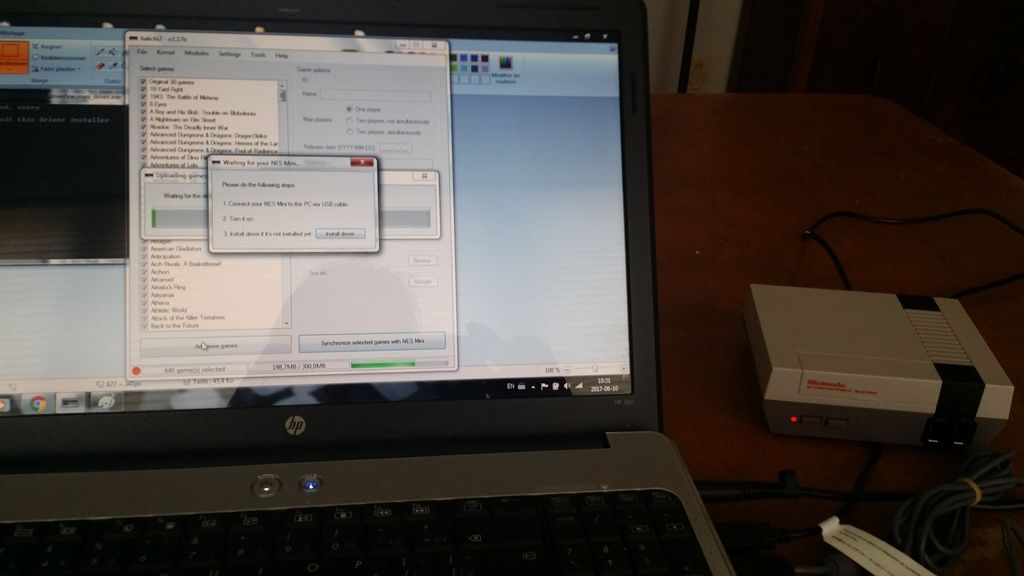
power_on_zps4el7wx6i.jpg

When power is on I get this when trying to install the driver
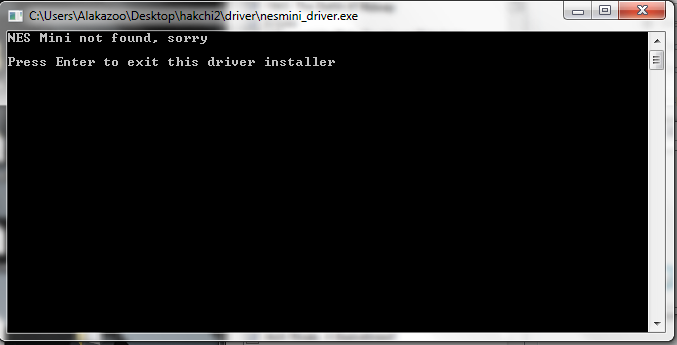
new%20method_zps9ikjtqzj.png


When using the old reset/power method I can get to installing the driver
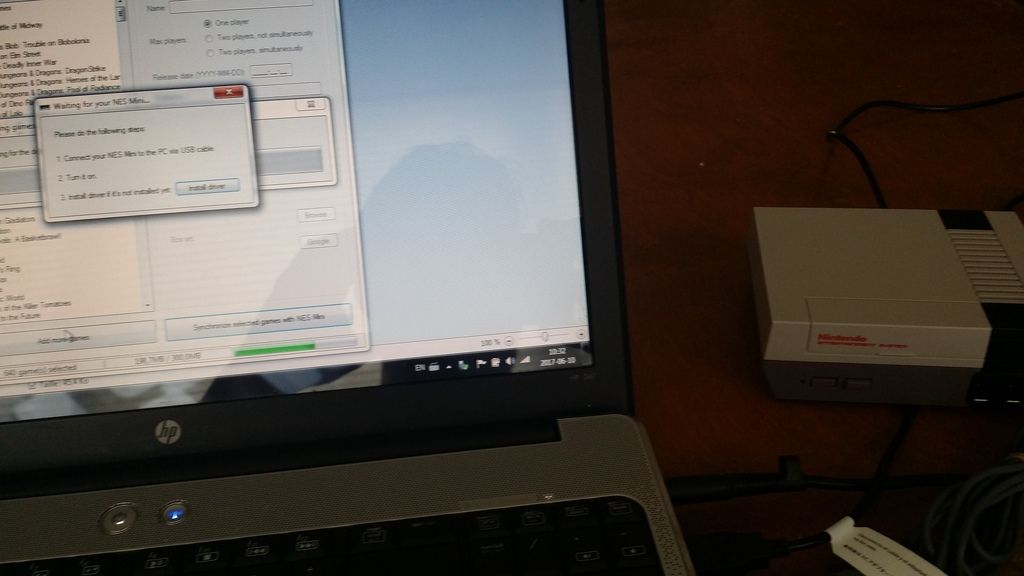
classic_mode_zpsqlmrd8np.jpg

old%20method_zps93qaua0p.png

Windows asks for permission to install the driver, I thought this was the problem but even on Windows 10 which didn't ask such permission it gave same result.
permission_install_zpsfyrjwiet.png


then when trying either detection method, power on or reset/power it stays on this message
hakchi2_message_zps0ow9l5bd.png


I cannot get to installing the kernel onto the NES Classic...

When I use classic Reset/Power On method Windows sees the NES Mini as:
nes_mini_zps3nqdntki.png


When using simple Power On it's like this:
nesy_zpspykqr2qm.png


I'm seriously contemplating restarting everything with 2.12 but I wanted to change the options without reuploading everything each time...
Did you give it permission to install the driver? Or did you no? And what you mean you can't get to installing thit kernel? There is a kernel tab up top. Dump kernel if you haven't and then flash custom kernel.

--------------------- MERGED ---------------------------

I can't get X-Men vs. Street Fighter to work. I also can't get Marvel vs. Capcom or Marvel Super Heroes Vs. Street Fighter to work, either. I got the proper roms for mame2003, and used the cps2 command line. Just now, I put the roms that I had on my computer that worked in Mame64 and mameUI64 0.152. If that doesn't work, I'll try the roms for mame 2000 and see if that works.
Try the Europe versions
 
what I mean is that in the end when everything is ready and you proceed on to reflashing it, with all the games. because basically we're flashing the kernel each time we're adding games.

sure I did give it permission, driver is installed an everything...

My suspission goes to the mode it's in when it's powered on, when it's in NESY mode, my PC does not recognize this as the mini NES and I can't install the driver for that mode. Only for the mode when it's on reset/power mode. which the new versions of Hakchi2 doesn't look for now.

--------------------- MERGED ---------------------------

what I mean is that in the end when everything is ready and you proceed on to reflashing it, with all the games. because basically we're flashing the kernel each time we're adding games.

sure I did give it permission, driver is installed an everything...

My suspission goes to the mode it's in when it's powered on, when it's in NESY mode, my PC does not recognize this as the mini NES and I can't install the driver for that mode. Only for the mode when it's on reset/power mode. which the new versions of Hakchi2 doesn't look for now.


you made me think, I flashed the custom kernet with the old hakchi... I'm gonna try to flash the kernel only anew with the option.

sure enough it looks for old mode, I'm sure everything will be fine after this. if not I'll report.

--------------------- MERGED ---------------------------

My bad, I hadn't thought that the new app couldn't detect the NES Classic in a different mode alone, the way the kernel acts has to be changed...

I've had bad times reflashing my NES mini few times jumping from previous versions of hakchi2, I had to rebuild all the infos for my games 2 times and also reinstall covers 2 times also. I wish there was an easier way to go from earlier versions. I kept my old Games folder so I can always overwrite the old files with this.
 
Last edited by The Frenchman,
what I mean is that in the end when everything is ready and you proceed on to reflashing it, with all the games. because basically we're flashing the kernel each time we're adding games.

sure I did give it permission, driver is installed an everything...

My suspission goes to the mode it's in when it's powered on, when it's in NESY mode, my PC does not recognize this as the mini NES and I can't install the driver for that mode. Only for the mode when it's on reset/power mode. which the new versions of Hakchi2 doesn't look for now.

--------------------- MERGED ---------------------------


you made me think, I flashed the custom kernet with the old hakchi... I'm gonna try to flash the kernel only anew with the option.

sure enough it looks for old mode, I'm sure everything will be fine after this. if not I'll report.

--------------------- MERGED ---------------------------

My bad, I hadn't thought that the new app couldn't detect the NES Classic in a different mode alone, the way the kernel acts has to be changed...

I've had bad times reflashing my NES mini few times jumping from previous versions of hakchi2, I had to rebuild all the infos for my games 2 times and also reinstall covers 2 times also. I wish there was an easier way to go from earlier versions. I kept my old Games folder so I can always overwrite the old files with this.
You shouldn't have to go through that if you upgrade correctly. Always keep a backup hakchi folder too. And don't overlap new versions on top of each other then you always have your backup from earlier version.
 
I put the Fba2012_CPS2 core but have a question. I don't plan on playing any neogeo games. I just want Marvel Vs. Capcom, Marvel Super Heroes Vs. Street Fighter, and X-Men Vs. Street Fighter to work. What command line do I use ? /bin/neo ?
 
What is actually happening is, I'm trying to use hakchi2 v2.17 on Windows 7 (also tried on a Win 10 PC)
I'm all hooked correctly
power_on_zps4el7wx6i.jpg

When power is on I get this when trying to install the driver
new%20method_zps9ikjtqzj.png


When using the old reset/power method I can get to installing the driver
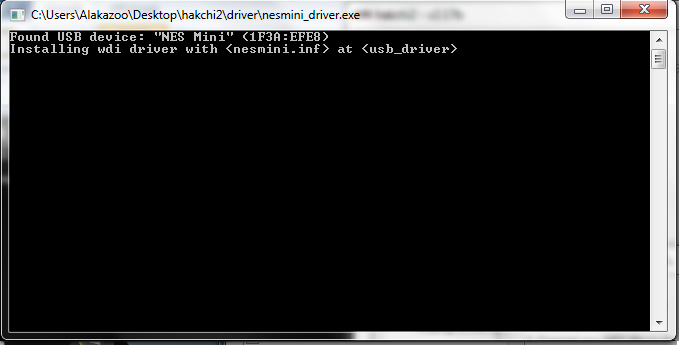
classic_mode_zpsqlmrd8np.jpg

old%20method_zps93qaua0p.png

Windows asks for permission to install the driver, I thought this was the problem but even on Windows 10 which didn't ask such permission it gave same result.
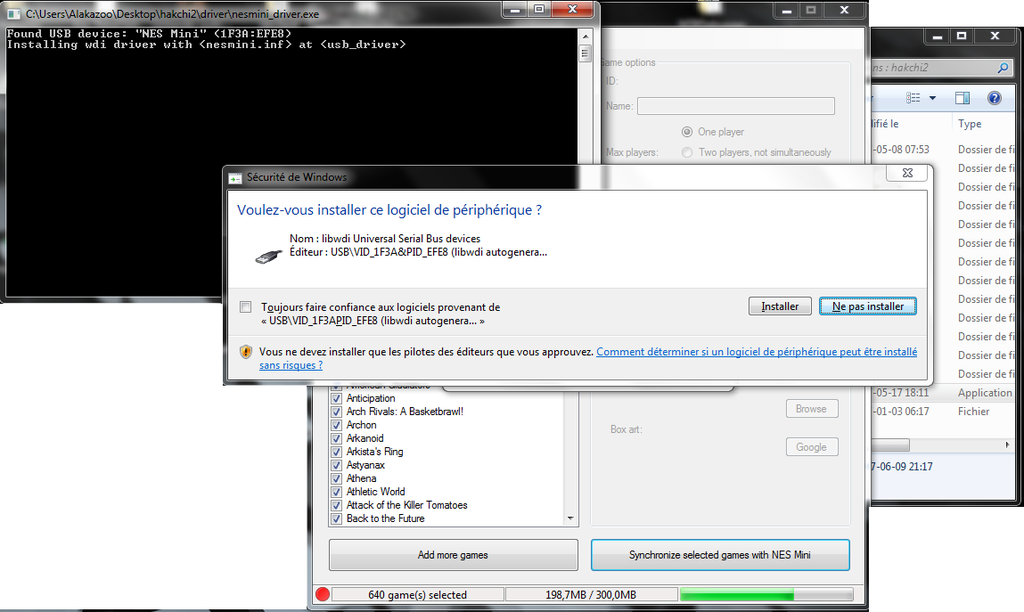

then when trying either detection method, power on or reset/power it stays on this message
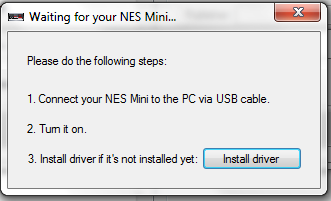

I cannot get to installing the kernel onto the NES Classic...

When I use classic Reset/Power On method Windows sees the NES Mini as:
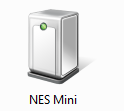

When using simple Power On it's like this:
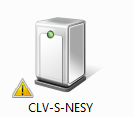

I'm seriously contemplating restarting everything with 2.12 but I wanted to change the options without reuploading everything each time...

Did you disable driver verification?
Did you disable windows defender?
Did you disable any anti-virus?
Did you disable windows firewall?
Did you try zadig?

And did you try to flash custom kernal?

--------------------- MERGED ---------------------------

How do you upgrade then?

You unzip the new hakchi..copy over your dump folder...config folder..games folder..user mods folder...and last but not least art & folder images if you wish...flash custom kernal in new hakchi and you should be ready to fly..
 
  • Like
Reactions: youngtune27
Nes mini this stop, what kind of advances will be made in the future, perhaps bring new emulators or improve existing ones.

Waiting for hakchi2 v3.00

Nes mini, and it's a shame, it is being abandoned little by little.
nes_game_room_1-620x413.jpg
 
  • Like
Reactions: ArcNoculus
maybe someone can help me. I've come to the conclusion that the Marvel Vs. Capcom games just won't work on the mini. I tried running them with MAME2003 and the matching romsets and using the mame2003 command line /mame2003. Clicking the games just sent me back to the main menu. Next, I tried MAME2003 with the versions that I had on my computer. Same thing. It kicked me back to the menu. After this, I tried fbalpha_cps2 with the /fba command line. Nothing. After THIS, I tried installing the neogeo core because I read that it also played CPS2 games...which the Marvel Vs. Capcom games are. According to that core, you have to use the command line /neo, which I tried. Again, clicking the games sent me back to the main menu.

So, I've concluded that the games just don't work on the nes classic. Am I right ? I thought I saw a video on youtube showing someone running these same games on the mini, but I don't know how he did it. Do I have to install the neogeo bios to get them to work...even though they're not neogeo games ?
 
Nes mini this stop, what kind of advances will be made in the future, perhaps bring new emulators or improve existing ones.

Waiting for hakchi2 v3.00

Nes mini, and it's a shame, it is being abandoned little by little.
nes_game_room_1-620x413.jpg
??? You are welcome to contribute... if you know any other language, are able to program a bit. ..".."
 
maybe someone can help me. I've come to the conclusion that the Marvel Vs. Capcom games just won't work on the mini. I tried running them with MAME2003 and the matching romsets and using the mame2003 command line /mame2003. Clicking the games just sent me back to the main menu. Next, I tried MAME2003 with the versions that I had on my computer. Same thing. It kicked me back to the menu. After this, I tried fbalpha_cps2 with the /fba command line. Nothing. After THIS, I tried installing the neogeo core because I read that it also played CPS2 games...which the Marvel Vs. Capcom games are. According to that core, you have to use the command line /neo, which I tried. Again, clicking the games sent me back to the main menu.

So, I've concluded that the games just don't work on the nes classic. Am I right ? I thought I saw a video on youtube showing someone running these same games on the mini, but I don't know how he did it. Do I have to install the neogeo bios to get them to work...even though they're not neogeo games ?

I have X-Men vs Street Fighter and Marvel vs Street Fighter working. Have not tried Marvel vs Capcom yet but I'm pretty confident it will work as well.

Did you put the qsound.zip file in the games folder? It is required for all CPS2 games on the mini...
 
I have X-Men vs Street Fighter and Marvel vs Street Fighter working. Have not tried Marvel vs Capcom yet but I'm pretty confident it will work as well.

Did you put the qsound.zip file in the games folder? It is required for all CPS2 games on the mini...
when you say games folder, do you mean the folder called games that holds all the games ? Or the folder OF the game that I'm trying to get working ? Does the zip have to be unzipped and I use the bin file ? Or do I leave it zipped and just put that there ? I just checked and each of the games has both the zip file and the unzipped bin file.

What command line do you use ? /cps2 ? I've tried /cps2 and /neo and mame2003. What core ?

It's weird that I need to put a qsound.zip file in the games folder. You say all cps2 games need it to play....but I have X-Men Children Of The Atom playing just fine without qsound. The only thing about it is it doesn't do the qsound sound when the game starts. The game it's self plays with sound just fine.
 
Last edited by Spottedfeather,
Anyone able to get Arcade versions of X-Men Children of Atom and Street Fighter Alpha 2 to work?

I have X-Men vs Street Fighter working so I know about the cps2 command line change and the qsound bios etc.

I tried multiple sites with different roms still a no go... anyone out there successful?

xmencota.
 
I have X-Men vs Street Fighter and Marvel vs Street Fighter working. Have not tried Marvel vs Capcom yet but I'm pretty confident it will work as well.

Did you put the qsound.zip file in the games folder? It is required for all CPS2 games on the mini...

Just make a bios_template.hmod with qsound in it..then you won't have to put qsound in each game folder..
i want to connect a ps3 controller to my nes classic , i have the nes classic receiver
this tell me i need to download the "8bitdo retro receiver tools app" and hit pair but i don't see the app on their website
http://download.8bitdo.com/Manual/Receiver/nes_classic/8Bitdo_NesMini_RR_Manual.pdf

anybody have a link to download the app ?

What are you looking for?? The drivers for 8bitdo?? I have the drivers for these on my laptop:

8Bitdo_NesMini_RR_Firmware_v1.05_Beta0

and:

8Bitdo_NesMini_RR_Firmware_V105_beta3

If you need them..PM me..I will send them to you.
 
Last edited by ByteThis,
  • Like
Reactions: PlaystationTV
Nes mini this stop, what kind of advances will be made in the future, perhaps bring new emulators or improve existing ones.

Waiting for hakchi2 v3.00

Nes mini, and it's a shame, it is being abandoned little by little.
nes_game_room_1-620x413.jpg

Maybe USB storage one day... Maybe a recompiled PSP core that is stable... Better N64 support...
 
Just make a bios_template.hmod with qsound in it..then you won't have to put qsound in each game folder..


What are you looking for?? The drivers for 8bitdo?? I have the drivers for these on my laptop:

8Bitdo_NesMini_RR_Firmware_v1.05_Beta0

and:

8Bitdo_NesMini_RR_Firmware_V105_beta3

If you need them..PM me..I will send them to you.
I'm looking for the actual app
The instructions say to connect both and hit pair on the app
Where's the app ?
 
I'm looking for the actual app
The instructions say to connect both and hit pair on the app
Where's the app ?

I don't use the 8bitdo..I was thinking about them..but changed my mind..but still have the drivers...AFAIK...peeps have just been loading in the correct drivers and the retro receiver works...either one of the above I posted...but find out what your receiver needs first..I'm not sure myself..but are other peeps here that may chime in..or ask on reddit...
 
Maybe USB storage one day... Maybe a recompiled PSP core that is stable... Better N64 support...

Pcsx games run great on the mini...do you have the corresponding bios's for the emulator? Or using eboots instead of bin & cue?

If you make a bios_pcsx.hmod with the 3 bios files..you can play alot of games with those installed...all run smooth and very playable..
 
Last edited by ByteThis,
when you say games folder, do you mean the folder called games that holds all the games ? Or the folder OF the game that I'm trying to get working ? Does the zip have to be unzipped and I use the bin file ? Or do I leave it zipped and just put that there ? I just checked and each of the games has both the zip file and the unzipped bin file.

What command line do you use ? /cps2 ? I've tried /cps2 and /neo and mame2003. What core ?

It's weird that I need to put a qsound.zip file in the games folder. You say all cps2 games need it to play....but I have X-Men Children Of The Atom playing just fine without qsound. The only thing about it is it doesn't do the qsound sound when the game starts. The game it's self plays with sound just fine.

You will need to have the fb_alpha_cps2 module to be installed. The qsound.zip file must be in the folder OF the game. Leave it zipped. The command line is /bin/cps2

If it's not working perhaps the rom you are using is not good? I used X-Men vs Street Fighter (euro version) rom from emuparadise. Marvel vs Street Fighter rom I got from somewhere else, I forgot where.
 
Last edited by TooMuchPower,

Site & Scene News

Popular threads in this forum