Hacking [Release] TagMo : Tool for creating/editing Amiibos

  • Thread starter Thread starter HiddenRambler
  • Start date Start date
  • Views Views 587,324
  • Replies Replies 663
  • Likes Likes 35
Hi

I tried with v2.3.4Beta, 2.3.3 and even 2.3.2 with no success, I have used a Nexus 5 and a Galaxy S4... In the Nexus 5 the app crashes when try to write to the tag, and in the Galaxy S4 I can get to the writing screen, there is a beep that the tag was read, but nothing happens... Also if I scan the card it appears as empty

The steps I'm doing are

1.- Load the keys
2.- Load the amiibo
3.- Write (Auto)

Any help here? I have access to multiple devices, should I just keep trying? Or the problem might be with the tags? The tags are N215
Latest build never works on my Samsungs. The only version that ever works for me is this one. And it works perfectly with everything up to gs7

https://www.dropbox.com/s/ty25dclqt9ui0mp/tagmo2.1.apk?dl=0
 
This build (masterchan777 fork) https://mega.nz/#F!9WJSHDAL!Si2pHDhT7jc6sC6RzDvuLw usually works good with samsung phones.

app-fat-armeabi-v7a-debug - Crashed when scanning the card in "Write to Tag (Auto)"

app-fat-x86-debug - I get to the "Write to Tag (Auto)" screen, but nothing happens when I put the card under the phone, it just makes the beep

app-fat-universal-debug - I get to the "Write to Tag (Auto)" screen, but nothing happens when I put the card under the phone, it just makes the beep
 
app-fat-armeabi-v7a-debug - Crashed when scanning the card in "Write to Tag (Auto)"

app-fat-x86-debug - I get to the "Write to Tag (Auto)" screen, but nothing happens when I put the card under the phone, it just makes the beep

app-fat-universal-debug - I get to the "Write to Tag (Auto)" screen, but nothing happens when I put the card under the phone, it just makes the beep
Did you try the version I posted?
 
The version @Kafluke posted fixed the crash error, but I"m still getting a (Stage 1) Transceive error. So frustrating; I can't figure out how to get it to work. Also using a Samsung Galaxy S7. Could it be that my tags are no good or perhaps my keytags are incorrect?
 
I'm not sure if this is allowed, but I compiled kidels fork of this app since it has a more updated database and allows for wolf link modifications. Since the OP has been MIA for 3 months, I thought I'd share it with you (so you don't have to compile it yourself)

Works as expected on my oneplus one

Source: https://github.com/Kidel/TagMo

http://gbatemp.net/threads/release-...g-editing-amiibos.431670/page-22#post-7263447 <- This compiled version of the app with the TP hearts editor works great on my s8! Programed 9 tags today and they all work with no issues!! App did not crash at all while using.
 
  • Like
Reactions: MattKimura
When I used a Tagmo SSB Link in Breath of the Wild, it spawns Epona every single time I scan it instead of spawning different loot. Does anyone know why that might be and what, if anything, I can do to change it?
 
I can happily report after finally getting a legit battery, my Samsung Galaxy SIII Mini (Specifically the SM-G730 model) was able to write my tags. :D

The background UI likes to interrupt my app to tell me it detected a new tag...Anyway to prevent it from doing that? It's kinda of annoying. :P
 
Last edited by Apache Thunder,
Anybody know if there is a version working perfectly with a Pixel on 7.1.2? The official apk messes up a lot. When scanning tags, it doesn't always update and show what scan I just tagged and the serial number. Edit SSB data crashes immediately. Sometimes simply loading a bin crashes.
 
Got these ones, is there a way to check if those are really NTAG215?
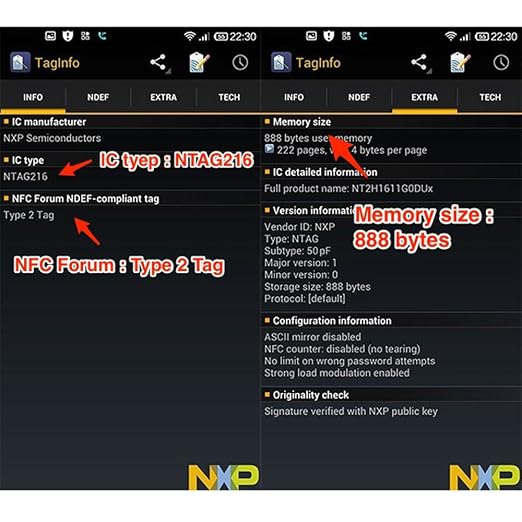
Get TagInfo from the play store. I've included a screen shot of a ntag216, since I couldn't find a ntag215 one but you get the idea. Use TagInfo to scan the tag. It will tell you what type of tag it is.
71HRy5RS2UL._SX522_.jpg

TagInfo-Icon-white-background-500x400.jpg
 
I try to use tagmo on my old samsung s2 plus. (Firmware 4.2.2)
I try any official and custom version of tagmo, i alway get the Error Message:

Error: Error while writing main data (stage 1) java.io.IOException: Tansceive failes

Did anyone get tagmo working on a s2 plus ???
 
Get TagInfo from the play store. I've included a screen shot of a ntag216, since I couldn't find a ntag215 one but you get the idea. Use TagInfo to scan the tag. It will tell you what type of tag it is.
71HRy5RS2UL._SX522_.jpg

TagInfo-Icon-white-background-500x400.jpg

I prefer NCF Tools, it tells you the amiibo name!
 

Attachments

  • Screenshot_20170517-152154.png
    Screenshot_20170517-152154.png
    33.7 KB · Views: 361
I try to use tagmo on my old samsung s2 plus. (Firmware 4.2.2)
I try any official and custom version of tagmo, i alway get the Error Message:

Error: Error while writing main data (stage 1) java.io.IOException: Tansceive failes

Did anyone get tagmo working on a s2 plus ???


Try using Near Field NFC Tester from the Play store to see if your phone actually has NFC and that it is turning on. The s2 plus came in more than one variation and only one of those had NFC.

The other factor that could definitely cause issues is using any Android version before Kit-Kat (4.4). Google made a bunch of API changes to NFC after 4.4 so it is quite possible that TagMo needs to communicate with your NFC module using methods only available after 4.4 (although I don't know either way for sure).

The error you're receiving is a communications error essentially complaining that your NFC reader is not sending the data.
 
Last edited by mofukr,

Site & Scene News

Popular threads in this forum