Hardware Guide needed for Hard modding an o3DS

  • Thread starter Thread starter megazero1x1
  • Start date Start date
  • Views Views 8,257
  • Replies Replies 25
  • Likes Likes 1

megazero1x1

Well-Known Member
Member
Joined
Oct 16, 2011
Messages
434
Reaction score
95
Trophies
1
XP
421
Country
United States
Hi all

I recently decided to go ahead and hard mod my o3DS for nand Backups and restores and such .

I'm fairly confident in my soldering skills , but the one thing that worries me is that the NAND chips on the o3DS is located below the game card slot.

can someone link me to a guide which shows how to correctly and safely remove the slot so I can access the NAND?

Also if there is a good guide for hard modding the 3DS from start to finish that would be helpful too.

Thank you.
 
  • Like
Reactions: Obi123
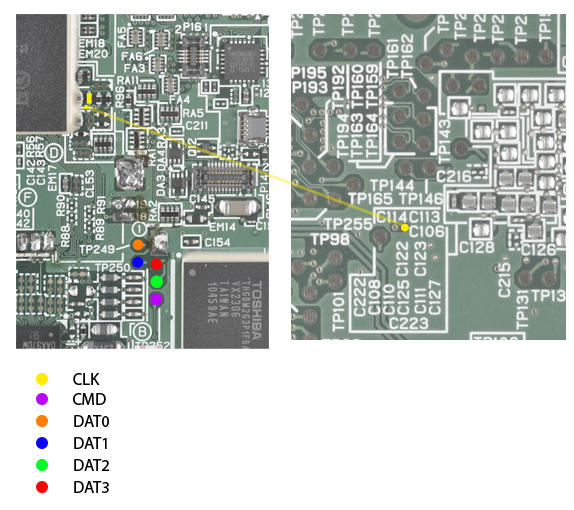
You do not have to remove the slot. You can solder to point on the other side of board. you might even be lucky enough to get one with the clk point next to the other points.
CTR_NAND_pinout.png
 
  • Like
Reactions: Obi123
You do not have to remove the slot. You can solder to point on the other side of board. you might even be lucky enough to get one with the clk point next to the other points.
CTR_NAND_pinout.png

Thank you , most of the tutorials I found , needed the game card slot to be removed.
 
Thank you I really needs that.

But quick question, I wanted to mod my 3DS in such a way that I does not interfere with the normal working of the 3DS, something like having a port for me to connect to when ever I need to dump / restore , from the guide you posted , correct me if I'm wrong, it seems that you can't have the mod in place and use the 3ds normally at the sametime
 
You can have the mod installed. It only interferes when the SD reader is connected to the 3DS.
 
You can have the mod installed. It only interferes when the SD reader is connected to the 3DS.

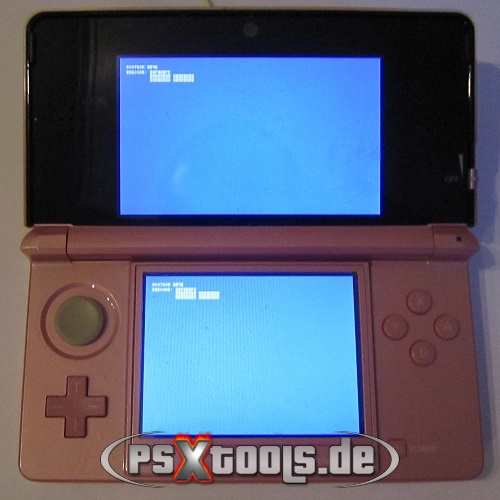
In that guide posted here it, says to first turn on the 3ds , then a blue screen like this:

3dsDump6.jpg


BOOTROM 8046
ERRCODE: 00F800FE
00000000 00000000
00000002 00000000

should appear before connecting to the PC.

So if it does not interfere with the normal working , how does that blue screen come up ?

Sorry to bother you so much.
Its just that I'm a little paranoid / nervous about this.
 
The easiest way is to plug the 3DS to the SD card reader without plugging it into the computer, this should ground out the CMD or DAT lines which will the the booterror.
If you are on Windows here is a small guide for backing up the system eMMC using Win32DiskImager.
 
The easiest way is to plug the 3DS to the SD card reader without plugging it into the computer, this should ground out the CMD or DAT lines which will the the booterror.
If you are on Windows here is a small guide for backing up the system eMMC using Win32DiskImager.

Small problem...

I use a laptop which has an SD card slot.

So what now ?
Am I supposed to connect the SD without Turning on the laptop..?
 

Thanks , but I'd rather not mess around the circuitry.

I guess I go buy an USB SD card reader.

Thanks for the explanation though.

Sorry if I bothered you.
 
No bother at all!:lol:
but I am serious just take piece of wire from your ground pin and connect it to the CMD or DAT0 and boot up the 3DS.
 
I'm also wondering if there's a guide to open the 3DS to install the NAND mod on original 3DS.
The only tutorial I found is for 3DS XL.

I opened mine but stopped at the casing, I didn't remove the mother board.
Nobody explained what need to be removed, in what order, where to unscrew, how to remove the SD card slot, how to remove the analog Stick, etc..


Like they said, you can install the mod and keep using your 3DS normaly.
The blue screen only appear if you connect the SD card reader.
 
I could whip up a quick pictorial guide later on today when I get some free time if you'd like.
 
I'm also wondering if there's a guide to open the 3DS to install the NAND mod on original 3DS.
The only tutorial I found is for 3DS XL.

I opened mine but stopped at the casing, I didn't remove the mother board.
Nobody explained what need to be removed, in what order, where to unscrew, how to remove the SD card slot, how to remove the analog Stick, etc..


Like they said, you can install the mod and keep using your 3DS normaly.
The blue screen only appear if you connect the SD card reader.

If it's for opening: here's a nice guide (it's in German) with lotsa pictures.
 
Thank you :)
there's a lot of little cables and clips to disconnect, it would be bad to break one.
pictures are easy to follow to put everything back.

soldering point is too small for me. I'm looking for someone to do the mod too (france/europe).
 

Site & Scene News

Popular threads in this forum