Hardware GBA Backlight! (AGB-001)

  • Thread starter Thread starter zazilu
  • Start date Start date
  • Views Views 684,121
  • Replies Replies 1,367
Can someone with a new crystal screen modded GBA and an original AGS-101 SP can tell me if the screen quality makes any difference?
 
In my experience, the replacement LCDs are BETTER than the originals (aside from having slightly more delicate ribbon cables).


I bought a GBA SP (since they are not producing any replacement screen anymore) to take out the screen and do the backlit mod to the original GBA, but there is a little problem. The GBA SP have some stuck/ dead pixels and I will like to know if there is a way to fix that.
Here are some pics:
u8TDMaM.png

sorry bud, you're pretty much stuck with those dead pixels :/
 
The GBA SP have some stuck/ dead pixels and I will like to know if there is a way to fix that.
Here are some pics:
u8TDMaM.png
Stuck Pixel Fixer

If your GBA's display has pixels that are stuck lit or stuck dark, this program may be able to coax them into working again. It also works on LCD TVs through a GameCube and Game Boy Player.
Health Warning: This program works by rapidly cycling the color of the screen. It may trigger seizures in people sensitive to flashing lights. If you have a seizure disorder, make sure to turn over your GBA or close your GBA SP or Nintendo DS when prompted to do so. If you are using a Game Boy Player and you are photosensitive, have somebody else run the program for you. See your health care professional for more information on photosensitive epilepsy.
Download Stuck Pixel Fixer (25 KB; includes source code and GBA binary)
 
Hey, new here. I recently bought an adapter ribbon to try and put an AGS-101 screen into an AGB-001, but I'm having a bit of trouble with the adapter ribbon. Specifically, I'm not sure where to solder the wire since it looks different from all the guides I've seen.
$_57.JPG


This is an adapter for a 32-pin AGB-001, anybody know what I'm supposed to do here? x_x
 
I have a similar bug and i have fixed it by connected one pin to GND!

My pic:
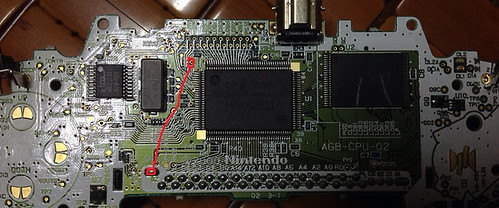
Fixit by dragonhk2005, on Flickr


Thanks! This is exactly what I needed.
In case anyone else has the same problem, here's a summary:

Symptom: After connecting my AGS-101 screen, it was only showing white with very faint color. Basically washed out and very bad contrast. Adjusting the POT didn't help.

Solution: Found dragonhk2005's post, connected GND to the solder point he shows (next to the printed "103" by the CPU) - and Viola! Colors!

System Info: My AGS-101 screen ribbon cable matches what is identified earlier in this thread (Page 32, post #626) as "type B" (rescued from a Spongebob GBA SP), my adapter cable is from eBay. My GBA is the 40-pin type.

Interestingly, after soldering the wire on the GBA motherboard, I noticed 2 solder points on the back of my adapter cable (opposite side from P1/P2). One of those points, C1, actually connects to that motherboard solder point next to "103" on the CPU... P2 (on the opposite side of the adapter ribbon) connects to ground.
*So instead of soldering the motherboard, I could have made the connection from C1 to P2 on the adapter cable.*

Here's what mine looks like:
gba-type-b-fix.jpg


After playing a few hours I have decided that I want just a little more contrast so I'll be opening it up to adjust the POT tonight. It is bright enough now despite not having connected P1 to a voltage point, but after adjusting the POT I'm wondering if I'll need that boost... we'll see.

I saw a guy on the train yesterday playing his front-lit sp... wow, what a difference - love my backlit GBA!

 
In response to those asking about battery life after this mod (its been a while since anyone asked but...):
With fresh batteries after putting an AGS-101 screen in my AGB-001 I got about 13 hours or so before the Costco Alkaline batteries died.
-Dokapon reported 4:39 playing time (I really wanted to like it... maybe I'll try again some other time)
-Golden Sun reports 5:51 playing time
-Played some Wario Blast and a few other oldies (mostly original GB games) that I didn't keep good track of, but I'd estimate between 1.5 and 3 hours (scattered through a few days or I'd have a better idea).
=Somewhere between 12 and 13.5 hours battery life with sound on about 50% volume (though I did play a few hours of Dokapon with the sound way down).

According to Nintendo, battery life while playing GBA games should be about 15 hours, and a little bit less when playing GB or GBC games. With that in consideration it seems battery life isn't taking as big a hit as I would've thought.
 
  • Like
Reactions: pelago
I doublechecked, it's the right board and right thread too!I'm certain..:unsure:

I only read about 10 pages or so, so sorry if this has already been answered but does it matter how many pins the gba sp has?

A seller on ebay for the cables says to check if there's a black or white sticker on your GBASP lcd cable and I have both a white and black stickered cable and although the traces on the cable (black one has like 8 fat traces) the connectors are the same size on the GBASP motherboard and both connectors are labeled for 34 pins. I don't get what the different result would be.
 
I doublechecked, it's the right board and right thread too!I'm certain..:unsure:

I only read about 10 pages or so, so sorry if this has already been answered but does it matter how many pins the gba sp has?

A seller on ebay for the cables says to check if there's a black or white sticker on your GBASP lcd cable and I have both a white and black stickered cable and although the traces on the cable (black one has like 8 fat traces) the connectors are the same size on the GBASP motherboard and both connectors are labeled for 34 pins. I don't get what the different result would be.

As far as I know all the screens from the SP have the same connectors and pinouts. They differ in front-lit/back-lit, and also A or B type which I actually don't get (propably the amount of "fat" traces).
 
As far as I know all the screens from the SP have the same connectors and pinouts. They differ in front-lit/back-lit, and also A or B type which I actually don't get (propably the amount of "fat" traces).
Yeah it seems that way, I'll try em both and see what happens.
 
I'm having a bizarre issue. I bought some original AGS-101 screens and popped one into my GBA only to be met with horribly washed-out display on both. I already tried the various wire-ups. " GND+REVC+COM" and tweaking the POT. No dice, then I tried my own GBA SP's screen and it worked perfectly.

IMG_20141105_012207.jpgIMG_20141105_012009.jpgIMG_20141105_012201.jpgIMG_20141105_012016.jpg

What can I do to rectify this?
 
I'm having a bizarre issue. I bought some original AGS-101 screens and popped one into my GBA only to be met with horribly washed-out display on both. I already tried the various wire-ups. " GND+REVC+COM" and tweaking the POT. No dice, then I tried my own GBA SP's screen and it worked perfectly.

View attachment 11539View attachment 11540View attachment 11542View attachment 11541

What can I do to rectify this?
Please post pictures of the cable used and wiring as it is now please.
 
Please post pictures of the cable used and wiring as it is now please.

The two LCDs that are washed out have a white plastic tab on the end of the ribbon whilst the one that works has a black tab on the end. Do you think that is indicative of anything? I thought the LCDs in the AGS-101s were all the same performance-wise.

No wiring, just the adapter cables. Even though the ribbon cable is said to work without soldering the ribbon cable has 4 pads marked R1 & R2.
 

Site & Scene News

Popular threads in this forum