Windows 10

  • Thread starter Thread starter Flame
  • Start date Start date
  • Views Views 49,957
  • Replies Replies 417
  • Likes Likes 5
I clean and defragment my registery regularly, I don't see why I'd have to complicate my life with adding a virtual machine to the mix. My OS is always squeaky clean, partially because it doesn't run background bullshit. :P
I didn't think adding a virtual machine would be complicated, then again I am used to using virtual machines. Do you use any registry cleaner, to clean your registry? Also do you use a third party application uninstaller? I tried using a registry cleaning software in the past, but that was a mess. What RC do you use if you use one? Does an AV actually slows down your computer?

@everyone,
I don't have the metro version of the calculator either and I don't even have classic shell installed. Perhaps Windows Server 2012 doesn't have a metro calculator?
 
I didn't think adding a virtual machine would be complicated, then again I am used to using virtual machines. Do you use any registry cleaner, to clean your registry? Also do you use a third party application uninstaller? I tried using a registry cleaning software in the past, but that was a mess. What RC do you use if you use one? Does an AV actually slows down your computer?

@everyone,
I don't have the metro version of the calculator either and I don't even have classic shell installed. Perhaps Windows Server 2012 doesn't have a metro calculator?
Live scanners do slow down my computer - it's not a massive drop, but I'm a performance freak and I can't take it. That, and constant updates of AV definitions annoy me.

As far as cleaning the registery and/or the HDD is concerned, I'm a devout CCleaner user - it's highly customizable and can really clean up your PC the way you want it to.
Plus I am pretty sure a lot of these features were borrowed from other OS's
It doesn't matter as long as they're good features.
 
  • Like
Reactions: Margen67
The rumour didn't explicitly say window 7 users would have to pay, it didnt mention them at all so people assumed they would have to pay. New rumors have been circulating that It will be free for windows 8 users and windows XP users (To get them off that OS) and 7 users will get a discount.
7->8 was a paid upgrade though, so if you basically view 10 as another free upgrade to 8 much like 8.1 was, having to pay to upgrade 7->10 makes sense.
 
Live scanners do slow down my computer - it's not a massive drop, but I'm a performance freak and I can't take it. That, and constant updates of AV definitions annoy me.

As far as cleaning the registery and/or the HDD is concerned, I'm a devout CCleaner user - it's highly customizable and can really clean up your PC the way you want it to.
I guess I am not sensitive enough to actually notice the change in the performance of my computer when using live scanners, or it could be that my rig actually handles live scanning without any performance drop, most likely the former. I can definitely understand about the updates that an AV software gets, it does get annoying after a while. Is the CCleaner the same one on piriform.com? I use their defragger software to defrag the hard drive and it's seems to work well.
 
I guess I am not sensitive enough to actually notice the change in the performance of my computer when using live scanners, or it could be that my rig actually handles live scanning without any performance drop, most likely the former. I can definitely understand about the updates that an AV software gets, it does get annoying after a while. Is the CCleaner the same one on piriform.com? I use their defragger software to defrag the hard drive and it's seems to work well.
Yep, it's their flagship product. :)
 
Somebody has got to do the beta testing ;p
It should be the Testing Department. Early Access essentially allows you to use software in its worst, most buggy, most unstable form and everyone's going nuts over it. I'm just going to let the professionals finish their job and then I'll consider whether I want to pirate their software or not. ;O;
 
Somebody has got to do the beta testing ;p

Foxi4 already said he was waiting for the retail version to roll out, and seen as the laptop makers/general vendors will tend to jump ship as soon as possible it means he, I assume one that acts in token IT support for friends, family and people they know, will probably have that fun soon enough.
 
It should be the Testing Department. Early Access essentially allows you to use software in its worst, most buggy, most unstable form and everyone's going nuts over it. I'm just going to let the professionals finish their job and then I'll consider whether I want to pirate their software or not. ;O;

Atleast the Tech preview gives me food for thought about upgrading.
Buggy or not, it's not as bad as Windows ME.
Or the beta games I collected xd
 
  • Like
Reactions: the_randomizer
The whiners won, Start is back. Yay? I haven't used the Start menu for years, stopped long before the Metro interface replaced it. Essentially it was just a quick way for me to enter the Command Line, but in Metro all I have to do is press the Windows key and type in the name of whatever app I want to start, so yeah - no loss in productivity, and I'd argue it was actually beneficial. Of course people would sooner hang themselves than get used to a new interface.

Sounds pretty primitive to me. I click the start button and click the program i'm looking for. Typing? Who has time for that? I'm way too lazy to have to type out every single program i'm looking to use. My start button is filled with stuff I use frequently but don't feel like cluttering my desktop with, my desktop has all my gaems and folders. EDIT: Oh and anything past showing me the icons is a giant waste of space. I don't need bright colourful buttons :P

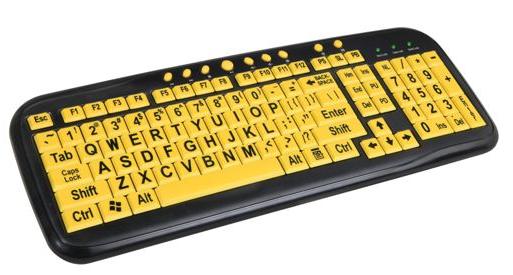
Whenever I see Metro it makes me feel like it's catering to old people, putting gigantic buttons in neon colours so they can clearly see them.
Kinda like these babies
keyboard.jpg


Easy read keyboard to go with your easy read metro buttons.


You don't fix what ain't broke. Metro is a cute idea, and it's a great optional feature, but until I hit my 80's I doubt i'd use it. So it's good that they're toning it down and fixing it by making it optional. Great for those who like a simpler, less efficient interface. But i'll stick to my superior setup that works much better than big, bright buttons I really don't need.
 
Typing? Who has time for that? I'm way too lazy to have to type out every single program i'm looking to use. My start button is filled with stuff I use frequently but don't feel like cluttering my desktop with, my desktop has all my gaems and folders.
knowing your shortcut key and how to type let you do stuff much faster than browsing drop-down menu and icon list with a mouse, any power user knows that.
 
  • Like
Reactions: Foxi4
Whoever says the Vista/7 start menu is any good is a goddamn liar. I want to know who over at Microsoft thought it was a good idea to throw everything in one big menu (AND LET'S JUST RANDOMLY THROW PROGRAMS ALL THE WAY AT THE TOP OF THE LIST LOL) instead of keeping the logical file cabinet style organization of the earlier start menus. And people don't need a quick easy way to see the last files they accessed/edited, let's just get rid of that too! At this point in time I find Metro to be a vastly superior alternative. I simply pin the programs I use most frequently and press start whenever I need it, kind of like the dock in OS X but not annoyingly present, and type out anything that I didn't pin.


I'm way too lazy to have to type out every single program i'm looking to use. My start button is filled with stuff I use frequently but don't feel like cluttering my desktop with
You don't type out the entire name, just the first few letters of what the program is. You should know that.
 
Foxi4 already said he was waiting for the retail version to roll out, and seen as the laptop makers/general vendors will tend to jump ship as soon as possible it means he, I assume one that acts in token IT support for friends, family and people they know, will probably have that fun soon enough.
I'd like to point out that the only certification IT specialists require is "Googling faster than the customers". :)
 
I'd like to point out that the only certification IT specialists require is "Googling faster than the customers". :)

I knew the time I spent learning search operators was time well spent, also that which would doom me to tedium.
 

Site & Scene News

Popular threads in this forum