Hacking 3DS Flashcarts - News, Updates, and Support Thread

  • Thread starter Thread starter pedrobarca
  • Start date Start date
  • Views Views 758,270
  • Replies Replies 3,108
  • Likes Likes 11
But they have had 1.64 up long before their 3DS Deluxe flash cart came out... That's why I was curious.
★ R4i Gold 3DS Deluxe Edition for Playing 3DS Games is Officially Released! (2013.10.31) More Detail>>
★ WOOD R4 Kernel V1.64 Released... (2013.11.08) More Detail>>
The Wood Kernel came after the R4i Gold 3DS Deluxe Edition.
 
Gateway hardware update?

Does anyone know if the Gateway hardware is updated to avoid the "need to solder" issues? If so, how would you recognize one (in case you get one from the bottom of the shelf).

I am referring to these errors where Gateway said you can fix it yourself by soldering or you can send it back.
 
Gateway hardware update?

Does anyone know if the Gateway hardware is updated to avoid the "need to solder" issues? If so, how would you recognize one (in case you get one from the bottom of the shelf).

I am referring to these errors where Gateway said you can fix it yourself by soldering or you can send it back.

You're confusing two different things. The thing you needed to solder was your 3DS, not your Gateway, in case it bricked during the 2.0b2 debacle. There is only one Gateway cart, and there is no need for soldering.
 
I used these guys to order a pair of MT Cards
http://www.3ds-flashcart.com/

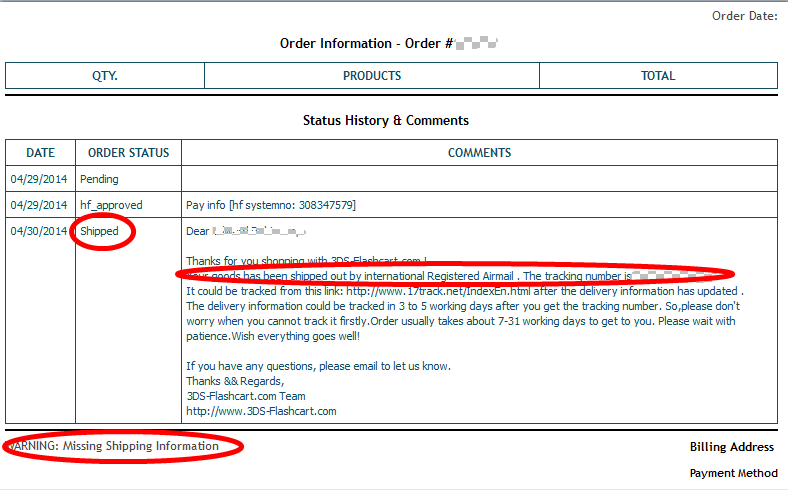
I paid for my order two weeks ago. I went to the site to check on tracking of my shipment but to my surprise, the tracking number doesn't exist. I went back to 3ds-flashcart.com and found this under my order....
VERY WORRYING.
Anyone else used them?

7a656952de64b298017d5c34838f9d08.png
 
i download/purchased "SOUL OF DARKNESS" using this : MT-CARD (classic mode with the Latest Firmware 7.1 E) when i'm about to play it i get a BLACK SCREEN (yes i download twice but still the same), are the DSIWARE game can be play on Region-free mode?
 
i download/purchased "SOUL OF DARKNESS" using this : MT-CARD (classic mode with the Latest Firmware 7.1 E) when i'm about to play it i get a BLACK SCREEN (yes i download twice but still the same), are the DSIWARE game can be play on Region-free mode?
no DSI ware will work on emunand
 
I used these guys to order a pair of MT Cards
http://www.3ds-flashcart.com/

I paid for my order two weeks ago. I went to the site to check on tracking of my shipment but to my surprise, the tracking number doesn't exist. I went back to 3ds-flashcart.com and found this under my order....
VERY WORRYING.
Anyone else used them?

7a656952de64b298017d5c34838f9d08.png

I believe they are legit. Read other reviews. If you are worried just drop them mail.
 
Hi, n00b here, been trying to read and search to see if anyone else has had my problem, but wasn't exactly sure what search terms, so my apologies if this has already been addressed, if so please point me that way...

Just got my Gateway card in the mail and have been following the youtube video on the Gateway site. Everything was copacetic until I went to update the system. I made sure I was in gateway mode first waited for the update, all seemed ok. Checked my main menu to make sure I was still on my original 4.4 firmware and all was fine. However when I try to boot into gateway mode now I just get stuck in a loop. Once I click either boot into gateway mode or just press profile in the settings menu the 3ds attempts to do it, but just gets locked up with the Nintendo 3ds logo on top screen with the red waves and white nintendo logo on bottom. I can hold down power button to shut it off turn back on and it works fine, but it seems updating that NAND is screwing something up. Once again, I did backup my original NAND and made doubly sure I was in gateway mode (system settings said 3d or whatever to show i was not on the original firmware) before updating the system.

So where do I go from here? I can get into the gateway menu and I ran the diagnostic, but all checked out. I'm sure there is some stupid issue I overlooked here, but not seeing it.

Any help greatly appreciated.

 
Hi, n00b here, been trying to read and search to see if anyone else has had my problem, but wasn't exactly sure what search terms, so my apologies if this has already been addressed, if so please point me that way...

Just got my Gateway card in the mail and have been following the youtube video on the Gateway site. Everything was copacetic until I went to update the system. I made sure I was in gateway mode first waited for the update, all seemed ok. Checked my main menu to make sure I was still on my original 4.4 firmware and all was fine. However when I try to boot into gateway mode now I just get stuck in a loop. Once I click either boot into gateway mode or just press profile in the settings menu the 3ds attempts to do it, but just gets locked up with the Nintendo 3ds logo on top screen with the red waves and white nintendo logo on bottom. I can hold down power button to shut it off turn back on and it works fine, but it seems updating that NAND is screwing something up. Once again, I did backup my original NAND and made doubly sure I was in gateway mode (system settings said 3d or whatever to show i was not on the original firmware) before updating the system.

So where do I go from here? I can get into the gateway menu and I ran the diagnostic, but all checked out. I'm sure there is some stupid issue I overlooked here, but not seeing it.

Any help greatly appreciated.
Let me guess, you updated your emuNAND to the most recent version? Unfortunately, the most recent update breaks compatibility with 3DS flashcarts. Gateway says they're working on it, but who knows if/when they'll have a fix for it.
 

Site & Scene News

Popular threads in this forum