Homebrew RetroArch - A new multi-system emulator

  • Thread starter Thread starter Toad King
  • Start date Start date
  • Views Views 743,073
  • Replies Replies 3,294
  • Likes Likes 27
Status
Not open for further replies.
...But i don't want to read 42 pages from stratch.
Anyone can post some info about dat version used by RA team ?...

ya didnt wanna read the readme info either by the looks of it=P
- Final Burn Alpha Cores (CPS1 - CPS2 - NeoGeo) [version 0.2.97.26] (**)
** The biggest Neo-Geo ROMs that can be loaded are around 23+MB in
size, such as Real Bout Fatal Fury 1 and King of Fighters '96.
 
anyone else just get a black screen when they try to start the app?

Edit# ya i cant for the life of me get the app to even start up just keep getting black screen with the latest version
 
thank you for reply,
i read whole post. Start assemble complete set,
so i must skip rom > 23 Mb for wii limits?

thank you for support and patience,
m.
 
LATEST VERSION: 0.9.7.1 (0.9.7.2 for SNES9x-next)
46g5s.png


README


CHANGELOG


Download Link (0.9.7.1): https://anonfiles.co...00c37a65bbdaf05
Download Link (0.9.7.2 SNES9x-next, just extract over 0.9.7.1 installation): http://www.multiupload.nl/3VIAI0V035

This release has been a long time in the making, and is the first time that I know of a lot of CPS2 games can be played on the Wii.

Just some caveats to know going in:

* READ THE README SO YOU KNOW THE CONTROLS! We had put some unconventional controls in for menu navigation, specifically for the GameCube controller where we were lacking a Home button.
* There might be some delay between loading RetroArch and displaying the menu due to the core loader. This wait might be amplified on slower SD cards/USB sticks and on first boot when files and directories are being generated.
* Some cores can act up if you load multiple games in them without restarting. Specifically PrBoom will crash to HBC if you try to load a second WAD.
* RetroArch does not do any frameskipping. While a lot of work has been done to make games run fullspeed all the time, there are some games that will lag a bit. (Specifically select FBA games and possibly some SNES games with features like pseudo-hires mode/SA-1 chips/etc.)
* While we did a lot of work to make audio perfect, some testers still reported some popping. If you get these, try fiddling with the Audio Control Rate in options.
* Most CPS2 games can load fine. Please report if you find any that crash on load.
* Not all NeoGeo games can be loaded. If the ROM filesize is over 23 MB or so, it might crash on load.
* The full FBA core was not released with the Wii version due to it being so large it cannot load some larger ROMs. If you want to give it a try though, you can download it here: https://anonfiles.co...1e15056451c9182 (Extract it to apps/retroarch-wii, keeping the name CORE.dol. On load, it will rename it correctly.) Please note that ROMs will crash the emulator if they run out of memory. I've found most ROMs around 5-7 MB load fine, and 10 MB is probably the limit.
* If for some reason your SNES games don't work, you can try a more recent SNES9x core. It's slower than the current one though. https://anonfiles.co...b02a3b3047844d9

I came here wanting to find out if anyone else was having some "issues" with "input lag" or "controller delay" or however you want to call it and well, obviously I'm not the only one with this problem. So instead of throwing more wood to the fire I'd like to ask if there are any news regarding this? In my case the problem comes with the classic controller, the GC (cordless) one is ALMOST fine (it does have some delay though)
Is this fixable? Or is it "just the way it is"? Cause I was trying to play Top Gear 2 with a friend and it was IMPOSSIBLE (cause one of us had to use the GC controller and the other one the classic WII controller)
Thanks in advance and by the way, I like your emu very much. SNES9X GX looks horrible and if you try to use some filter it instantly becomes unplayable. Keep up the great work.
 
Thanks in advance and by the way, I like your emu very much. SNES9X GX looks horrible and if you try to use some filter it instantly becomes unplayable. Keep up the great work.

I hope you're joking. Unless you're running it on a CRT, the filter helps with those who have LCD TVs, and I experience no lag whatsoever with it on. Ever try playing the Virtual Console on a newer TV? It looks like s**t compared to a real console. Not sure what settings you've been using. You should use Snes9x Next (this version IS optimized) and NOT Snes9xGx (this version is not optimized) on RetroArch.

Use Tantric's Snes9xGx SEPARATE from RetroArch and not with it.

If it's that much of an issue, set it to 240p mode.
 
I came here wanting to find out if anyone else was having some "issues" with "input lag" or "controller delay" or however you want to call it and well, obviously I'm not the only one with this problem. So instead of throwing more wood to the fire I'd like to ask if there are any news regarding this? In my case the problem comes with the classic controller, the GC (cordless) one is ALMOST fine (it does have some delay though)
Is this fixable? Or is it "just the way it is"? Cause I was trying to play Top Gear 2 with a friend and it was IMPOSSIBLE (cause one of us had to use the GC controller and the other one the classic WII controller)
Thanks in advance and by the way, I like your emu very much. SNES9X GX looks horrible and if you try to use some filter it instantly becomes unplayable. Keep up the great work.
Yes, I realised very early on when playing high demanding reaction time games, like fighters. LibretroRetroArc just ended up saying that it is modern LCDs displays and wireless communications to blame.
The truth is that 3rd Strike OE on 360 plays fine, on the same LCD and with the wireless controller, just something to think about...
 
Yes, I realised very early on when playing high demanding reaction time games, like fighters. LibretroRetroArc just ended up saying that it is modern LCDs displays and wireless communications to blame.
The truth is that 3rd Strike OE on 360 plays fine, on the same LCD and with the wireless controller, just something to think about...

It plays fine on the same LCD because the 360 probably isn't outputting a 480i signal, you're probably using the component cables with the console set to 720p, compared to using the default composite cables that came with the Wii which can only do a 480 signal. Besides, it seems like the other guy is talking about an entirely different delay problem relating to the controllers themselves.
 
I hope you're joking. Unless you're running it on a CRT, the filter helps with those who have LCD TVs, and I experience no lag whatsoever with it on. Ever try playing the Virtual Console on a newer TV? It looks like s**t compared to a real console. Not sure what settings you've been using. You should use Snes9x Next (this version IS optimized) and NOT Snes9xGx (this version is not optimized) on RetroArch.

Use Tantric's Snes9xGx SEPARATE from RetroArch and not with it.

If it's that much of an issue, set it to 240p mode.
I hope you misunderstood my post. Cause no, I'm not joking. I'm talking about SNES9X GX framerate with any filter active. It drops to unplayable levels.
This is NOT the case with SNES9x Next. That's the reason I'm giving the guy kudos on his work. Cause the image looks like its supposed to with bilinear filtering on and it doesn't affect gameplay.

On the topic of input lag, I'm no programmer or anything, but I honestly doubt that it has anything to do with HDTVs and IR/BT protocols, cause then there would be delay on any and all controllers used. Which is not the case. I mean, sure there is "some" delay when using a GC controller for example, but it's totally playable. Even with the wiimote only it has no gamebreaking delay, it's only after you connect the Classic Controller to it that the ABSURDLY HIGH, NON RESPONSIVE delay begins (it even fails to register hits sometimes) so I doubt it has anything to do with HDTVs and wireless communications.

By the way, I tried playing a VC snes game with the classic controller (just to compare it) and it has no delay at all. So it IS definitely something with the emu.

*EDIT* Just to be clear I am in fact using the WII with component cables. So it has nothing to do with composite delay.
 
so no one got anything to say about my problem? i cant even get the app to start.
Mine does the same (black screen) the first time you start it. After the retroarch folder and settings are created it no longer does.
What I do is press power on the console (not until it turns off but a couple of light touches) it seems to "unlock" the freeze and drops you back at the HBC. From there you should be able to re-enter retroarch without any issues (mine does at least)
 
Mine does the same (black screen) the first time you start it. After the retroarch folder and settings are created it no longer does.
What I do is press power on the console (not until it turns off but a couple of light touches) it seems to "unlock" the freeze and drops you back at the HBC. From there you should be able to re-enter retroarch without any issues (mine does at least)
ya man ive tried this soooooo many times i cant get it to get past the black screen so wierd
 
I hope you misunderstood my post. Cause no, I'm not joking. I'm talking about SNES9X GX framerate with any filter active. It drops to unplayable levels.
This is NOT the case with SNES9x Next. That's the reason I'm giving the guy kudos on his work. Cause the image looks like its supposed to with bilinear filtering on and it doesn't affect gameplay.

On the topic of input lag, I'm no programmer or anything, but I honestly doubt that it has anything to do with HDTVs and IR/BT protocols, cause then there would be delay on any and all controllers used. Which is not the case. I mean, sure there is "some" delay when using a GC controller for example, but it's totally playable. Even with the wiimote only it has no gamebreaking delay, it's only after you connect the Classic Controller to it that the ABSURDLY HIGH, NON RESPONSIVE delay begins (it even fails to register hits sometimes) so I doubt it has anything to do with HDTVs and wireless communications.

By the way, I tried playing a VC snes game with the classic controller (just to compare it) and it has no delay at all. So it IS definitely something with the emu.

*EDIT* Just to be clear I am in fact using the WII with component cables. So it has nothing to do with composite delay.

Have you tried Snes9x Next 1.5.2.2 in RetroArch? The filtering doesn't slow it down at all due to optimizations made. Snes9xGx uses a helluva lot of speed hacks and frame skipping.
 
Have you tried Snes9x Next 1.5.2.2 in RetroArch? The filtering doesn't slow it down at all due to optimizations made. Snes9xGx uses a helluva lot of speed hacks and frame skipping.
My man, I don't seem to get through to you: I'm telling you SNES9X NEXT works WONDERS. My issues with filtering and framerate drops were with GXs version :)
The ONLY issue I have with this (or ay other for that matter) emu ATM is with the controller delay. Which is UNHOLY btw...
 
ok i finally got it going really weird man the only way i got past the black screen is launching the app from inside the homebrew broswer of usbloadergx not from the actual homebrew channel but it works now from anywhere. Ok so the first game i tried is golden sun 2 on the gba because that lags hard on the vbagx but unless im doing something wrong it also lags hard here i dnt see a difference at all.
 
My man, I don't seem to get through to you: I'm telling you SNES9X NEXT works WONDERS. My issues with filtering and framerate drops were with GXs version :)
The ONLY issue I have with this (or ay other for that matter) emu ATM is with the controller delay. Which is UNHOLY btw...

I misheard that part, but yes, Snes9xGx needs some serious optimization. Too bad Tantric/dborth refuses to work on it anymore.
 
The input delay is because the LCD, all the LCD will have delay with a wii (thats why Smash tournaments are played on CRTS)
 
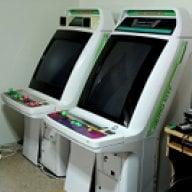
hi RetroArch dev's , i have made a brief video of WII RetroArch running on my Sega New Astro City. Ive been hoping for a long time a team would code a CPS1 CPS2 Neo Geo emulator for WII................


i hope you enjoy the video


The input delay is because the LCD, all the LCD will have delay with a wii (thats why Smash tournaments are played on CRTS)
Read my post. If thecause is, in fact having an LCD display, then why on earth is the problem only noticeable with the classic controller? Neither the GC or the wiimote by itself present that behaviour.
 
Status
Not open for further replies.

Site & Scene News

Popular threads in this forum