Gaming Pokémon Conquest Password Generator

  • Thread starter Thread starter Prof. 9
  • Start date Start date
  • Views Views 115,248
  • Replies Replies 56
  • Likes Likes 4

Prof. 9

Well-Known Member
Member
Joined
Jun 17, 2008
Messages
324
Reaction score
144
Trophies
1
Location
The Netherlands
Website
twitter.com
XP
914
Country
Netherlands
Since I don't like waiting, I've cracked the Pokémon Conquest password algorithm and built a password generator. It should be pretty self-explanatory.
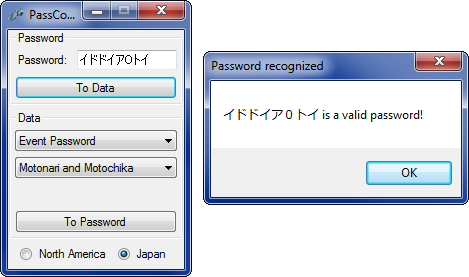
32749-screenshot.png


Take note, however. The official site says:
http://www.pokemonconquest.com/en-us/outline/pass said:
Note: Do not enter any unofficial passwords. If you enter such passwords, future attempts to enter correct passwords may not work.
They're not kidding. The thing is, you can only enter up to 64 passwords; after that, no more passwords can be used. You can change which "password slot" the password goes into by changing the Flag Number. I recommend you keep track of which password slots you have used if you plan on making your own passwords.

If you have a cheat device, you can use the following cheat to reset all your password slots:
Code:
::Reset Pokemon Passwords
:::Clears all 64 slots so you can use any Pokemon password again
920C4D82 00FF0200
B20C4D80 00000000
C0000000 0000001F
00000008 00C800C8
DC000000 00000004
D2000000 00000000

Of the 200 Pokémon available in Conquest, 62 cannot be obtained through the use of passwords. They are the following:
Aggron
Alakazam
Arceus
Armaldo
Articuno
Chandelure
Charizard
Charmeleon
Conkeldurr
Dewott
Dialga
Dragonair
Dragonite
Dusknoir
Emboar
Empoleon
Espeon
Flareon
Froslass
Gallade
Garchomp
Gardevoir
Gengar
Gigalith
Glaceon
Gothitelle
Groudon
Grovyle
Haxorus
Hydreigon
Infernape
Jolteon
Leafeon
Machamp
Metagross
Mewtwo
Mismagius
Monferno
Pignite
Prinplup
Raichu
Rayquaza
Registeel
Reshiram
Rhyperior
Samurott
Sceptile
Scizor
Serperior
Servine
Simipour
Simisage
Simisear
Snorlax
Spiritomb
Steelix
Terrakion
Umbreon
Vaporeon
Volcarona
Wigglytuff
Zekrom
When you boot up the program, you might notice that you can choose from Pokémon Password or Event Password. Pokémon Passwords will function like any other password you can find on the net. Event Passwords on the other hand, will unlock the Wi-Fi downloadable events. Some unlock postgame Special Episodes, some trigger special events when certain in-game conditions are met.

Download:
https://web.archive.org/web/20190314144451/https://s4.filetrip.net/p/778/191815-PokemonConquestPasswordGenerator112.zip
Requires .NET Framework 2.0.

Please don't submit passwords generated with this to sites such as GameFAQs.
 
Last edited by Prof. 9,
Sure, I guess. It's kind of hard to read, but here's the relevant part of the source:
http://pastebin.com/YJ4QtBD2
EDIT: This is now outdated, the latest source is included with the generator starting from version 1.1.
 
I've uploaded a small update that fixes the maximum selectable flag number for Event Passwords; it should have been 4, not 5. There's no need to regenerate your passwords or anything, though; any Event Password generated with flag number 5 just won't be accepted by the game.
 
The Event ones do work. I'm playing the Motonari & Motochika event now. The others I can't confirm until I finish the game though. I will do so soon.
 
if anyone wants, i can get the "Pokemon Conquest Character Pack 1" and "Pokemon Conquest Character Pack 2" from http://poweruprewards.com (gamestop stuff) for 1k points each, if someone wants them. just PM me.


pack 1.


Pokémon™ Conquest Character Pack 1

We know a thing or two about catching Pokémon™, and a good rule of thumb is that if someone offers you a free Pokémon™, you grab it and run!
Grab this set of 5 bonus in-game characters including: Emolga, Lapras, Scyther, Riolu and Pikachu, to build your kingdom and begin your conquest.


pack 2.


Pokémon™ Conquest Character Pack 2

We know a thing or two about catching Pokémon™, and a good rule of thumb is that if someone offers you a free Pokémon™, you grab it and run!
Grab this set of 5 bonus in-game characters including: Darmanitan, Sneasel, Larvitar, Beldum, and Axew, to build your kingdom and begin your conquest.
 
I can confirm 0, 4, and 5 are the Keiji, Okuni, and Ranmaru respectively.

Make sure to save AFTER entering the code or it won't work.

1 and 2 do not seem to be working for me at all. I have already cleared the story so that might be the issue....
The password gets accepted but the episodes do not show up. If anyone can figure out how to deal with this it would be greatly appreciated
 
That´s amazing, thanks so much for sharing your program with us.

That cheat code to reset all passwords works for the american version of the game?

I´m trying using it on my acekard2i but the cheat code does not appear on the list ...

Why is that happening?
 
That´s amazing, thanks so much for sharing your program with us.

That cheat code to reset all passwords works for the american version of the game?

I´m trying using it on my acekard2i but the cheat code does not appear on the list ...

Why is that happening?
How strange. You're using r4cce to edit the usrcheat.dat file, correct?
 
That´s amazing, thanks so much for sharing your program with us.

That cheat code to reset all passwords works for the american version of the game?

I´m trying using it on my acekard2i but the cheat code does not appear on the list ...

Why is that happening?
How strange. You're using r4cce to edit the usrcheat.dat file, correct?

Sorry about that, it was my mistake, I forgot to Build .CC file after editing the code using r4cce ...
I didn´t know that it was necessary to build after editing, first time editing ...
Thanks! :)
 
I've uploaded a new version of the generator, which lets our Japanese friends join the fun! You can also port codes between the two regions, though they won't be the same as the official passwords that are being given out.

Also, this one has the source included.
 
Wow, this is amazing! Thanks for your hard work Professor! Unfortunately, I use a Mac, so I can't use the program itself. But I think that AR code might be what I'm looking for.

I'm trying to get multiple Eevees using the official password (I've heard that using the wild pokemon modifier code will cause all the pokemon to become permanently stuck, so I'm trying to avoid using that), but passwords can only be used once. Would using the Reset Pokemon Passwords code allow official passwords to be reused? I've used the Dratini password, so I loaded my save with the code active and tried to input the Dratini password again, but it said that the password had already been used. So I don't know if I'm doing something wrong, or if the Reset code just doesn't work like that.

I'm using retail version, ARDSi and a DS, if that information is relevant. Thanks for any help anyone can give me!
 
Wow, this is amazing! Thanks for your hard work Professor! Unfortunately, I use a Mac, so I can't use the program itself. But I think that AR code might be what I'm looking for.

I'm trying to get multiple Eevees using the official password (I've heard that using the wild pokemon modifier code will cause all the pokemon to become permanently stuck, so I'm trying to avoid using that), but passwords can only be used once. Would using the Reset Pokemon Passwords code allow official passwords to be reused? I've used the Dratini password, so I loaded my save with the code active and tried to input the Dratini password again, but it said that the password had already been used. So I don't know if I'm doing something wrong, or if the Reset code just doesn't work like that.

I'm using retail version, ARDSi and a DS, if that information is relevant. Thanks for any help anyone can give me!
Download Wine to use it.
 

Site & Scene News

Popular threads in this forum